- Mark as New
- Bookmark
- Subscribe
- Mute
- Subscribe to RSS Feed
- Permalink
- Report Inappropriate Content
02-21-2022 03:43 PM
Thanks for responding.
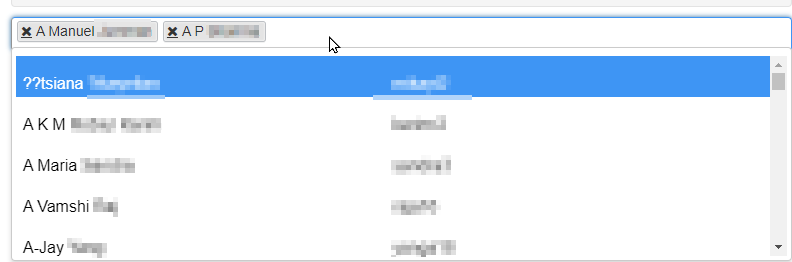
I am looking for something like this:

I can see the Full Name, and User ID (I would also like to add Email and Business Unit).
Each time I select a user, his/her name will be added to that List Collector (like A Manuel... AP) and so one.
I tried using glide_list but I do not like the small lockd.. .
Thank you


- Mark as New
- Bookmark
- Subscribe
- Mute
- Subscribe to RSS Feed
- Permalink
- Report Inappropriate Content
02-22-2022 04:14 AM
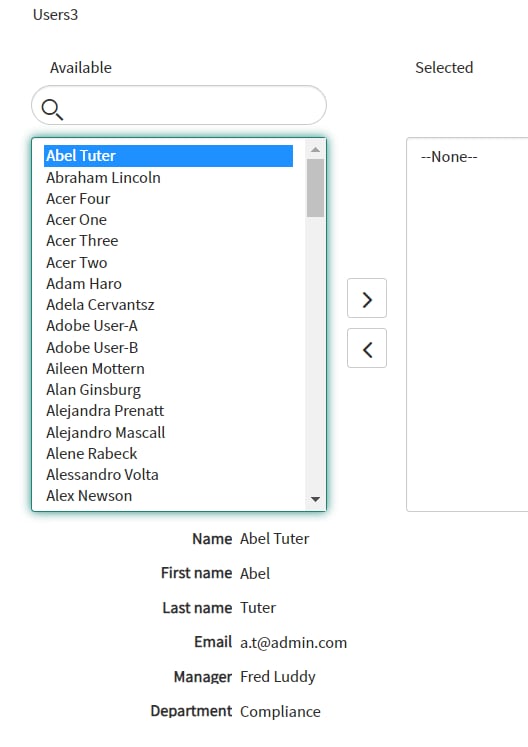
That's what a List Collector variable looks like in Service Portal - with or without the glide_list attribute. In the Service Catalog/native UI you have 2 choices as shown above.
- Mark as New
- Bookmark
- Subscribe
- Mute
- Subscribe to RSS Feed
- Permalink
- Report Inappropriate Content
02-22-2022 05:22 AM
Well.. that is not good :(. Thank you for the information!
Another question, my list collector is in 1 column which looks huge... I used 2 columns, and it looks ok (but I have a 24 inc monitor), how can I adjust the size of the list collector when it is using no_filter.
Also... when I click on the user name from my list collector, I can see the NAME, USERID, and EMAIL, how can I add another field like Department?
Thank you
- Mark as New
- Bookmark
- Subscribe
- Mute
- Subscribe to RSS Feed
- Permalink
- Report Inappropriate Content
02-22-2022 07:34 AM
You can re-size any variable by using the Variable Width field on the Type Specifications tab

To add another field to those displayed, I assume you're talking about the area below the list

To define the fields that are displayed below the list collector, navigate to a URL similar to this
https://dev80887.service-now.com/sys_user_list.do?sysparm_view=sys_ref_list
Replacing your instance name at the beginning, and notice that the name of the List table follows the instance name. Making this change will affect all list collector variables that reference the same table. The URL will display a certain list view of that table, showing the columns you currently see below the variable. Just like any other list, right-click in the headers and select Configure > List Layout to choose the desired columns and order. Once you save the layout and return to wherever you're populating the list collector variable, you will see the new layout.

- Mark as New
- Bookmark
- Subscribe
- Mute
- Subscribe to RSS Feed
- Permalink
- Report Inappropriate Content
03-21-2022 01:58 PM
Hello Brad,
I am not using a catalog form, I am using a Record Producer.
I do not see the option variable width