- Mark as New
- Bookmark
- Subscribe
- Mute
- Subscribe to RSS Feed
- Permalink
- Report Inappropriate Content
09-17-2022 05:17 AM
Hello
You can follow the below steps.
Go to Flow designer click on create new Action.
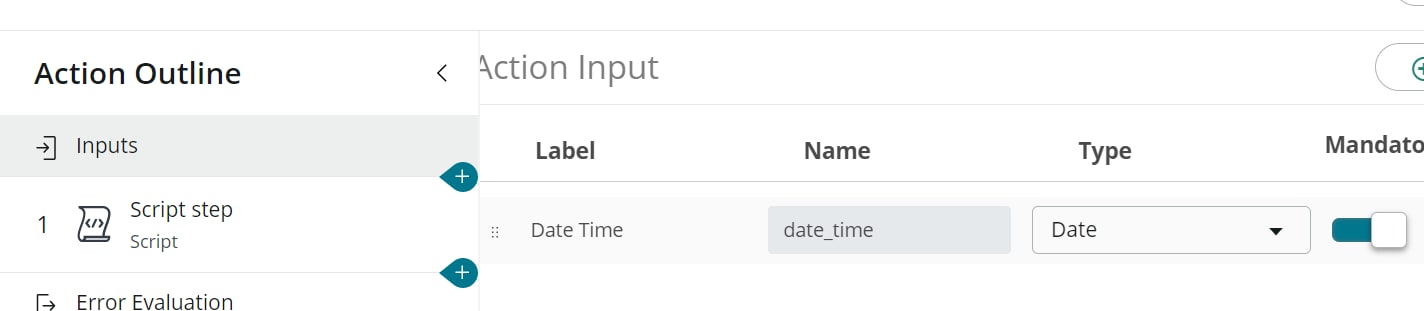
1. Create action input step:

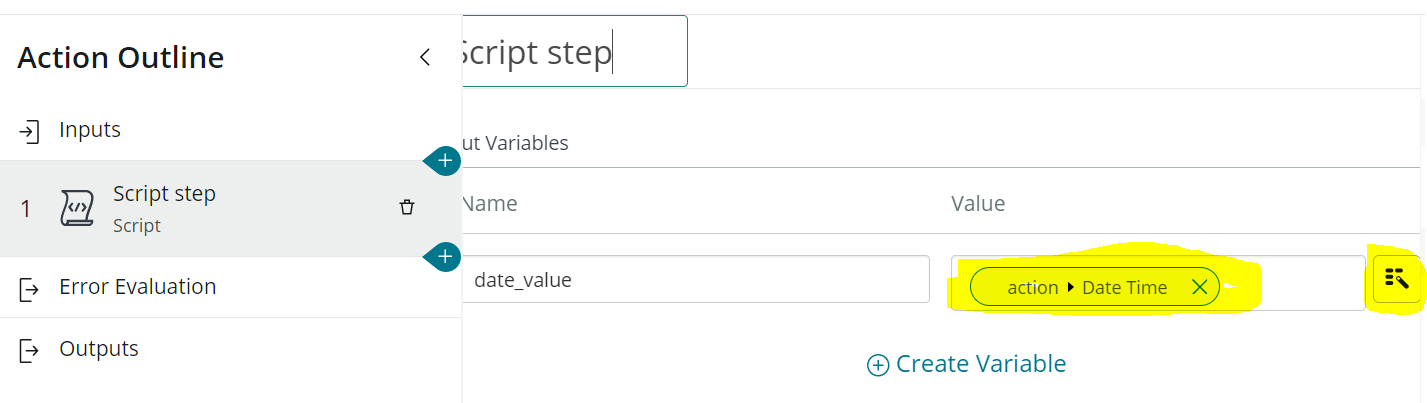
2. click on + icon and slect Script to create a Script action. Create Input Variables for script step to provide the input to the script. Click on Data pill picker to add the value to this variable from Inputs--> Date time variable. (ie. variable from step 1)

In script specify the below script:
(function execute(inputs, outputs) {
  var dateGDT = new GlideDate();
  dateGDT.setValue(inputs.date_value + "");
  outputs.month_value = dateGDT.getMonthNoTZ();
  outputs.date_value = dateGDT.getDayOfMonthNoTZ();
})(inputs, outputs);
Create Output vairable for script step as show below:

3. Create Outputs as shown below. You need to first create Output variables. Click on Exist Edit mode button. Then assign the value to those variable by clicking on Data pill picker icon and using the variable created as output variables in step 2.


Click on Save. Then to test the action click on Test button. Provide the date value and then check the values in flow execution:

If my answer helped you in any way then please do mark it as helpful. If it answered your question then please mark it correct and helpful. This will help others with similar issue to find the correct answer.
Thanks