What are the correct procedures to install the Microsoft SQL Server Management (SMO) library on a MID server?

- Mark as New
- Bookmark
- Subscribe
- Mute
- Subscribe to RSS Feed
- Permalink
- Report Inappropriate Content
11-21-2018 01:39 PM
ServiceNow documentation apparently states that we must install the Microsoft SQL Server Management (SMO) library on the MID server in order to Discover MSSQL servers (https://docs.servicenow.com/bundle/london-it-operations-management/page/product/discovery/reference/mssql-data-collected-pattern.html, https://docs.servicenow.com/bundle/geneva-it-operations-management/page/product/discovery/reference/r_MicrosoftSQLServers.html).
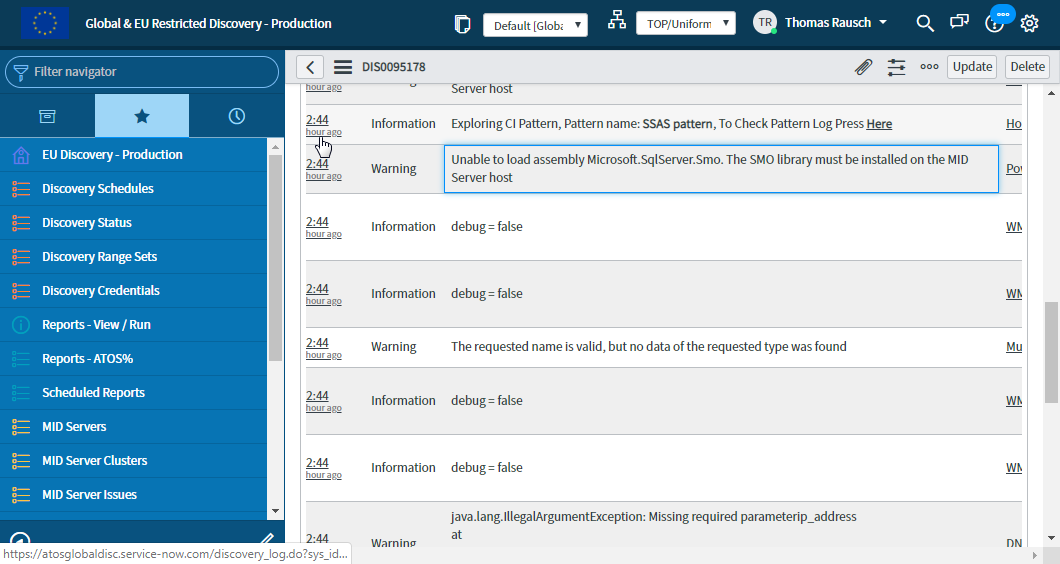
We installed the SMO on one of our MID servers as part of a larger VisualStudio installation (Installed SMO.png). Unfortunately, when we attempt to run a Discovery against a machine that has a MSSQL server, we obtain the error "Unable to load assembly Microsoft.SqlServer.Smo. The SMO library must be installed on the MID Server host" (Discovery - SMO Error.png) .
What is the correct way to install the SMO on the MID server?
- Labels:
-
Instance Configuration