- Mark as New
- Bookmark
- Subscribe
- Mute
- Subscribe to RSS Feed
- Permalink
- Report Inappropriate Content
05-23-2021 09:03 AM
You should set outline, border and box-shadow (one can additionally set -webkit-box-shadow) properties on some CSS selector(s), which uses :focus. The exact selectors depends on CSS applied on your current page. I suppose that the required CSS rule could be the following:
button:focus,
.btn:focus,
.form-control:focus,
a:focus,
input:focus,
select:focus,
.selectize-input.focus,
[role="button"]:focus,
[role="slider"]:focus,
[tabindex]:focus {
	outline: none;
	border: 1px solid #1f8476;
	-webkit-box-shadow: 0px 0px 5px #1f8476;
	box-shadow: 0px 0px 5px #1f8476;
}
where you should change #1f8476 to some other color.
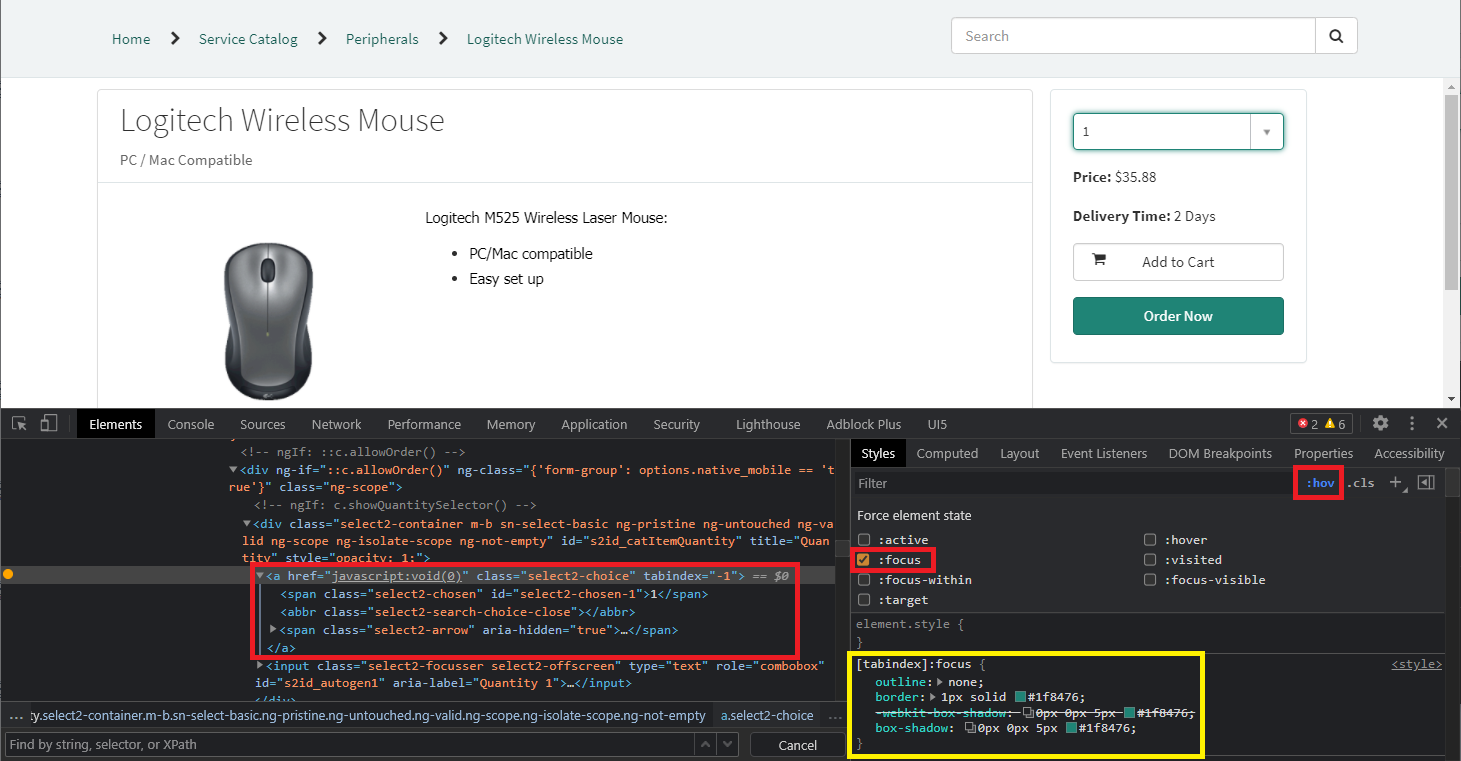
To examine a specific case, which you have, you can use Developer Tools of your web browser. You need select element (input or select), which CSS rules you want to examine, open context menu and choose "Inspect". After that you can click on ":hov" to simulate pseudo-classes like :focus or :hover and check ":focus" for example. If you selected correct page element, then you will see focus effect and you can examine existing the CSS rule of the page, which set outline, box-shadow, border or other CSS properties. The same CSS selector (or other with higher specificity) you should use in your custom CSS rule:

The example on the picture uses [tabindex]:focus selector, for example.