- Mark as New
- Bookmark
- Subscribe
- Mute
- Subscribe to RSS Feed
- Permalink
- Report Inappropriate Content
01-31-2020 06:48 AM
Good morning developers,
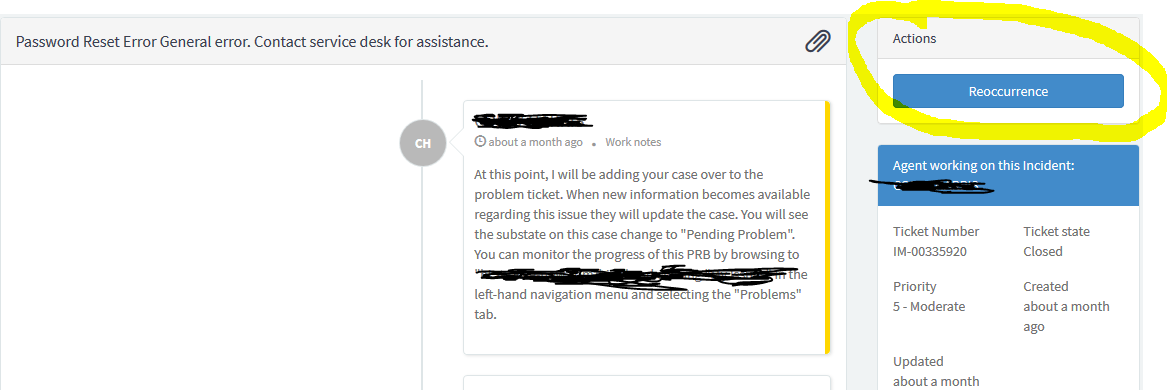
I need a little help. I was tasked with creating a button on our Service Portal for Closed Tickets. This button will be called Reoccurrence. The functionality is for the user to be able to go to a closed ticket from the Ticket Conversations view and be able to copy the fields from the closed ticket and create a new ticket and redirect them to the ticket in Ticket Conversations. I read over several articles on the community where other developers created buttons but I couldn't find anything on what I'm trying to do.
I did find this article: https://serviceportal.io/create-custom-action-buttons-service-portal/ which was helpful but I still can't get the button to do what I need it to do. I have attached a few screenshots of my code. Any help will be greatly appreciated.
Here's a copy of the page of where I want the button:

Here's my code from the widget that I created:

Best regards,
cnharris
Solved! Go to Solution.
- Labels:
-
Service Portal Development

- Mark as New
- Bookmark
- Subscribe
- Mute
- Subscribe to RSS Feed
- Permalink
- Report Inappropriate Content
01-31-2020 12:07 PM
You have to initialize and use gr.insert();
Please see below code for reference:
In your widget server code you need to put
line 22: gr.initialize();
&
line 38: gr.insert();
var gr = new GlideRecord('to_do');
gr.initialize();
gr.name = 'first to do item';
gr.description = 'learn about GlideRecord';
gr.insert();
You can read more about this in below
https://developer.servicenow.com/app.do#!/api_doc?v=newyork&id=r_GlideRecord-initialize
Mark as correct if this helps!!
-Vinay.
- Mark as New
- Bookmark
- Subscribe
- Mute
- Subscribe to RSS Feed
- Permalink
- Report Inappropriate Content
01-31-2020 01:07 PM
I tried the gr.initialize but it still didn't create a new record.
- Mark as New
- Bookmark
- Subscribe
- Mute
- Subscribe to RSS Feed
- Permalink
- Report Inappropriate Content
02-03-2020 06:28 AM
Check if there are any WRITE ACLs on that table
- Mark as New
- Bookmark
- Subscribe
- Mute
- Subscribe to RSS Feed
- Permalink
- Report Inappropriate Content
02-03-2020 10:05 AM
I only have the 'itil' role acl on the table.