Options
- Mark as New
- Bookmark
- Subscribe
- Mute
- Subscribe to RSS Feed
- Permalink
- Report Inappropriate Content
11-01-2017 07:31 PM
You will need to create a custom Widget by copying the existing Approvals widget, add the new field to it, then swap out the widgets on your Page(s).
Hold in Ctrl and right-click on the header, then select Widget in Editor.

Clone the Widget:

Give the new copy a name:

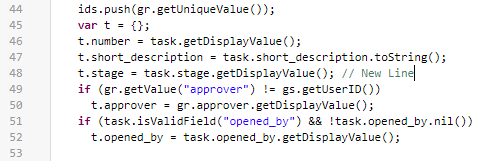
Add in the new field information in the Server Script (I added it at Line 48):

Put the new field into the HTML Template (I added it at Line 24):

Finally, replace the original widget with the new copy on the Page:

Find the new widget and drag it onto the Page above or below the original one. Then remove the original.

Done!