- Mark as New
- Bookmark
- Subscribe
- Mute
- Subscribe to RSS Feed
- Permalink
- Report Inappropriate Content
10-06-2020 05:02 PM
Hi
1st image seems to be your script in action, right?
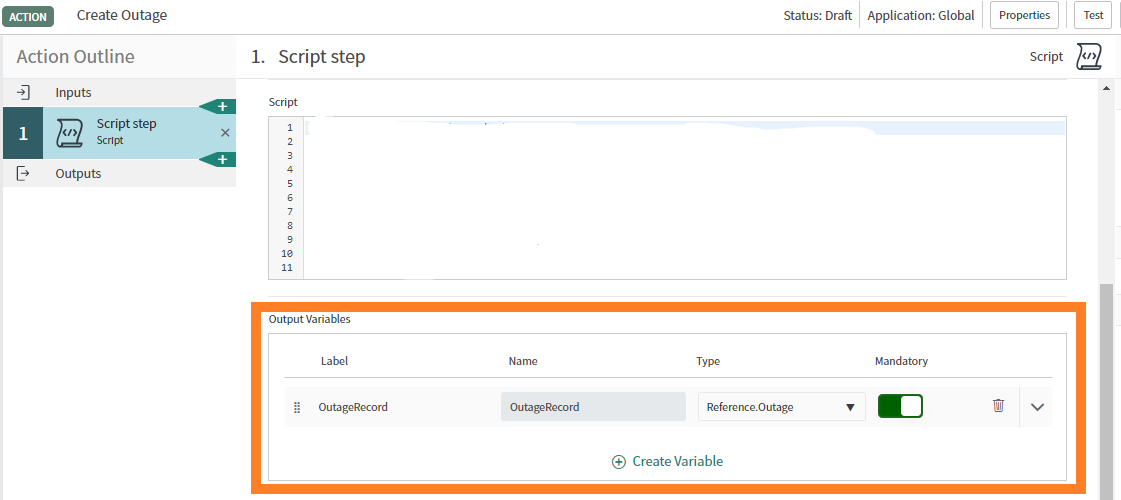
Step1: In that case create and output variable in script section like this

Step 2:

Create an output variable type reference and respective table.
Once you have done both publish it and try to add this is flow and you will get whole record and you can use it as per requirement.
If you want more help maybe we can connect.
Please mark this as helpful and correct if this helps you.
Regards,
Rohit Duseja.

- Mark as New
- Bookmark
- Subscribe
- Mute
- Subscribe to RSS Feed
- Permalink
- Report Inappropriate Content
10-07-2020 11:05 AM
Thanks, Rohit,
We're actually using a JDBC step to get a value from an Oracle database, which doesn't have the Output Variables section you highlighted. It creates a complex object and which we are trying to parse into an Action Output variable.
I've added additional screenshots to the question to clarify; thanks!
- Mark as New
- Bookmark
- Subscribe
- Mute
- Subscribe to RSS Feed
- Permalink
- Report Inappropriate Content
10-08-2020 10:17 AM
Not sure it's the best solution, but we were able to script and Action Output and get the needed value:
var obj = fd_data._1__jdbc_step.resultset;
var str = JSON.stringify(obj);
var parser = new JSONParser();
var parsed = parser.parse(str);
var result = parsed.Records[0].priority;

return result;
- Mark as New
- Bookmark
- Subscribe
- Mute
- Subscribe to RSS Feed
- Permalink
- Report Inappropriate Content
04-06-2021 08:12 AM
Hi
- Mark as New
- Bookmark
- Subscribe
- Mute
- Subscribe to RSS Feed
- Permalink
- Report Inappropriate Content
05-24-2023 11:34 AM
This is how i did it
in the Outputs

And then in the actual flow i did it like this

Just output to the log

and in the message is one of the two records