- Mark as New
- Bookmark
- Subscribe
- Mute
- Subscribe to RSS Feed
- Permalink
- Report Inappropriate Content
11-14-2017 05:37 AM
Hi Michael,
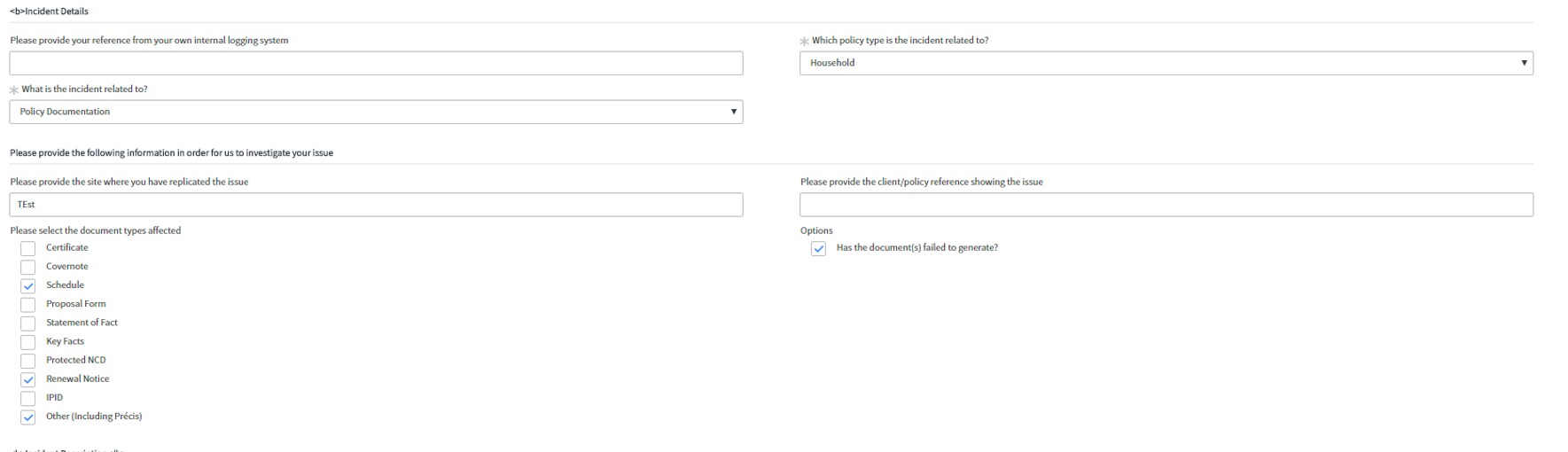
just noticed one other thing on this. I have several variables where I have a label, and then multiple checkboxes. If I answer say 2 out of the 4 checkboxes, none of them are displaying in the variable editor.
Thanks
- Mark as New
- Bookmark
- Subscribe
- Mute
- Subscribe to RSS Feed
- Permalink
- Report Inappropriate Content
11-14-2017 05:47 AM


- Mark as New
- Bookmark
- Subscribe
- Mute
- Subscribe to RSS Feed
- Permalink
- Report Inappropriate Content
11-14-2017 07:48 AM
Sam, I just replicated the issue on my demo instance and the issue is caused by hiding the label. The variable UI uses the label above checkboxes like a container so if you hide the label then all the checkboxes get hidden as well. Programmatically it will be difficult to come up with code to dynamically hide the label if none of the checkboxes are checked. Its definitely possible but would require more time than I have to help in a community setting.
I ended up commenting out the label:
//hideTypes.push("11"); //Label
Then I added 11 to the exclusion list:
if (producerVars.question.type == "11" || producerVars.question.type == "19" || producerVars.question.type == "20") {
continue;
}
Once I did that the checkboxes showed up and only the ones that I had checked.
- Mark as New
- Bookmark
- Subscribe
- Mute
- Subscribe to RSS Feed
- Permalink
- Report Inappropriate Content
11-14-2017 08:23 AM
Thanks for the above Michael and all your help.
I've just tried this, and the checkboxes now appear, but also all the other labels that I'd like not to appear also show.
I'll mark this question as answered, and start a new one to see if can come up with the finial issue.
Thanks once again for all your time and effort on this.
Sam
- Mark as New
- Bookmark
- Subscribe
- Mute
- Subscribe to RSS Feed
- Permalink
- Report Inappropriate Content
06-07-2018 10:18 AM
Hi Michael,
Thanks for this.
Can I just ask if there's any reason this wouldn't work in a scoped app? The BR is a scoped Display BR is that the right way to do this?
Cheers,
Nabeel