- Mark as New
- Bookmark
- Subscribe
- Mute
- Subscribe to RSS Feed
- Permalink
- Report Inappropriate Content
06-21-2020 12:46 AM
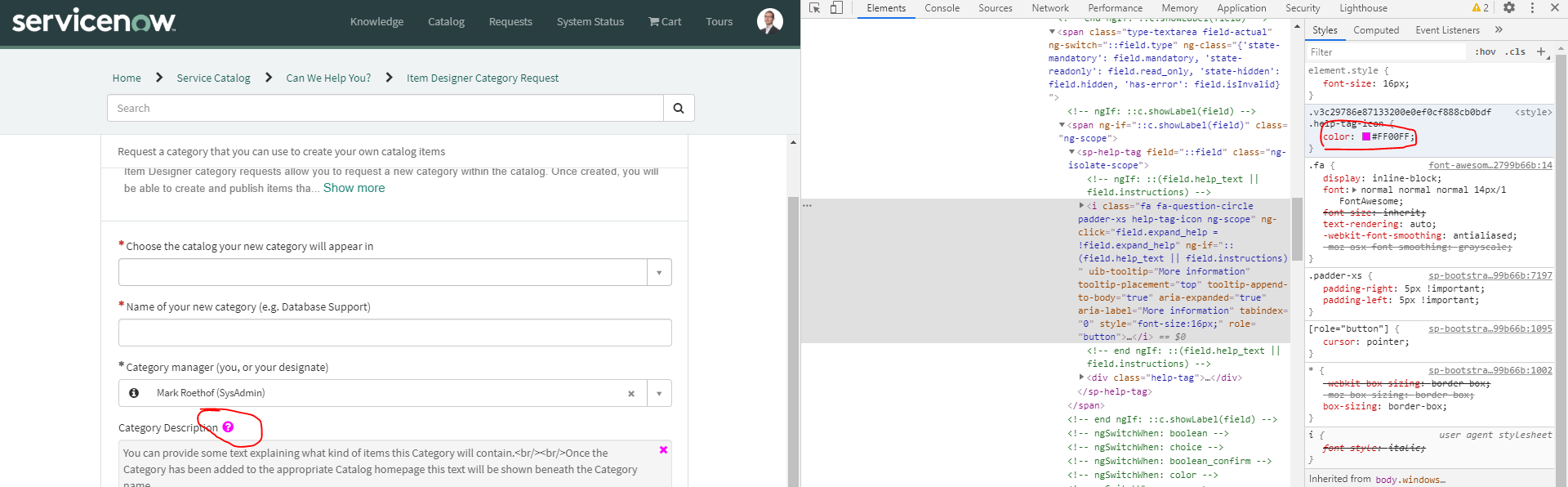
To help a bit more. See below 2 images, how you can find which element it concerns. Also easy to test in chrome.
With that knowledge, you know what to add to the Widget Instance CSS, or Page Specific CSS. Also with applying this way of work, you could do future things like this yourself quicker, then you are not depending on the community anymore and taking days to achieve this.


.help-tag-icon {
    color: black;
}
or
.help-tag-icon {
    color: #000000;
}
Be aware: this does concern Service Portal. This does NOT concern the Variable Editor on the Platform UI.
If my answer helped you in any way, please then mark it as helpful.
Kind regards,
Mark
2020 ServiceNow Community MVP
2020 ServiceNow Developer MVP
---
LinkedIn
Community article list
Kind regards,
Mark Roethof
Independent ServiceNow Consultant
10x ServiceNow MVP
---
~444 Articles, Blogs, Videos, Podcasts, Share projects - Experiences from the field