
- Mark as New
- Bookmark
- Subscribe
- Mute
- Subscribe to RSS Feed
- Permalink
- Report Inappropriate Content
05-19-2026 03:11 AM
Hello,
I am trying setting up an RTO Smart assessment for BIA template (and utilising demo data subflows).
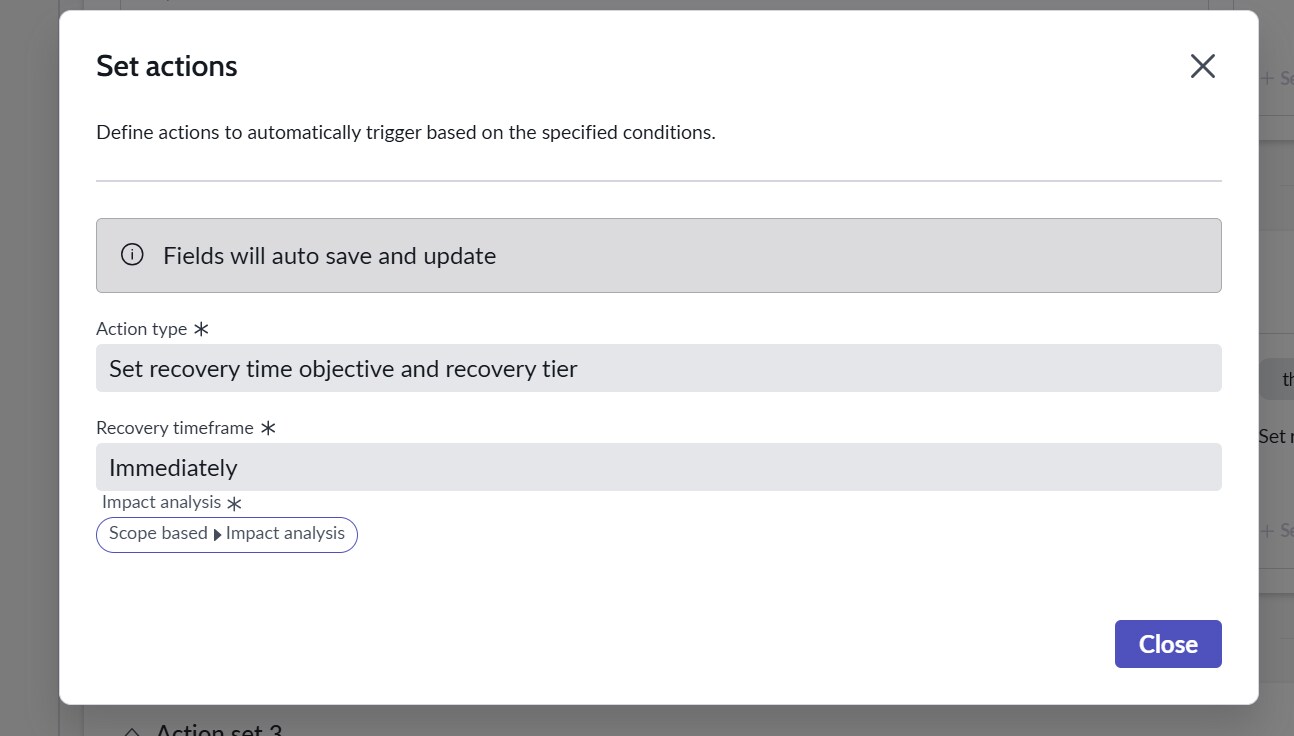
When I get to Automations and attempt to set up an action in "then", I am seeing a dropdown of actual approved BIAs rather than what I am seeing in the demo assessment in my PDI - a pill "Scope Based - Impact Analysis".
Can you advise please, why is that and what needs to change?
Thanks in advance!
Solved! Go to Solution.

- Mark as New
- Bookmark
- Subscribe
- Mute
- Subscribe to RSS Feed
- Permalink
- Report Inappropriate Content
05-19-2026 10:22 PM
Hi!
The "pill" is not there until you created the relation.
In you case click on the small wand icon. You should see something like this:

If not, check the settings of your assessment in the details section under "General".
Make sure you selected the right scope (in my case controls, should be different in your case).


- Mark as New
- Bookmark
- Subscribe
- Mute
- Subscribe to RSS Feed
- Permalink
- Report Inappropriate Content
05-19-2026 10:22 PM
Hi!
The "pill" is not there until you created the relation.
In you case click on the small wand icon. You should see something like this:
If not, check the settings of your assessment in the details section under "General".
Make sure you selected the right scope (in my case controls, should be different in your case).
- Mark as New
- Bookmark
- Subscribe
- Mute
- Subscribe to RSS Feed
- Permalink
- Report Inappropriate Content
05-21-2026 01:15 AM
Thanks, Matthias!
