Suzanne Smith

ServiceNow Employee
Options
- Subscribe to RSS Feed
- Mark as New
- Mark as Read
- Bookmark
- Subscribe
- Printer Friendly Page
- Report Inappropriate Content
12-02-2014
09:48 PM
"Software is like entropy. It is difficult to grasp, weighs nothing, and obeys the second law of thermodynamics; i.e. it always increases."
-Norman Ralph Augustine
If you are starting or revamping your asset management program, one of the first steps is to figure out what assets, including software assets, you have. How can you obtain information about what you own, what you lease, where assets are physically located, and who is using specific assets?
For a great start, use the ServiceNow Discovery application (or a third-party tool) to do the following:
- identify computers and devices connected to your network
- update the CMDB with configuration, provisioning, and status information obtained about identified assets
- identify software running on computers
In addition to Discovery, the Asset Management application contains overview gauges, a list of assets in stock, and a list of unallocated software licenses that can also help you identify and manage assets.
Overview gauges
For a snazzy visual look at your assets, navigate to Asset Management > Overview. In the example below, there are several helpful gauges showing licenses, configuration items, configuration item types, and computers listed by manufacturer.
You can customize the Asset Management overview page to change the layout and show the information important to you. For example, I started with the overview page shown above and in just a few minutes, I created this custom page with a new layout and different information:
Assets in stock
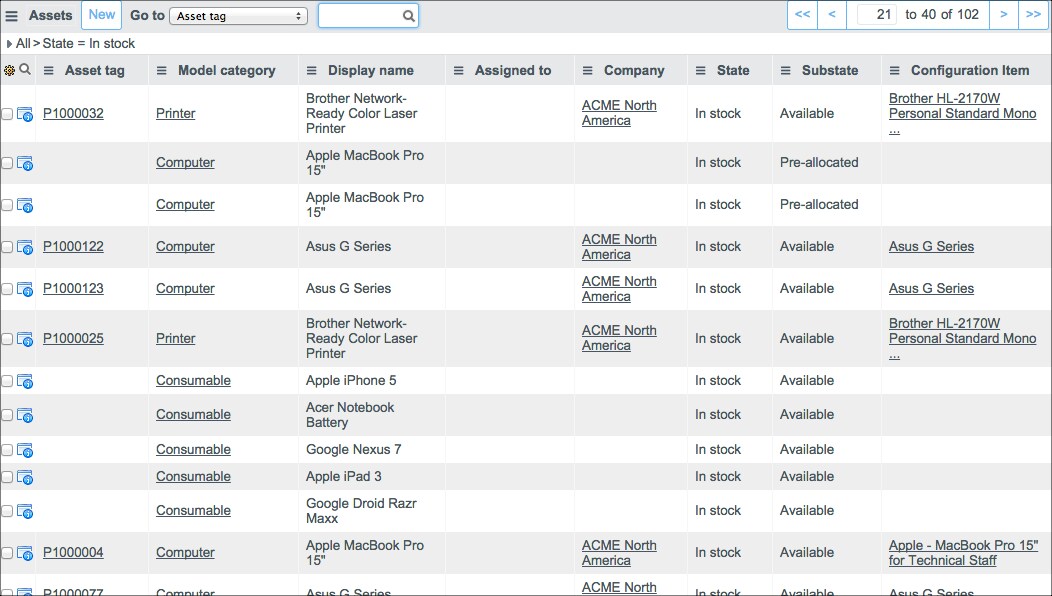
View a list of all assets that are in stock by doing one of the following:
- If you are on the Dublin release or an earlier version, navigate to Asset Management > Stock > In Stock
- If you are on the Eureka release or later, navigate to Inventory Management > Stock > In Stock
The list of in-stock assets also shows other useful information including the Asset tag, the Model category, the Display name, and the Configuration Item.
Unallocated software licenses
Software is a tricky asset to manage. It is especially frustrating (not to mention, expensive) to have software licenses that are unallocated and not being used. You can quickly identify these unallocated licenses using the Software Asset Management application and the Asset Management application. After you have a list of unallocated licenses, consider doing any or all of the following:
- allocate the licenses to individuals
- allocate the licenses to computers
- order fewer copies (or none at all) of the software in the future
To check that the Software Asset Management plugin is activated:
- Navigate to System Definition > Plugins.
- In the Name column, navigate to Software Asset Management.
- In the Status column, check if the plugin is active. If it is Inactive, go to the next step.
- In the Name column, click Software Asset Management.
- Click Activate/Upgrade.
- Click Activate.
To view a list of unallocated software licenses:
- Do one of the following:
- If you are on the Dublin release or an earlier version, navigate to Asset Management > Stock > Unallocated licenses
- If you are on the Eureka release or later, navigate to Asset Management > Software > Unallocated Licenses
The unallocated licenses are listed, along with other useful information such as Model, Location, Cost center, and Valuation.
ServiceNow offers more information about identifying assets.
In the product documentation:
In the community:
When I input a new asset how do I connect this asset with a CI being created through Discovery?
Software Asset Management without software installations record
Role Model, or Why Model Management is Important
You must be a registered user to add a comment. If you've already registered, sign in. Otherwise, register and sign in.