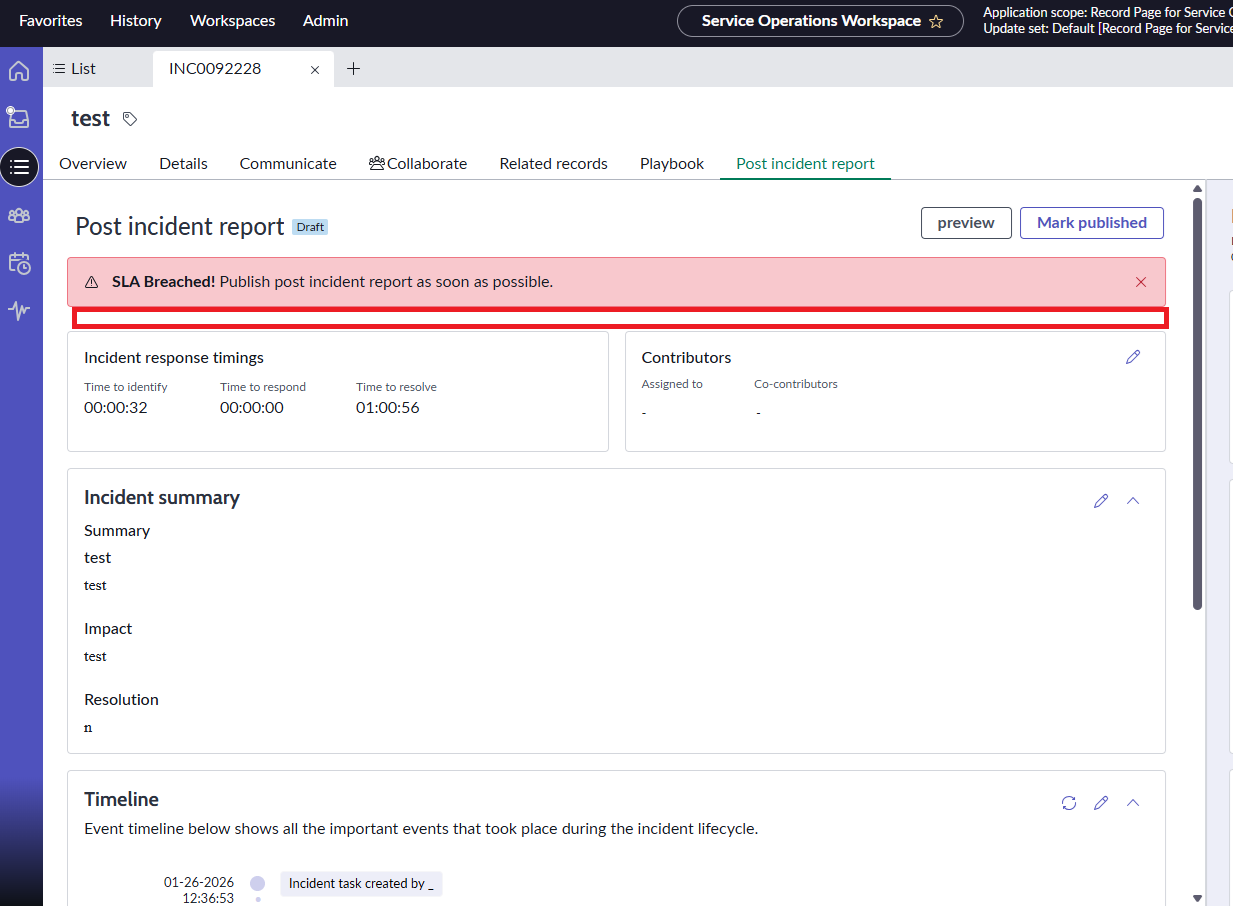
I want to add Info message only in Post Incident report Tab

- Mark as New
- Bookmark
- Subscribe
- Mute
- Subscribe to RSS Feed
- Permalink
- Report Inappropriate Content
01-28-2026 12:06 PM - edited 01-28-2026 12:39 PM


- Mark as New
- Bookmark
- Subscribe
- Mute
- Subscribe to RSS Feed
- Permalink
- Report Inappropriate Content
01-28-2026 01:57 PM
Hi @mahesh kumar6 ,
Technical Analysis: The g_form.addInfoMessage() function is designed to appear at the very top of the record (Global scope), which is why it shows up next to the "SLA Breached" error in the header, rather than inside the specific tab.
To display a message inside the tab (where you drew the red box), you have two options depending on whether the message is Static (always there) or Dynamic (based on logic).
Solution 1: Form Annotation (Recommended for Static Messages)
If you want a permanent instruction (e.g., "Please fill this out") that always appears on this tab, do not use a script. Use a Form Annotation. This places text directly into the form layout of that section.
Open an Incident record in the Classic UI (backend).
Switch your View to Post Incident Report (or go to Configure > Form Layout).
In the Form Layout configuration:
Ensure you are editing the Post Incident Report section.
In the "Create new field" section (or Available list), look for "Annotation".
Select the type "Info Box Blue" (for a blue banner) or "Text".
Type your message content.
Add it and move it to the very top of the Selected list (right side).
Save.
Result: The message will render as a block inside that specific tab, right above the fields.
Solution 2: Field Message (For Dynamic/Scripted Messages)
If you need to show the message only under certain conditions (e.g., via Client Script), you cannot use addInfoMessage. You must use showFieldMsg and attach it to the first field in that tab.
Identify the database name of the very first field or UI Macro visible in that tab (e.g., let's assume it is time_to_identify).
Create an onLoad (or onChange) Client Script:
function onLoad() {
   // Verify if the field exists on the current view to avoid errors
   if (g_form.hasField('time_to_identify')) {
      // 'info' makes it blue, 'error' makes it red
      g_form.showFieldMsg('time_to_identify', 'Your message here specifically for this tab.', 'info');
   }
}
Why this works: Since the field (time_to_identify) is located inside the "Post Incident Report" tab, the message will attach itself to that field. When the user navigates away from the tab, the field (and the message) will be hidden automatically.
Recommendation: Try Solution 1 (Annotation) first, as it is the native, no-code way to achieve exactly what shows in your screenshot.
Best regards, Brandão.


- Mark as New
- Bookmark
- Subscribe
- Mute
- Subscribe to RSS Feed
- Permalink
- Report Inappropriate Content
01-29-2026 02:06 AM
Would you mind sharing screenshots supporting your post?
That would really help.
Ankur
✨ Certified Technical Architect || ✨ 10x ServiceNow MVP || ✨ ServiceNow Community Leader
- Mark as New
- Bookmark
- Subscribe
- Mute
- Subscribe to RSS Feed
- Permalink
- Report Inappropriate Content
01-29-2026 11:19 AM
Thanks for the info @Itallo Brandão . I found a way which helped for my situation. In SOW, Post incident report page is being loaded as related record from "sn_sow_inc_post_incident_review" table.
I wrote a client script on that table and now it is showing message only under that Tab.
- Mark as New
- Bookmark
- Subscribe
- Mute
- Subscribe to RSS Feed
- Permalink
- Report Inappropriate Content
01-29-2026 02:05 AM
your question is not clear.
when should the info message be shown?
The Post Incident Report is a separate tab within the INC record.
I believe it's built using UI builder
So you will require some UI builder logic to handle that.
💡 If my response helped, please mark it as correct ✅ and close the thread 🔒— this helps future readers find the solution faster! 🙏
Ankur
✨ Certified Technical Architect || ✨ 10x ServiceNow MVP || ✨ ServiceNow Community Leader