- Mark as New
- Bookmark
- Subscribe
- Mute
- Subscribe to RSS Feed
- Permalink
- Report Inappropriate Content
03-22-2026 04:53 PM
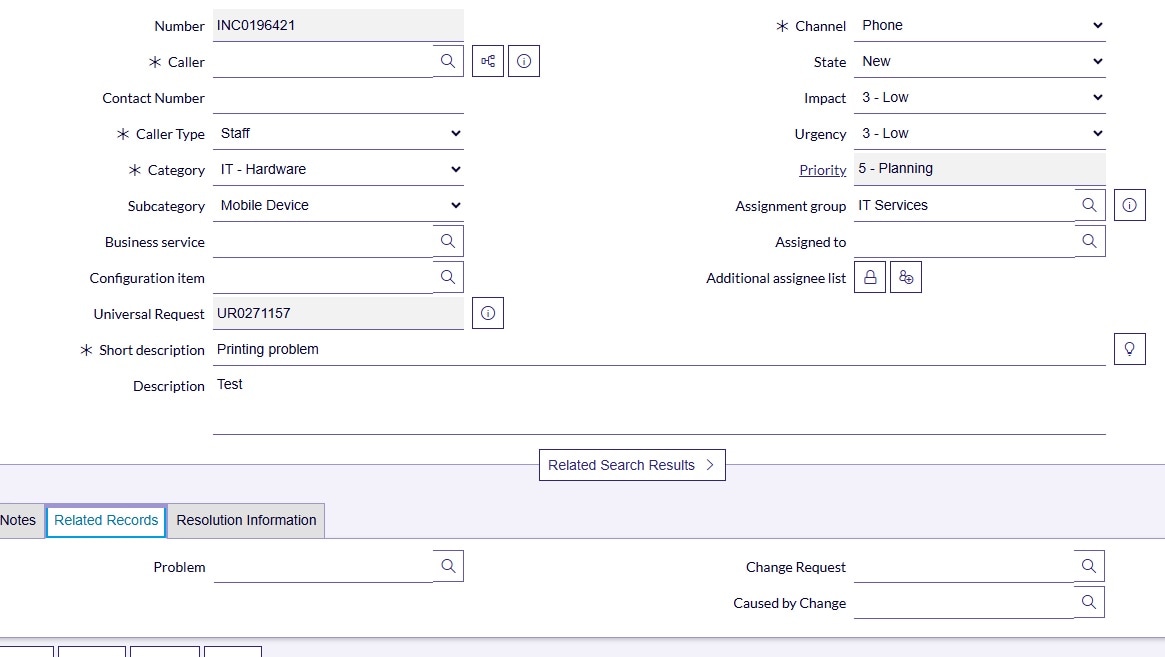
I am not able to see the "impact" field, the fields under the Impact Section, or the fields under Related records section when creating a new incident, or viewing/editing an existing incident details on the Service Operations Workspace.
My team members are all able to see these fields.
Please refer to the attached screenshots.
I have the most permissions and group memberships.
I am sure I've had visibility of these fields as recently as last week.
What am I missing?
Solved! Go to Solution.
- Mark as New
- Bookmark
- Subscribe
- Mute
- Subscribe to RSS Feed
- Permalink
- Report Inappropriate Content
03-23-2026 01:23 AM
Hi everyone, I have figured out the solution. All I had to do was select"Personalize form" to tick and untick the fields I want to see. For some reason, all the fields that I was missing were unticked! Now i have ticked them I can see them all again on the new incident form and the Details form! Thanks everyone for your suggestions!


- Mark as New
- Bookmark
- Subscribe
- Mute
- Subscribe to RSS Feed
- Permalink
- Report Inappropriate Content
03-22-2026 08:22 PM
To get clarity on access issues,can you open that record in native UI and check whether those fields are visible for you or not in native UI ?
- Mark as New
- Bookmark
- Subscribe
- Mute
- Subscribe to RSS Feed
- Permalink
- Report Inappropriate Content
03-22-2026 08:34 PM
- Mark as New
- Bookmark
- Subscribe
- Mute
- Subscribe to RSS Feed
- Permalink
- Report Inappropriate Content
03-22-2026 08:41 PM
Hi @karla_s2023 ,
Is this the same in both the Service Operation Workspace and the native view? Does this occur across all instances or only in a specific instance?
Also, please check if there are any customizations in the Impact section for specific roles or conditions that might be causing the issue.
Please mark helpful and correct answer it it's worthy for you.
- Mark as New
- Bookmark
- Subscribe
- Mute
- Subscribe to RSS Feed
- Permalink
- Report Inappropriate Content
03-22-2026 08:56 PM
Hello @abirakundu23 it only happens in the Service Operation Workspace, and it happens across all instances, dev, uat and production. I am not able to see any customisations - you may have to specify exactly where to look.
I am able to see the fields if i look at the incident at the list view as show in the attached screenshot.