- Mark as New
- Bookmark
- Subscribe
- Mute
- Subscribe to RSS Feed
- Permalink
- Report Inappropriate Content
07-07-2017 11:12 AM
I have reset my password a number of times, because I can't find my username on the My Profile page or My Instance page.
Solved! Go to Solution.

- Mark as New
- Bookmark
- Subscribe
- Mute
- Subscribe to RSS Feed
- Permalink
- Report Inappropriate Content
07-07-2017 11:55 AM
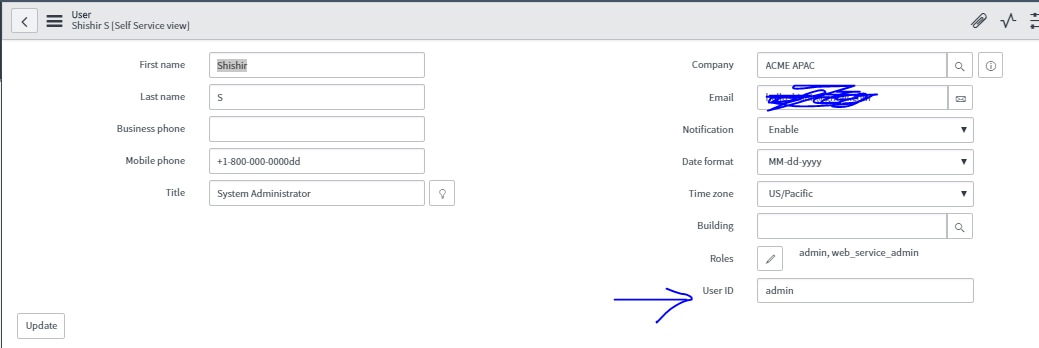
I believe it should be admin if you haven't changed it. You can configure your page to add the user id field ir you get get from sys_user.list table.

- Mark as New
- Bookmark
- Subscribe
- Mute
- Subscribe to RSS Feed
- Permalink
- Report Inappropriate Content
07-07-2017 11:55 AM


- Mark as New
- Bookmark
- Subscribe
- Mute
- Subscribe to RSS Feed
- Permalink
- Report Inappropriate Content
07-07-2017 12:12 PM
Do you mean your business's ServiceNow instance, or the ServiceNow HI instance?
If it's your own, an admin can add the username to the my profile section quite quickly. Just select My Profile, which opens a user form in the self service view.
Then select configure form design

Search for the user id field and add it to the form. This will then show it in the my profile section.

An admin going to the user list view can also add and see the 'User ID' field, which will allow for text search across any column.