- Post History
- Subscribe to RSS Feed
- Mark as New
- Mark as Read
- Bookmark
- Subscribe
- Printer Friendly Page
- Report Inappropriate Content
on 10-04-2021 01:56 PM
Disclaimer: the methodology and code presented in this article is unsupported and comes with no express or implied warranty. Use at your own risk.
As I covered in an earlier article (here), the ACC-M monitoring capability can be extended and augmented with any Sensu or Nagios-compatible plugin. As I walked through the process numerous times while composing that article, I realized that there was an opportunity to use a CI/CD pipeline to make the process of creating and maintaining those custom plugins automated. This article will describe the example solution I created which does just that.
Terminology
Inside your ServiceNow instance with the ACC-M plugin activated, monitoring components are organized as follows:
- "ACC Plugins" are gzipped tar (or "tgz"/"tar.gz") archives which contain one or more scripts or executables; these archives are automatically distributed to servers running the Agent Client Collector as determined by Agent Client Collector "Policies".
- "Check Definitions" are configuration records which specify how one of those scripts or executables is launched, how often, with what default parameters, etc.
This article covers a way to maintain the contents of ACC Plugins via a Git repository which automatically applies any changes to the corresponding ServiceNow ACC Plugin record.
Components
Git repo
In my example, I decided to maintain a "1-1-1" relationship between a Git repo, tgz archive and ACC Plugin record. For consistency and ease of management, I assigned the same name to all three pieces. They were named "monitoring-plugin-example". Inside this Git repo (https://github.com/willhallam-sn/monitoring-plugin-example) I created the following components:
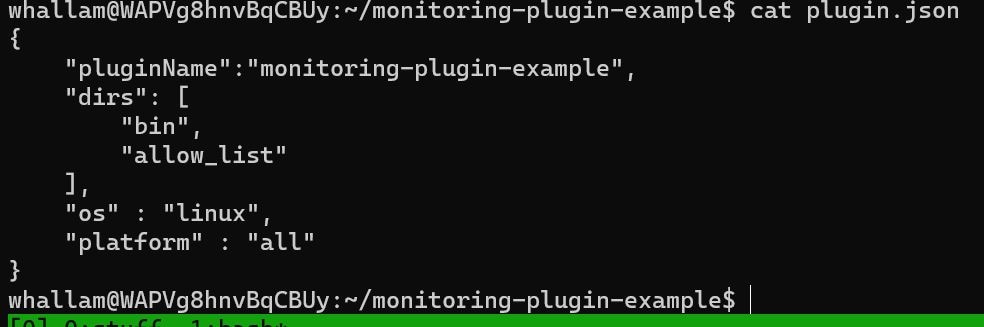
- plugin.json - this file is used to store various pieces of metadata required by ServiceNow for an ACC Plugin record; it contains the following keys (required keys in bold)
-
- pluginName - name to assign; best practice would be to match the git repo name, e.g. "monitoring-plugin-hallam"
- dirs - directories to include in archive -- minimally "bin" and "allow_list"
- os - OS to receive the plugin; default choices are "all", "windows", "linux", "darwin" (MacOS)
- platform - specific platform to receive the plugin; default choices are "all", "ubuntu", "debian", "centos", "redhat", "microsoft_windows_10_enterprise", "microsoft_Windows_server_2012_r2_standard", "suse", "sles"
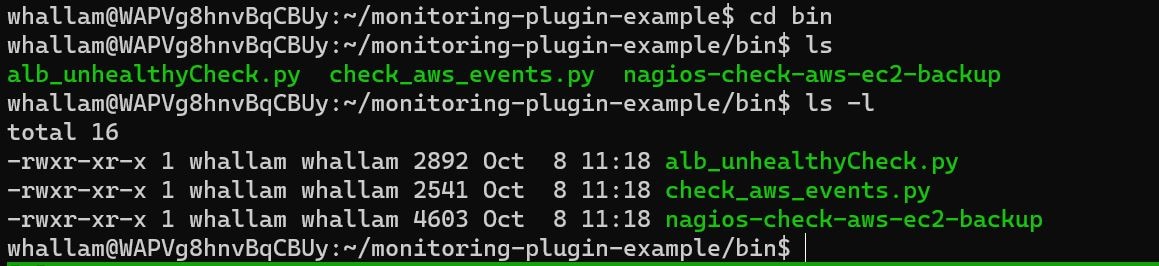
- bin - binary directory; this directory contains the scripts/executables which will be included; for this exercise I selected some arbitrary Nagios scripts from the Nagios Exchange website.
-
- allow_list - allow list directory; this directory contains the check-allow-list.json file which controls what plugins can be execute (optionally with what arguments are allowed).
-
- bundle-plugin.py - This is a Python script I wrote which performs the various archiving, signing and uploading tasks which I'd previously done by hand.
- azure-pipelines.yml - This is the definition for my Azure pipeline which automatically invokes bundle-plugin.py whenever updates are merged into the main branch of the repo.
- pluggy-post.js - This is the script used by the ServiceNow scripted REST API; it takes the updated tgz archive from the POST and attaches it to the corresponding ACC plugin record, creating the record if it doesn't already exist.


I chose to host this repo on Github because it made integrating with Azure DevOps much easier.
Scripted REST API
I opted to handle the ServiceNow side of this pipeline via a scripted REST API because it allowed me to keep everything contained in a scoped application. I defined a single POST operation for the API, backed by the script contained in file "pluggy-post.js". This script accepts the payload from the POST and attaches it to the corresponding ACC Plugin record if one exists, creating a new one if it does not.
CI/CD Pipeline
To automate the interactions between all the other parts, I created an Azure DevOps pipeline (defined in aforementioned file azure-pipelines.yml). Triggered when I merge code into the main branch in the repo, the pipeline runs the bundle-plugin.py Python script, passing in pipeline variables for the ServiceNow instance, username and password. The plugin signing key I created is stored as an Azure DevOps Secure File (never keep authentication tokens in your Git repo!).
Example
Let's run through an example of how this pipeline operates. I'll start by creating a new working branch which will contain my changes.

Now that I have my new branch, I'll add a new script, "check-aws-vpn.py", to the bin directory, add an entry for the new script to the file allow_list/check-allow-list.json and commit the change to the working branch and push it up to Github.


Next I will login to Github and create a pull request to merge the changes into the main branch.

Finally I will merge the pull request.

Now if I check my Azure pipeline, I see a new run has been queued.

Clicking into that pending job run, I can verify the pipeline ran successfully.

I can double-check that the payload has been updated by bringing up the plugin record in my ServiceNow instance:

Clicking on the attachment will download it to my PC. When I open the archive, I can see the new plugin is present in the "bin" subdirectory.

Once the attachment is updated in ServiceNow, the instance will automatically distribute the new or modified content to applicable agents based on the active ACC policies.
- Mark as Read
- Mark as New
- Bookmark
- Permalink
- Report Inappropriate Content
Hi Will,
In the Example, as you have explained adding a new check-aws-vpn.py, we need to add the allow-list changes also in the same PR, otherwise agent will not be able to run that check. Can you please check whether we need to add that step also in that example?
Thanks,
Mahesh
- Mark as Read
- Mark as New
- Bookmark
- Permalink
- Report Inappropriate Content
You're right, the allow_list needed updating. Thanks for pointing it out.