Unable to export Sys_id form sys_user table

- Mark as New
- Bookmark
- Subscribe
- Mute
- Subscribe to RSS Feed
- Permalink
- Report Inappropriate Content
08-27-2018 11:35 PM
I have a list of sys_ids of the users. I am querying the sys_user table with this list of sys_ids. from the result set i am trying to export the data. The data include the user_id, full name and sys_id.
My issue is that when i export i am not seeing sys_ids in the export excel. If i try
https://<myinstance>.service-now.com/sys_user.do?EXCEL&sysparm_fields=user_name,sys_id its exporting entire list of records from the sys_user table and not the filtered one.
- Labels:
-
Customer Success


- Mark as New
- Bookmark
- Subscribe
- Mute
- Subscribe to RSS Feed
- Permalink
- Report Inappropriate Content
08-27-2018 11:52 PM
Hi Mohammed,
I am able to get sys_id as column in excel using below url
https://<instanceName>.service-now.com/u_sample_table_list.do?EXCEL&sysparm_fields=sys_id
What is your requirement to have sys_id
Regards
Ankur
- Mark as New
- Bookmark
- Subscribe
- Mute
- Subscribe to RSS Feed
- Permalink
- Report Inappropriate Content
08-27-2018 11:55 PM
The table contains around 35000 records. The query i fire returns 885 records. When i use the above i get 35,000 records in the excel whereas i require only the query output of 885 records.
The issue is with sys_id the export return all the records in the table
Without sys_id i get 884 records (i.e by normal right click export)
Thank you

- Mark as New
- Bookmark
- Subscribe
- Mute
- Subscribe to RSS Feed
- Permalink
- Report Inappropriate Content
08-27-2018 11:58 PM
Hi Sikander,
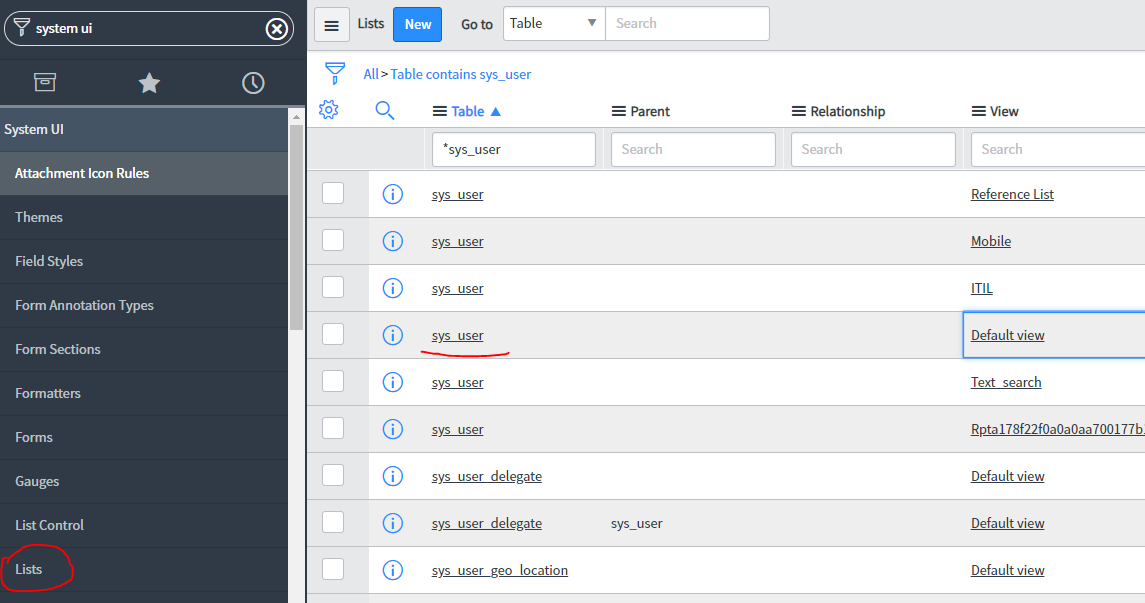
I have modified my answer as the process looks complex and found this link to be useful:
Regards, Akash



- Mark as New
- Bookmark
- Subscribe
- Mute
- Subscribe to RSS Feed
- Permalink
- Report Inappropriate Content
08-28-2018 12:04 AM
Hi Ankur, Akash,
Thank you for the quick reply.
Hi Akash,
You were able to replicate exactly what i am doing. But the problem is this will return the records but sys_id wont be there in the attachment.
So i was trying with the other option :
https://<instanceName>.service-now.com/u_sample_table_list.do?EXCEL&sysparm_fields=sys_id
in this case the sys_id will be there but it will export all the records in the table.
Please let me know if you require more information.
Thank you.
