Bharath Padaki

ServiceNow Employee
Options
- Subscribe to RSS Feed
- Mark as New
- Mark as Read
- Bookmark
- Subscribe
- Printer Friendly Page
- Report Inappropriate Content
08-31-2017
06:52 PM
On the Service Catalog, there is often a need to present the end user with some additional help when populating the catalog forms (Catalog items or Record producers). End users or requestors may not be familiar with the information requested from them. Providing additional help text and setting some context goes a long way in providing them with a better experience. This ensures that they don't have to go looking for help to understand how to provide information to submit the request.
In the past few releases, leading up to the Jakarta release, we have provided a number of options to give end users more information when using the catalog. You can implement a variety of help prompts within your instance to guide users with more information as they fill out the form.
Help text options for catalog variables
- Tooltips
- Help text
- HTML help text
- Example text
See Create a Service Catalog variable for more info.
Tooltip
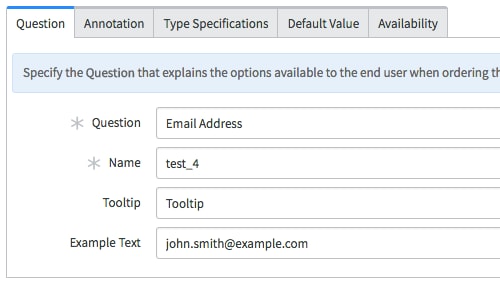
The Tooltip feature, as the name suggests, provides information as a tooltip when you hover over a variable. This option is available on the Question section of the variable form.
By default, the Tooltip allows you to store 40 characters of information. My recommendation would be not to exceed this value as long tooltips hinder the user experience.
Help Text
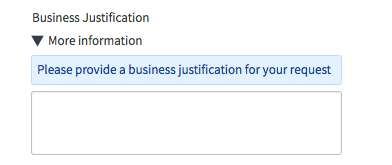
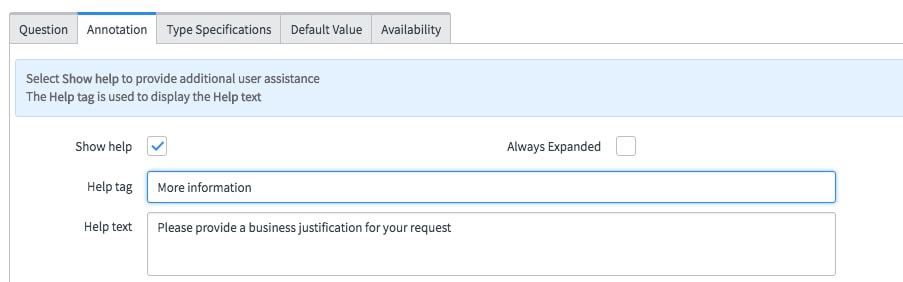
The Help Text feature allows you to configure help text for the variable and is displayed as additional text under a default help tag named "More Information."
To display the help text information, it is required to select the Show Help option and set it to true. The Help Text field can store up to 4000 characters, giving you a lot of flexibility to provide detailed help information for your users. Additionally,
- The Help Tag can be customized to suit your needs.
- If you would like the help text to be displayed for the user at all times, select the Always Expanded and set it to true (Available from Istanbul).
- If you would like the help text for all the fields on the form to displayed at all times, you can use the Expand help for all questions field on the catalog item or record producer form (Available from Istanbul).
Help text in the native UI and in the Service Portal
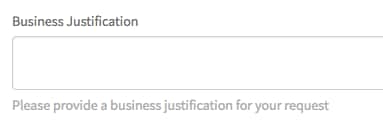
There are some differences on how Help text is rendered within the native UI vs. Service Portal. In the native UI. Help Text is displayed as a toggle that can be expanded or collapsed in the native UI. In Service Portal, the help text is displayed below the variable with no toggle. This was a deliberate decision considering the Service Portal is designed to be device agnostic and having the help text toggle disrupts the user experience.
Native UI
Service Portal
HTML enabled Help Text
In Istanbul, we also provided the ability to include HTML help text on catalog forms. The Instructions field available on the variable form can be used to enable HTML help text. A good example would be to add images to better illustrate what information you are looking for. This could include an image of a credit card to help users identify the CVV number or the Asset Tag on their laptop when reporting issues against it.
There are no options available to migrate existing help text information in the Help Text field to the Instructions field. You will have to manually move this information if you would like to use this feature. Additionally, ensure that help information is stored in only one of the two fields, not both.
On Service Portal, the HTML help text is displayed above the field rather than at the bottom like with plain help text.
Example Text
We introduced an additional feature around help text, named Example Text. Companies can configure the Example Text to enhance the user's understanding of the information they are being asked to provide.
Example text helps users understand how to provide information within a field, for example, a specific email format. As the user starts to provide the information, the example text disappears.
An example of how Example Text is displayed on a form
The ServiceNow platform gives you a number of options at your disposal to make the Service Catalog experience for your end users better. There is no one right way to do this, or any one option better than the other. Use your judgement to decide what works best in a given scenario. I would, however, recommend that you ensure the end user is not overwhelmed with help information. The intent is to make the experience better, not worse.
Labels:
- 45,674 Views
21 Comments
You must be a registered user to add a comment. If you've already registered, sign in. Otherwise, register and sign in.