Change the colour of info message on portal

- Mark as New
- Bookmark
- Subscribe
- Mute
- Subscribe to RSS Feed
- Permalink
- Report Inappropriate Content
12-22-2022 06:08 AM
Hi ,
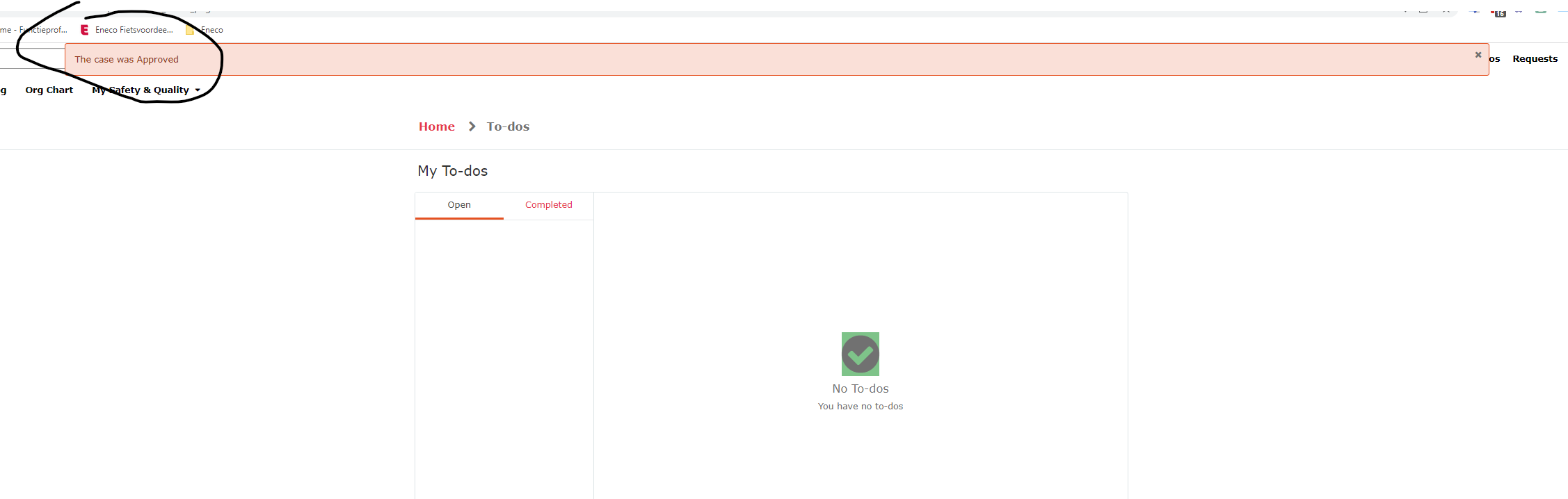
As a Servicenow Approver, When approving or rejecting on the SP, I would like the labels to reflect based on the rejection or approval. When approving, it should be a green label, when rejecting it should be red I have attached the screenshot on which the color of info message needs to be changed.


- Mark as New
- Bookmark
- Subscribe
- Mute
- Subscribe to RSS Feed
- Permalink
- Report Inappropriate Content
12-22-2022 06:24 AM
Hello,
There are additional message types that you can use:
g_form.addWarningMessage = yellow
g_form.addErrorMessage = red
g_form.addInfoMessage = blue
you can change the font color using the following script:
var message1 = 'TEST';
var message2 = message1.fontcolor("red");
g_form.addInfoMessage(message2);
You can also use text background high-lighting such as:
var message = '<b><p style="color:black;background-color:orange;">';
message+='TEST';
g_form.addInfoMessage(message);
or
var message = '<div style="background-color:blue;color:white">Assignment group changed.<br/>';
g_form.addInfoMessage(message);
If it is a server side script use gs instead of g_form.
Please mark my answer as correct based on Impact
- Mark as New
- Bookmark
- Subscribe
- Mute
- Subscribe to RSS Feed
- Permalink
- Report Inappropriate Content
12-22-2022 06:28 AM
Where exactly can I make the changes?
- Mark as New
- Bookmark
- Subscribe
- Mute
- Subscribe to RSS Feed
- Permalink
- Report Inappropriate Content
12-22-2022 06:32 AM
You will have to do it in the widget which we see in the screenshot. If it is a custom widget then you can easily do it and if it is not a custom widget you will have to clone and make the changes.