- Mark as New
- Bookmark
- Subscribe
- Mute
- Subscribe to RSS Feed
- Permalink
- Report Inappropriate Content
07-15-2025 11:12 AM
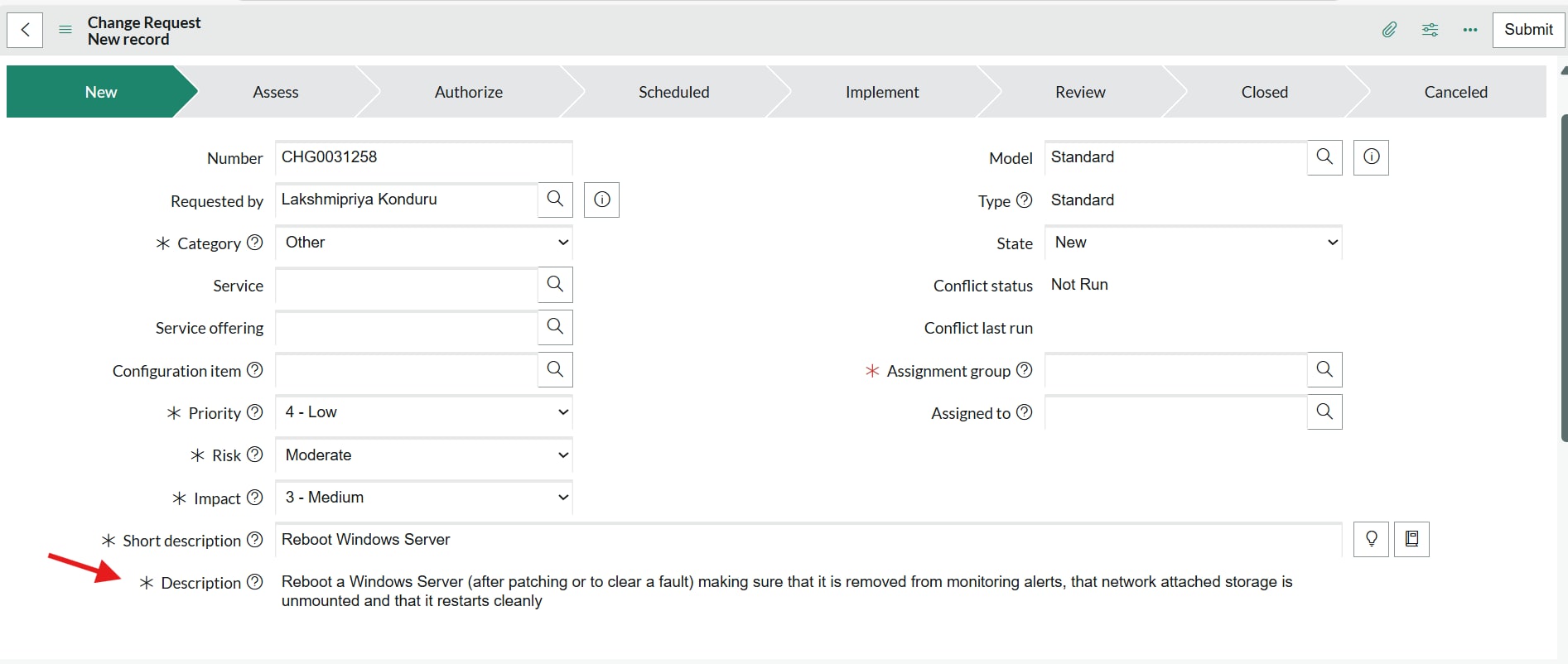
- I’m working on a requirement where the Description field should be mandatory for Standard Change Requests, but only when the State is 'New' and the view is SOW.
- I tried implementing this using a UI Policy, but it didn’t work in the SOW view. I then attempted it using a client Script, and it works fine in the Default view, but not in SOW.
- The field is present in the SOW form layout, so I’m not sure why the mandatory condition isn’t being applied.
If anyone has faced a similar issue or could kindly guide me on how to achieve this, I’d really appreciate your help.
Solved! Go to Solution.

- Mark as New
- Bookmark
- Subscribe
- Mute
- Subscribe to RSS Feed
- Permalink
- Report Inappropriate Content
07-16-2025 02:26 AM - edited 07-16-2025 02:27 AM
Hi @lakshmi9 ,
Please check and confirm if you have selected for a specific view
because it will work.


Mark it helpful if this helps you to understand. Accept solution if this give you the answer
Chandan
- Mark as New
- Bookmark
- Subscribe
- Mute
- Subscribe to RSS Feed
- Permalink
- Report Inappropriate Content
07-16-2025 03:09 AM
Hi @lakshmi9 ,
it is directly coming from template that's why is is not appearing mandatory.
Chandan


- Mark as New
- Bookmark
- Subscribe
- Mute
- Subscribe to RSS Feed
- Permalink
- Report Inappropriate Content
07-16-2025 03:54 AM
Hi @lakshmi9
There are two possible reasons: First, there might be another script running on the same field that is overriding the mandatory setting. Second, it could be a bug. Also, please check if there are 2-3 views in the SOW and whether you added the correct view in the script.
Regards
Dr Atul G. - Learn N Grow Together ServiceNow Techno - Functional Trainer
LinkedIn: https://www.linkedin.com/in/dratulgrover
YouTube: https://www.youtube.com/@LearnNGrowTogetherwithAtulG
******************************************************************************************
- Mark as New
- Bookmark
- Subscribe
- Mute
- Subscribe to RSS Feed
- Permalink
- Report Inappropriate Content
07-16-2025 03:09 AM
Hi @lakshmi9 ,
it is directly coming from template that's why is is not appearing mandatory.
Chandan
- Mark as New
- Bookmark
- Subscribe
- Mute
- Subscribe to RSS Feed
- Permalink
- Report Inappropriate Content
07-16-2025 03:03 AM
Hi @lakshmi9
As per my understanding, a Standard Change is logged via a template, and in the template, you're already adding the short description and justification. So, if the value is coming from the template, it will not appear as mandatory to the user."
Regards
Dr Atul G. - Learn N Grow Together ServiceNow Techno - Functional Trainer
LinkedIn: https://www.linkedin.com/in/dratulgrover
YouTube: https://www.youtube.com/@LearnNGrowTogetherwithAtulG
******************************************************************************************
- Mark as New
- Bookmark
- Subscribe
- Mute
- Subscribe to RSS Feed
- Permalink
- Report Inappropriate Content
07-16-2025 03:32 AM
Hi @Dr Atul - LNG / @SD_Chandan
- I agree, but I noticed that in the default view, the Description field is showing as mandatory for the Standard Change template after I used an onload Client Script.
- However, in SOW the same script doesn’t make the field mandatory, which is confusing.

- Mark as New
- Bookmark
- Subscribe
- Mute
- Subscribe to RSS Feed
- Permalink
- Report Inappropriate Content
07-16-2025 03:54 AM
Hi @lakshmi9
There are two possible reasons: First, there might be another script running on the same field that is overriding the mandatory setting. Second, it could be a bug. Also, please check if there are 2-3 views in the SOW and whether you added the correct view in the script.
Regards
Dr Atul G. - Learn N Grow Together ServiceNow Techno - Functional Trainer
LinkedIn: https://www.linkedin.com/in/dratulgrover
YouTube: https://www.youtube.com/@LearnNGrowTogetherwithAtulG
******************************************************************************************