Hide variable through onchange client script

- Mark as New
- Bookmark
- Subscribe
- Mute
- Subscribe to RSS Feed
- Permalink
- Report Inappropriate Content
05-09-2019 07:09 AM
Hello All,
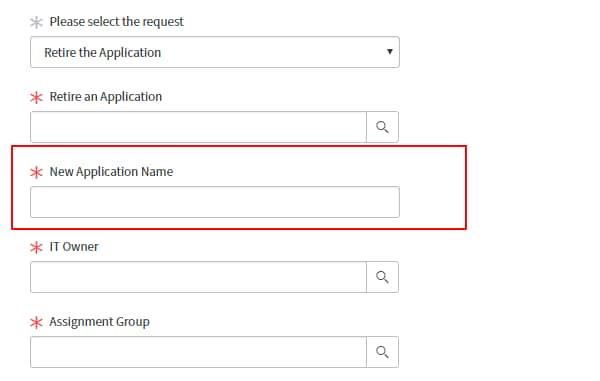
I want to hide variable when selecting the request.I have written below client script but its not hiding if I select the value again
For example,If I select Add the application new application will come but when i select retire application the field is not getting hided.Please help


function onChange(control, oldValue, newValue, isLoading) {
if (isLoading || newValue == '') {
return;
}
clearfields();
if (newValue == 'Add the Application') {
g_form.setMandatory('u_add_appl', true);
g_form.setMandatory('u_assigned_to', true);
g_form.setMandatory('u_assignment_group', true);
g_form.setDisplay('u_add_appl',true);
g_form.setDisplay('u_assigned_to',true);
g_form.setDisplay('u_assignment_group',true);
g_form.setDisplay('u_modify_application',false);
g_form.setDisplay('u_application',false);
}
if (newValue == 'Modify the Application') {
g_form.setMandatory('u_modify_application', true);
g_form.setMandatory('u_assigned_to', true);
g_form.setMandatory('u_assignment_group', true);
g_form.setDisplay('u_modify_application',true);
g_form.setDisplay('u_assigned_to',true);
g_form.setDisplay('u_assignment_group',true);
g_form.setDisplay('u_add_appl',false);
g_form.setDisplay('u_application',false);
}
if (newValue == 'Retire the Application') {
g_form.setMandatory('u_application', true);
g_form.setMandatory('u_assigned_to', true);
g_form.setMandatory('u_assignment_group', true);
g_form.setDisplay('u_application',true);
g_form.setDisplay('u_assigned_to',true);
g_form.setDisplay('u_assigned_to',true);
g_form.setDisplay('u_add_appl',false);
g_form.setDisplay('u_modify_application',false);
}
//opriate comment here, and begin script below
}
function clearfields()
{
g_form.setValue('u_add_appl',"");
g_form.setValue('u_application',"");
g_form.setValue('u_assigned_to',"");
g_form.setValue('u_assignment_group',"");
g_form.setValue('u_modify_application',"");
} //Type appr

- Mark as New
- Bookmark
- Subscribe
- Mute
- Subscribe to RSS Feed
- Permalink
- Report Inappropriate Content
05-10-2019 04:55 AM
If 1 or more variable cannot be in multiple UI policies. But you can write 1 ui policy that covers multiple scenarios even if it ends up only be for 1 variable. You can do this by using what I call the big OR. I don't have any like that in my current environment but here is a screenshot of what the condition look like after clicking on it.

Please make an answer correct or helpful to close out the thread.