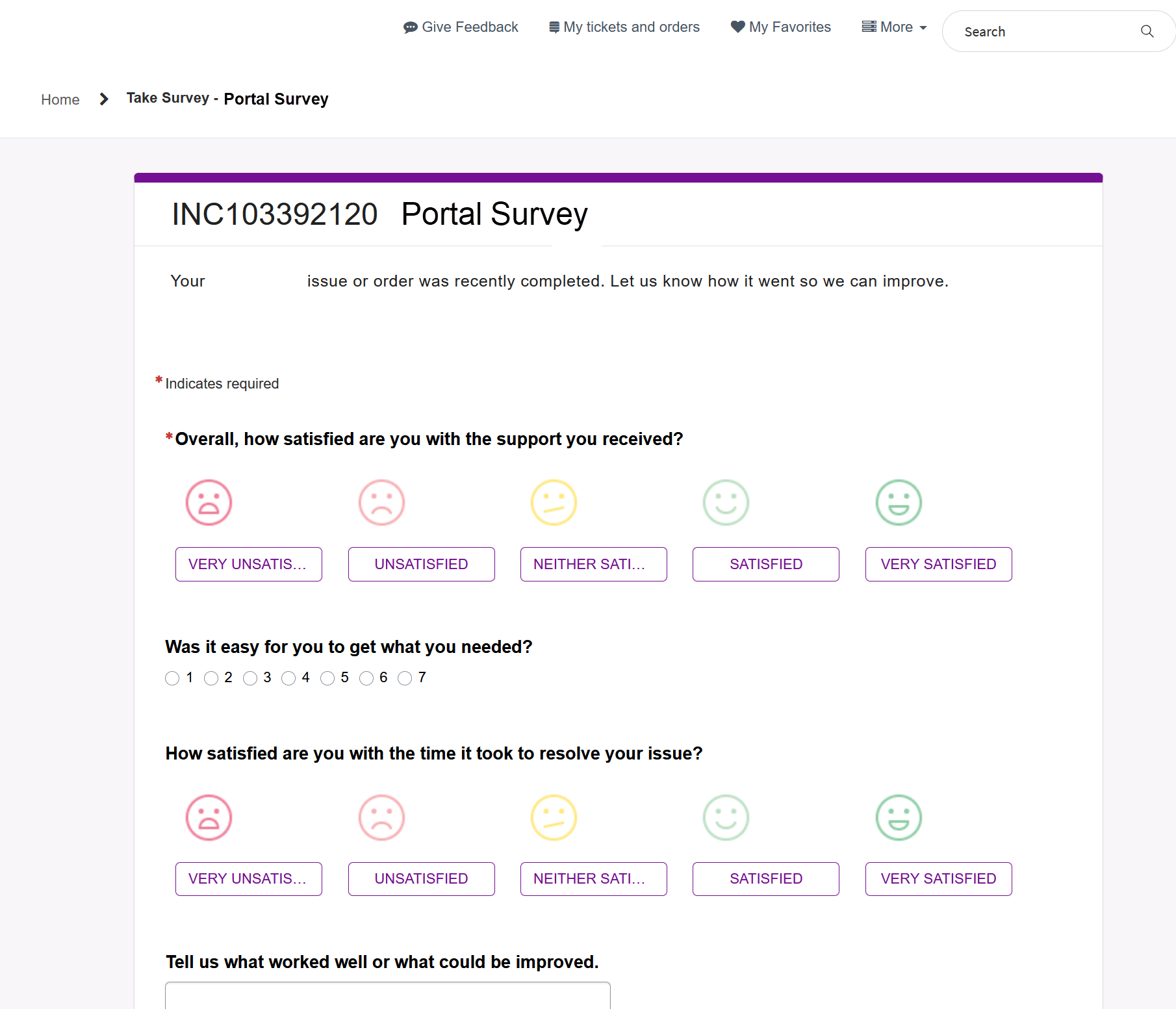
How can i add incident number and some description on top the survey widget.

- Mark as New
- Bookmark
- Subscribe
- Mute
- Subscribe to RSS Feed
- Permalink
- Report Inappropriate Content
03-12-2026 10:52 PM - edited 03-12-2026 11:09 PM
We have a requirement to show the incident number and some description on top of the survey widget.
Our instance was configured to show assessment (Survey) to the user who raised the ticket, once the ticket gets closed.
For now, we are using a custom page and adding a OOTB Widget (Surveys and Assessment) in to it. But the survey appears to be generic and doesnt show to what exactly we are submitting the survey for. So we wanted some incident and short description to be appeared in the page or widget. Also make some small changes like removing asterisk before a word.
I am aware that there very limited things we can do from OOTB widget. So i tried cloning it and testes several scripts in HTML and Server. Nothing made any changes to it.
There was one more widget (Take Survey Deprecated) which shows the incident and short description on the survey page. I would like the Surveys and Assessment to appears as Take Survey Deprecated.
Attaching screenshots for reference.
This is from Take Survey Deprecated widget. Which shows incident number and some description.

This is from Surveys and Assessment widget. I want the incident and some description to show at the header.


- Mark as New
- Bookmark
- Subscribe
- Mute
- Subscribe to RSS Feed
- Permalink
- Report Inappropriate Content
03-13-2026 04:12 AM
Hi @Kvb Kiran,
we have faced the same some 2-3 years ago and not sure if there was any fix applied during that time. You can try to create a case from Support Portal to get answer/assistance from ServiceNow.
As a workaround until that you might want to either change the question type, instead of faces you can make it a radio-button as you have in "Was it easy..." 1 - 2 - 3 - ... - 7 or to change the values, e.g. from "Neither satisfied or unsatisfied" to "Neutral" or "Neither option"... something like this
✂-----Cutting-out-the---✦AI-noise✦---All-replies-written-and-vouched-for-by-GlideFather---
- Mark as New
- Bookmark
- Subscribe
- Mute
- Subscribe to RSS Feed
- Permalink
- Report Inappropriate Content
03-13-2026 04:22 AM
Hi @glideFather ,
We do make changes in the questions which works fine. However, we only want to change the header text. Maybe adding incident number and some short description. And removing the asterisk.
I tried adding some "Introduction & end Notes" in the survey, yet no luck. I just do not know where this Portal Survey is getting fetched. Either in the widget or some other outside of this widget.

- Mark as New
- Bookmark
- Subscribe
- Mute
- Subscribe to RSS Feed
- Permalink
- Report Inappropriate Content
03-13-2026 04:45 AM
Hi @Kvb Kiran,
when you go to https://yourinstance.service-now.com/$ng_sd.do and locate your survey - top-right corner > Load Survey:

and there you have chance to update it as you want under the Design tab:

Eventually Configuration tab (continues with scrolling down):

If you want to see that in the native UI view and not the Survey designer, navigate to this table:
(there's a filter to search for a survey called "Portal Survey", you can adjust/remove it if needed)
https://yourinstance.service-now.com/asmt_metric_type_list.do?sysparm_query=nameSTARTSWITHportal%20survey
If you made any changes that are not visible, be sure that:
- the survey was published,
- you generated a new assessment AFTER the changes
The change is reflected only for new records created afterwards, not retrospectively - example you have a survey with 2 fields, some records satisfy the conditions and surveys/assessments are sent, then you update the survey to have 3 fields, only the surveys generated after adding that field will contain it, the old existing surveys will still have 2 only. Maybe it's a silly but worthy checking.
Let me know what do you think about this
✂-----Cutting-out-the---✦AI-noise✦---All-replies-written-and-vouched-for-by-GlideFather---
- Mark as New
- Bookmark
- Subscribe
- Mute
- Subscribe to RSS Feed
- Permalink
- Report Inappropriate Content
03-13-2026 05:34 AM - edited 03-13-2026 05:40 AM
Thank you. This is helpful.
One more thing.
There already is a "introduction and end notes" for that survey. That text is being displayed for one widget (Take Survey Deprecated), but not for another (Surveys and Assessment). Do you know why? Is this something that widget supports?
Is this the bug which you mentioned in the initial comment?

However, when i check the "Do not show survey introduction notes", out of nowhere, the survey now shows the ticket along with the title and short description. I do not understand if this is as part of widget that always shows and the introduction survey notes i added overwrites it but somehow doesn't renders it?