How can I update list view in bulk/ edit fields all together?

- Mark as New
- Bookmark
- Subscribe
- Mute
- Subscribe to RSS Feed
- Permalink
- Report Inappropriate Content
06-24-2022 03:57 AM
Hello everyone,
I wanted to know is there a way to make all the cab definitions in the list view inactive without actually going inside each record and manually un-cheking the active check-box.
In the list view, I can see that I am able to edit all the other columns except the Active column. I also am aware that, it has an ACL list-edit running 'cab_definition.active' and the role is set to nobody by default.
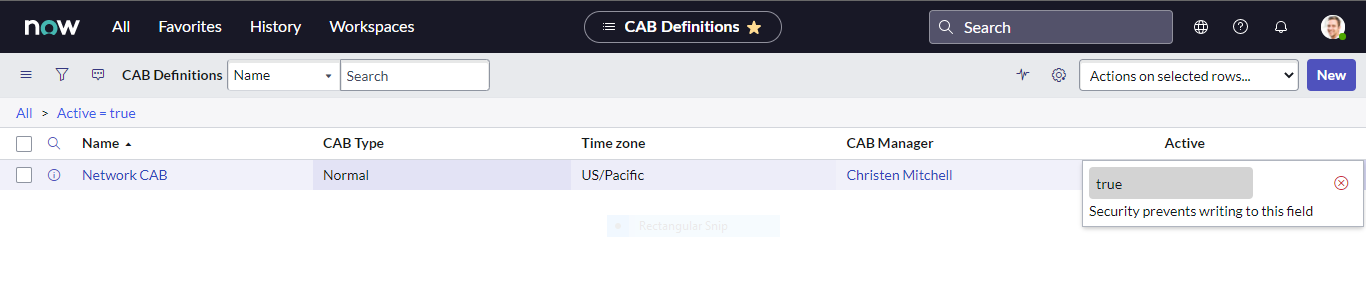
In the attached screeshots, you can see that I can edit CAB Type in the list view itself, but when I try to edit the active field it says "Security prevents writing to this field".
Please let me know if there is a way to edit the active field in the list view itself?
Thanks in Advance,
Lavanya
- Mark as New
- Bookmark
- Subscribe
- Mute
- Subscribe to RSS Feed
- Permalink
- Report Inappropriate Content
06-24-2022 03:58 AM
Hi


- Mark as New
- Bookmark
- Subscribe
- Mute
- Subscribe to RSS Feed
- Permalink
- Report Inappropriate Content
06-24-2022 04:16 AM
Hi,
if ACL is blocking then you cannot do it from UI
Why not run background script for this?
Regards
Ankur
Ankur
✨ Certified Technical Architect || ✨ 10x ServiceNow MVP || ✨ ServiceNow Community Leader