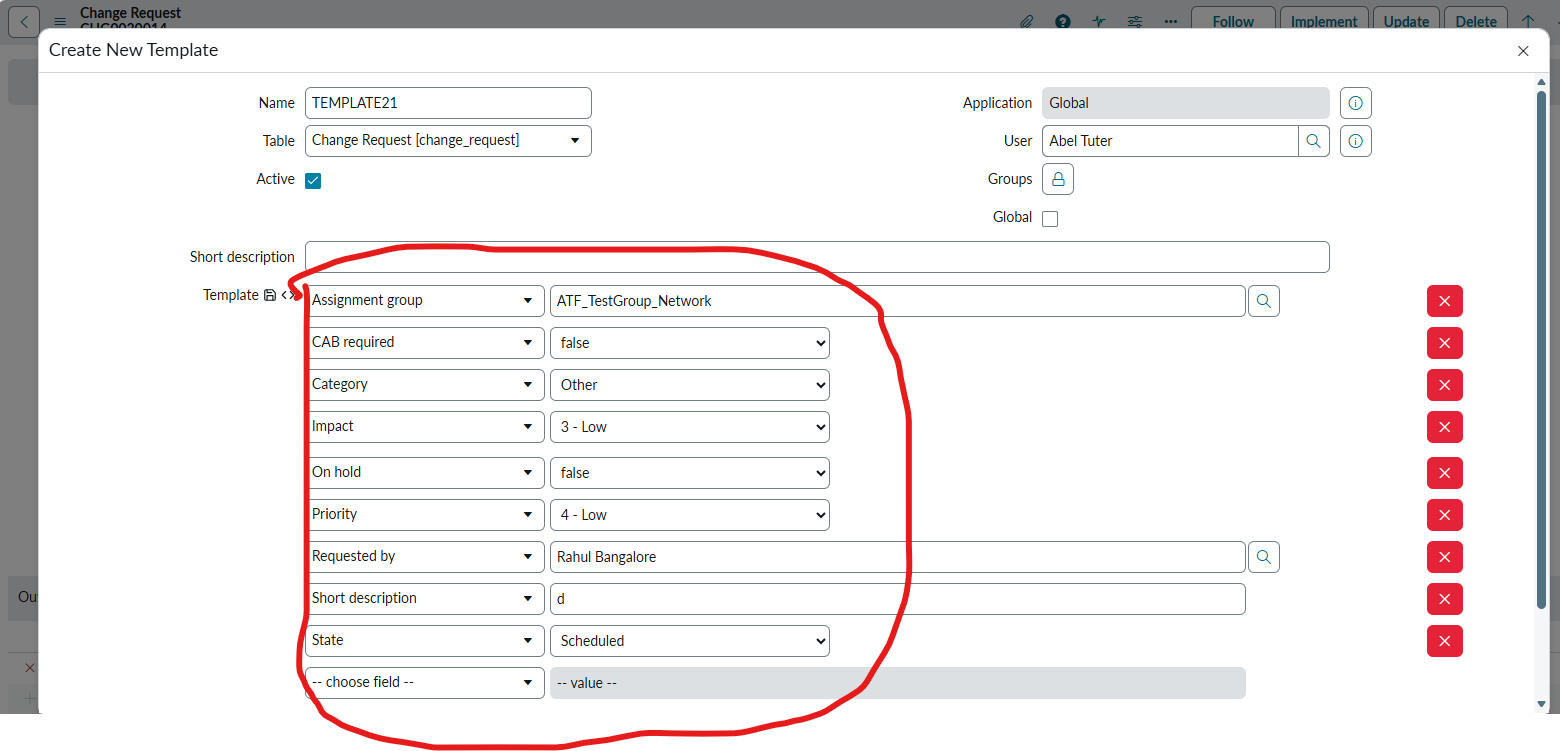
How to change the default fields in the new template creation form in change management

- Mark as New
- Bookmark
- Subscribe
- Mute
- Subscribe to RSS Feed
- Permalink
- Report Inappropriate Content
05-23-2026 09:55 AM
Hi All,
Need a help please. Iam trying to change the fields in the new template creation popup in the change management. Once change is opened, in the template bar, click on + sign and a new template creation form appears and it will have default fields. i am looking to modify them.
Any suggestion s would be of great help.
Thanks & Regards,

- Mark as New
- Bookmark
- Subscribe
- Mute
- Subscribe to RSS Feed
- Permalink
- Report Inappropriate Content
05-23-2026 10:46 AM
Hi @Raahul2
Navigate to Standard change properties under Administration , open it.
Link: https://<your_instance_name>/now/nav/ui/classic/params/target/std_change_properties.do%3Fsys_id%3D527b5dafff700200b18affffffffff89
These properties are configurable. Update it as per your requirement.

Regards
Tanushree Maiti
ServiceNow Technical Architect
LinkedIn: https://www.linkedin.com/in/tanushreemaiti
- Mark as New
- Bookmark
- Subscribe
- Mute
- Subscribe to RSS Feed
- Permalink
- Report Inappropriate Content
05-24-2026 10:26 AM
Hello Tanushree,
Thank you for your reply. However, Iam looking to modify for Normal change template. This is for standard which you have suggested.
Best regards,
- Mark as New
- Bookmark
- Subscribe
- Mute
- Subscribe to RSS Feed
- Permalink
- Report Inappropriate Content
05-24-2026 11:03 AM
Hi @Raahul2 ,
Check this video at 3:20 time, where it is editing Normal template
https://www.youtube.com/watch?v=gXxjQEKtMjo
- Navigate to Change > Create New and select Normal Change.
- Click the More options (three dots) icon at the top right of the form and ensure Toggle Template Bar is checked.
- In the template bar at the bottom, click the three dots and click Edit next to the template you want to modify.
- Update the desired fields
- Click Save on the template modal
You can try with sys_template.list ->selecting your template.. check if you have write permission
Regards
Tanushree Maiti
ServiceNow Technical Architect
LinkedIn: https://www.linkedin.com/in/tanushreemaiti

- Mark as New
- Bookmark
- Subscribe
- Mute
- Subscribe to RSS Feed
- Permalink
- Report Inappropriate Content
05-24-2026 11:21 PM
Hello Tanushree,
The video is for editing the existing templates or creating a new template, which Iam aware of. My issue is when you click on + sign in the template, a new template popup appears. In that new form I want to modify the default fields.
Thanks & Regards,