How to restrict Date optionality using a UI policy

- Mark as New
- Bookmark
- Subscribe
- Mute
- Subscribe to RSS Feed
- Permalink
- Report Inappropriate Content
03-28-2024 04:03 AM - edited 03-28-2024 04:49 AM
Hi all,
First time posting in this forum. I'm creating an SC Catalog Form and using the "Date" variable. I want to limit or restrict the date options to 1 month from "today's date" (date of the submission of the request). Meaning, I don't want a user to be able to select a date more than 1 month ahead as well as any past dates relative to "today's date" or the date the user is submitting the request.
How can I accomplish this without using a script? I don't seem to have the option of using scripts with my current permissions on our platform.
Thank you

- Mark as New
- Bookmark
- Subscribe
- Mute
- Subscribe to RSS Feed
- Permalink
- Report Inappropriate Content
03-28-2024 07:49 PM
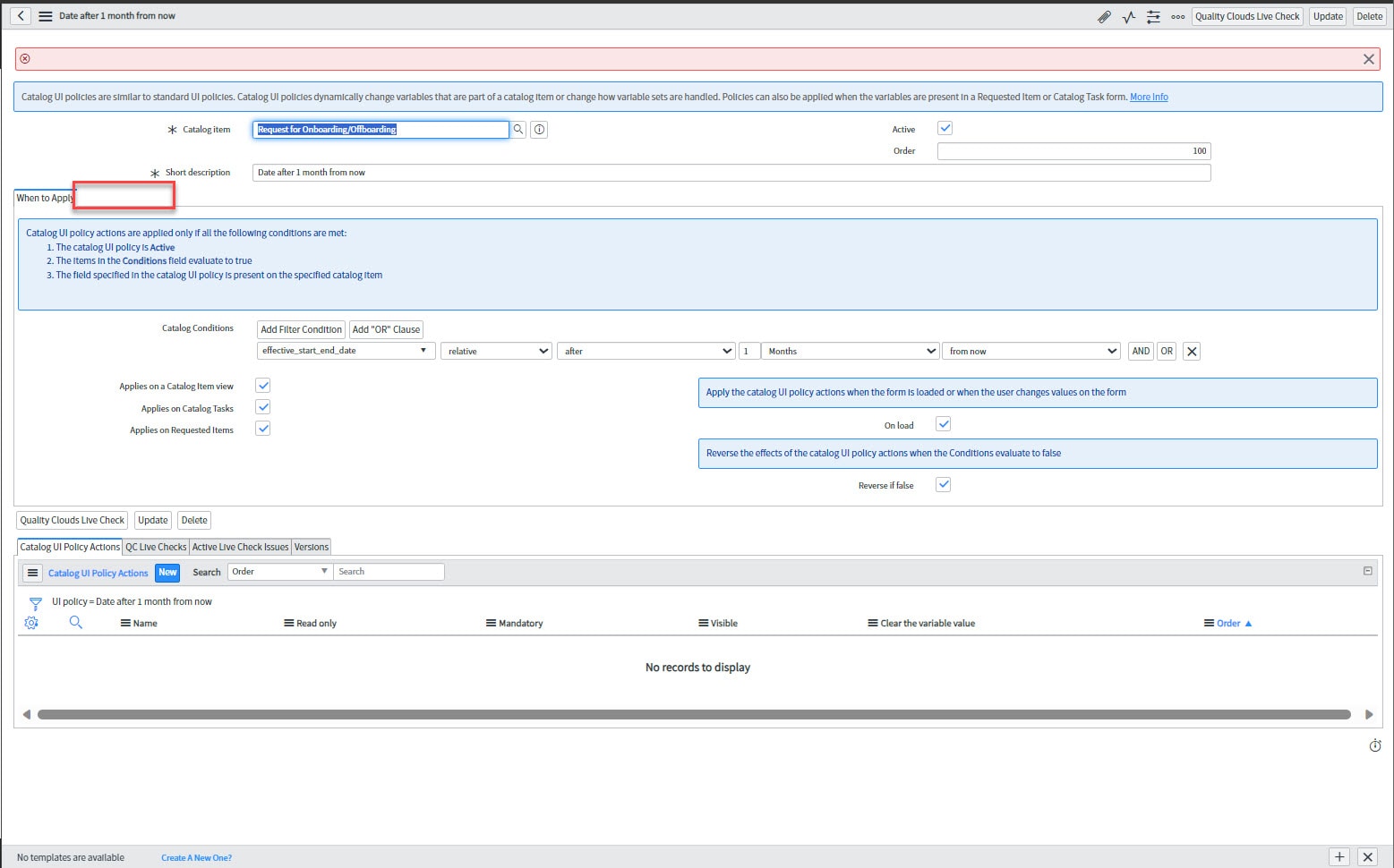
Hi @Cuber you would need 2 UI policies
1. To check more than 30 days below condition needs to be placed


2. To put error message if past date is selected


Harish
- Mark as New
- Bookmark
- Subscribe
- Mute
- Subscribe to RSS Feed
- Permalink
- Report Inappropriate Content
03-29-2024 06:30 AM
- Mark as New
- Bookmark
- Subscribe
- Mute
- Subscribe to RSS Feed
- Permalink
- Report Inappropriate Content
03-31-2024 06:18 PM
Hi @Cuber check whether the UI policy is in default view? if yes click on advanced view. Also u do have admin role ?
Harish
- Mark as New
- Bookmark
- Subscribe
- Mute
- Subscribe to RSS Feed
- Permalink
- Report Inappropriate Content
04-02-2024 06:26 AM
Hi @Harish KM I don't have the option for advanced view. I only see Default or sys_popup. I have limited ability on the backend. I'm not sure if you'd consider this "admin" or not. When I load the UI policy, I see the "script" tab for a split second. Once the page is fully loaded, it disappears.