Multiple Choice variable bug in catalog/order guide

- Mark as New
- Bookmark
- Subscribe
- Mute
- Subscribe to RSS Feed
- Permalink
- Report Inappropriate Content
07-26-2026 07:25 AM
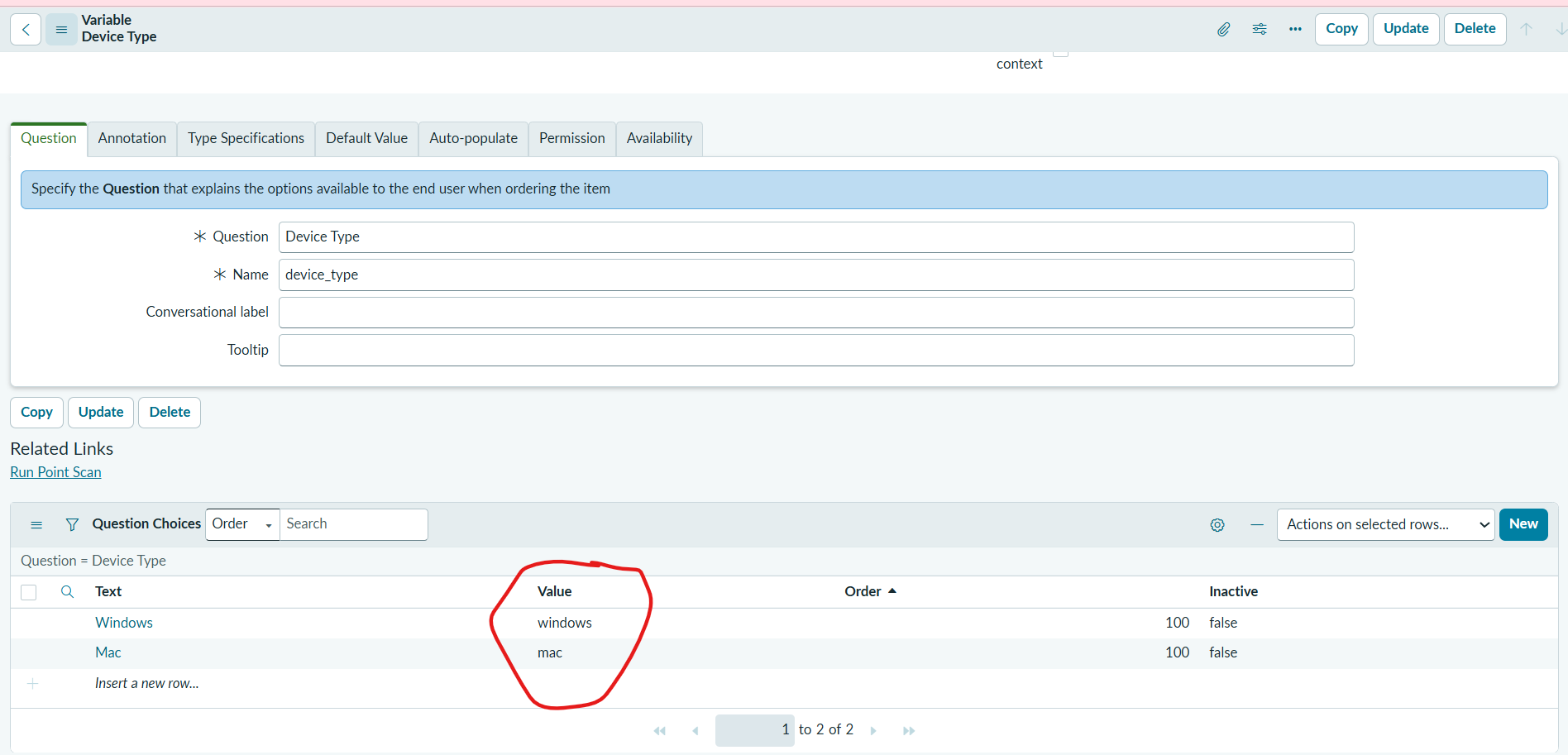
Hi guys! Can anyone help me with this issue that I'm facing, i was creating a order guide and creating a variable called Device Type, in which i gave 2 different choices but during the rule base i was able to see one. is it Australia patch bug or something because in earlier Zurich update patch there were no issue like this even I run the point scan it shows no error.


- Mark as New
- Bookmark
- Subscribe
- Mute
- Subscribe to RSS Feed
- Permalink
- Report Inappropriate Content
07-26-2026 10:50 AM
Hi @igsumit007
1. Open your Device Type variable > scroll down to the Question Choices related list
Verify both choices.
Ensure the Value column contains no accidental spaces, special characters, or uppercase differences.
2. Validate if the choice is marked inactive.
3. Type cache.do into the application navigator search bar and hit Enter to flush the system cache. Afterwards, close out of the Order Guide completely and reopen it.
4. Ensure your variable's Name field (Device Type) is unique
Regards
Tanushree Maiti
ServiceNow Technical Architect
LinkedIn: https://www.linkedin.com/in/tanushreemaiti
- Mark as New
- Bookmark
- Subscribe
- Mute
- Subscribe to RSS Feed
- Permalink
- Report Inappropriate Content
07-26-2026 05:12 PM - edited 07-26-2026 08:10 PM
Hello @igsumit007
This isn't an Australia Version issue. The Issue is right there in your screenshots. The Value is empty for both Mac and Windows Question choices. Blank Value collapses the dropdown to a single option.
I reproduced this in my PDI. please refer screenshots
Screenshots 1&2 Replicated your issue
Screenshots 3&4 are the fix for your issue
However, i don't understand one thing, how come your question choice values are empty, when you are creating a question choice, value field is Mandatory. i removed those values using a bg script.
please mark my response Helpful. if my reply added any value.

- Mark as New
- Bookmark
- Subscribe
- Mute
- Subscribe to RSS Feed
- Permalink
- Report Inappropriate Content
07-26-2026 08:02 PM
hi @igsumit007 ,
I don't think this is an Australia Patch bug. First, verify that each choice has a Text, Value, and Order populated correctly. After adding or updating the choices, save the Variable record first, then reopen it and confirm that both choices are saved under Question Choices.
Once you've verified the choices are saved correctly, check the Order Guide Rule again. In most cases, this resolves the issue.
try to clear cache and test (cache.do)
Regards,
Tejas
If you found my solution helpful, please mark it as Helpful and Accept Solution.
- Mark as New
- Bookmark
- Subscribe
- Mute
- Subscribe to RSS Feed
- Permalink
- Report Inappropriate Content
07-27-2026 07:48 AM
Thank you so much guys for correcting me 🙂