- Mark as New
- Bookmark
- Subscribe
- Mute
- Subscribe to RSS Feed
- Permalink
- Report Inappropriate Content
3 weeks ago
Need to understand the in which workflow , the event is being used in ServiceNow.
sla.warning.parm
Please advise how to check it, I have checked workflows on task_sla table, but NO LUCK(not able to find it)
Solved! Go to Solution.


- Mark as New
- Bookmark
- Subscribe
- Mute
- Subscribe to RSS Feed
- Permalink
- Report Inappropriate Content
3 weeks ago
it's triggered by Default SLA flow and not by workflow

💡 If my response helped, please mark it as correct ✅ and close the thread 🔒— this helps future readers find the solution faster! 🙏
Ankur
✨ Certified Technical Architect || ✨ 10x ServiceNow MVP || ✨ ServiceNow Community Leader

- Mark as New
- Bookmark
- Subscribe
- Mute
- Subscribe to RSS Feed
- Permalink
- Report Inappropriate Content
3 weeks ago
Hi @sharsha
If you’re using an older instance that has been upgraded over time and you’re still using Workflows, please check these three SLA workflows.

If you are using flow , then check Default SLA flow

Regards
Tanushree Maiti
ServiceNow Technical Architect
LinkedIn: https://www.linkedin.com/in/tanushreemaiti
- Mark as New
- Bookmark
- Subscribe
- Mute
- Subscribe to RSS Feed
- Permalink
- Report Inappropriate Content
3 weeks ago
Did I answer your original question?
If yes please close the thread by marking appropriate response as correct and the discussion can still continue on an answered thread.
Ankur
✨ Certified Technical Architect || ✨ 10x ServiceNow MVP || ✨ ServiceNow Community Leader
- Mark as New
- Bookmark
- Subscribe
- Mute
- Subscribe to RSS Feed
- Permalink
- Report Inappropriate Content
3 weeks ago
Yes, I did, Thanks!
need to achieve the below, could you please advise if we can do this below or do we have any conflicts here to proceed or is it expected in the system, I can see its a OOB flow from ServiceNow.
*• Identify why and where the "WM – 5 business days" SLA is now attaching to Facilities work orders (any SLA definition's applies-to condition???)
• Determine whether Facilities work orders should carry this SLA at all;
• Review the 50.01%-of-duration notification and either disable it for Facilities or adjust it so it no longer floods users.
• Confirm users stop receiving the SLA percentage emails, and that no legitimate notifications are lost in the process.
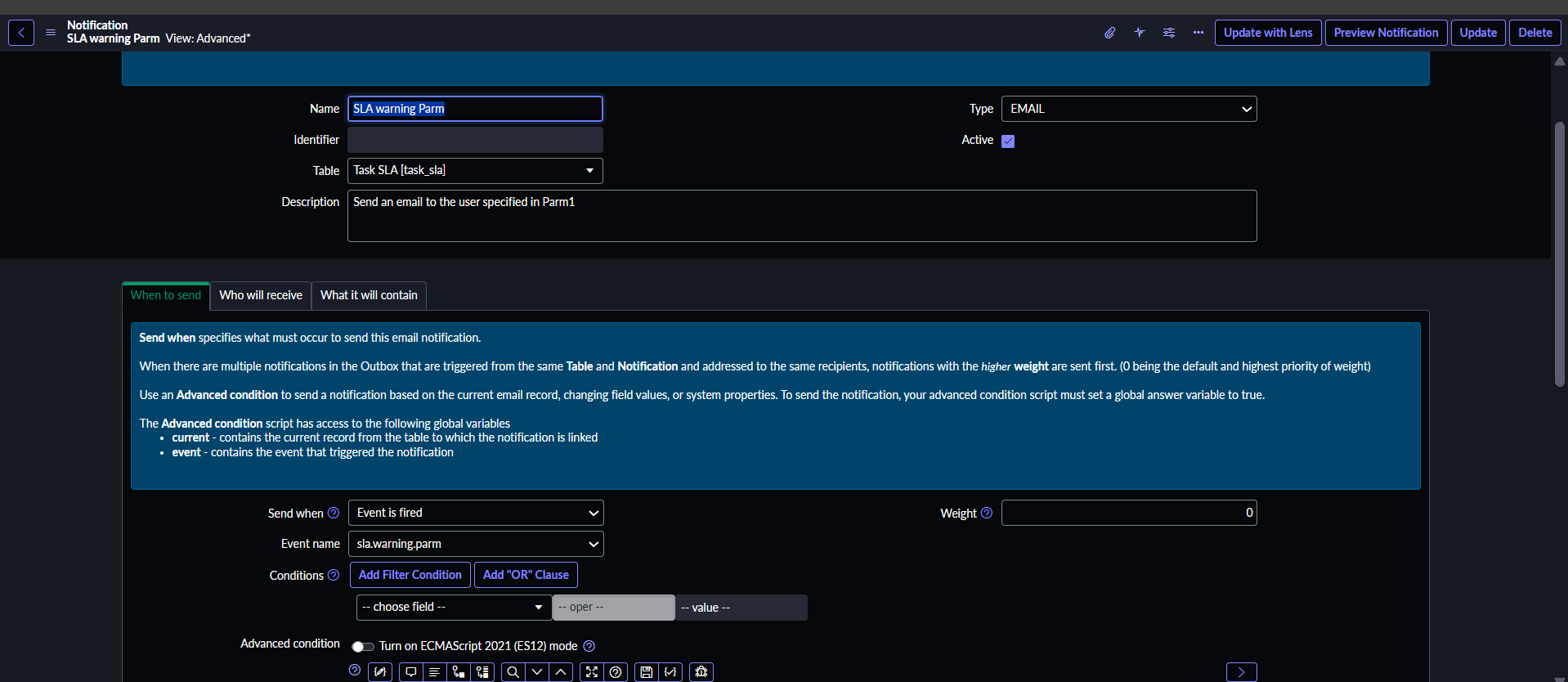
Attached is the OOB notification which is triggering and responsible for the same here,
Notification name: SLA warning Parm
/sysevent_email_action.do?sys_id=9660628ed7a2220035ae23c7ce61039e&sysparm_view=advanced&sysparm_view_forced=true&sysparm_view_resolved=advanced
- Mark as New
- Bookmark
- Subscribe
- Mute
- Subscribe to RSS Feed
- Permalink
- Report Inappropriate Content
3 weeks ago
sorry didn't get your question
Ankur
✨ Certified Technical Architect || ✨ 10x ServiceNow MVP || ✨ ServiceNow Community Leader
- Mark as New
- Bookmark
- Subscribe
- Mute
- Subscribe to RSS Feed
- Permalink
- Report Inappropriate Content
3 weeks ago
@Ankur Bawiskar , I need answers to this below,..can we do this to this OOB flow?
• Determine whether Facilities work orders should carry this SLA at all;
• Review the 50.01%-of-duration notification and either disable it for Facilities or adjust it so it no longer floods users.
- Mark as New
- Bookmark
- Subscribe
- Mute
- Subscribe to RSS Feed
- Permalink
- Report Inappropriate Content
3 weeks ago
Hi @sharsha
If you’re using an older instance that has been upgraded over time and you’re still using Workflows, please check these three SLA workflows.
If you are using flow , then check Default SLA flow
Regards
Tanushree Maiti
ServiceNow Technical Architect
LinkedIn: https://www.linkedin.com/in/tanushreemaiti