- Mark as New
- Bookmark
- Subscribe
- Mute
- Subscribe to RSS Feed
- Permalink
- Report Inappropriate Content
08-04-2022 12:13 AM
Hi All,
I have Record Producer. which has variable called Will you require IT's assistance for your meeting? or "it_requirement". It is multiple choice type with Values: Yes, No, Do not know.
If its variable value is 'yes' then I have to auto create a RITMXXXXXX with already created catalog item:
Requirement is:
- If Will you require IT's assistance for your meeting? = Yes a new catalog item is created with the following information:
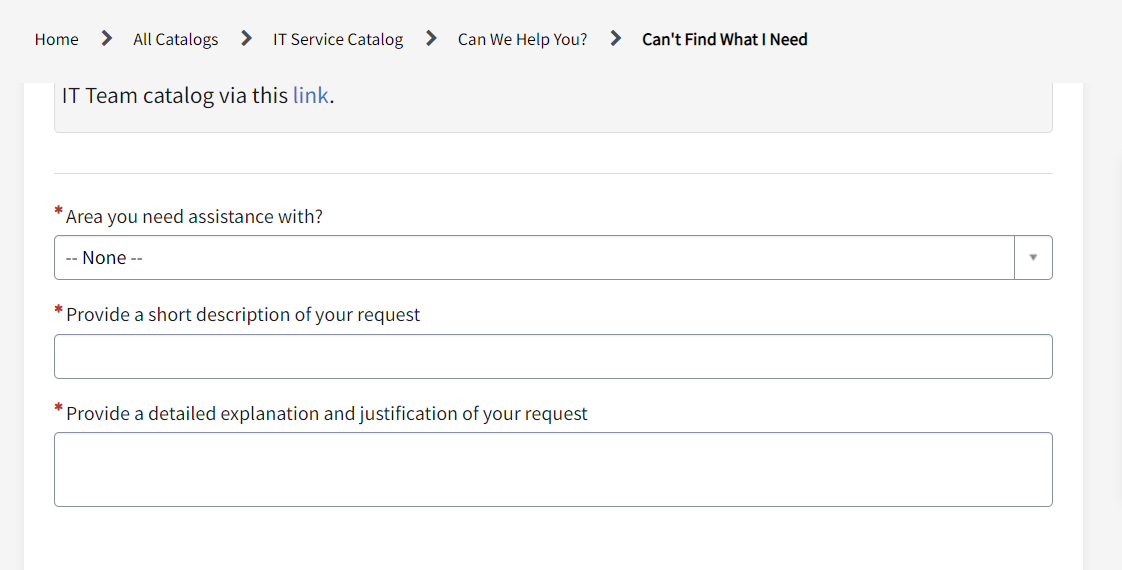
- Item type: Can't Find What I Need (This is a catalog item existed)
- (Field on RITM) Requested for: Event Host (Employee Name) - variable in Record producer
- (Field on RITM) Due date: When is your event? (1st Choice) - variable in Record producer
- Assignment Group: SG_SN-IT-ServiceDesk Tier I
- State: Open
- Approval: Not Required
- Parent: WPS record created (show in Request Item form)
- Short Description: IT Assistance for {Event Type} for {Requested for}
- Area you need assistance with? Other
- Provide a short description of your request: Same as short Description
- Provide a detailed explanation and justification of your request:
- Reference {WPE #}
- Event Host:
- Event type:
- Event Format:
- Event Title Name:
- Event Description = Describe this event, including its purpose
- Event 1st Choice:
- Event 2nd Choice:
- Expected Number of Attendees:
- Requested Country:
- Other Requests/Notes:
Attached is the Catalog item form
Please help me how to proceed.
Solved! Go to Solution.


- Mark as New
- Bookmark
- Subscribe
- Mute
- Subscribe to RSS Feed
- Permalink
- Report Inappropriate Content
08-04-2022 02:34 AM
Hi,
you cannot set field using Cart API
So update as this -> you need to query RITM with the REQ sysId and then update the record
if (producer.it_requirement == 'yes') {
try {
var cartId = GlideGuid.generate(null);
var cart = new Cart(cartId);
//add your requested item to the cart by sys_id of the catalog item
var item = cart.addItem('ed8e941a1bee9010f5bef5f61a4bcb82', 1);
//fill in the variables on the request item form
cart.setVariable(item, "requested_for", producer.event_host);
cart.setVariable(item, "state", "1");
cart.setVariable(item, "due_date", producer.virtual_event_choice_1);
cart.setVariable(item, "assignment_group", "0a064b7f1b8bd410eda185d7cc4bcb3d");
cart.setVariable(item, "approval", "not_required");
var rc = cart.placeOrder();
gs.info(rc.number);
var ritm = new GlideRecord('sc_req_item');
ritm.addQuery('request', rc.sys_id);
ritm.query();
if(ritm.next()){
ritm.parent = current.sys_id;
ritm.update();
}
} catch (ex) {
gs.info(ex);
}
}
Regards
Ankur
Ankur
✨ Certified Technical Architect || ✨ 10x ServiceNow MVP || ✨ ServiceNow Community Leader
- Mark as New
- Bookmark
- Subscribe
- Mute
- Subscribe to RSS Feed
- Permalink
- Report Inappropriate Content
08-10-2022 06:47 AM
Hi
Sorry for late response. I tried same script for after/insert BR on workplace service table on which Record Producer is created. Here is the BR code:
(function executeRule(current, previous /*null when async*/) {
if (current.u_it_requirement == 'yes') {
try {
var desc;
var cartId = GlideGuid.generate(null);
var cart = new Cart(cartId);
//add your requested item to the cart by sys_id of the catalog item
var item = cart.addItem('ed8e941a1bee9010f5bef5f61a4bcb82', 1); //sys_id of Can't Find What I Need
//Set variables on the catalog item form
cart.setVariable(item, "category", '7cf1c22d1bd46810217f54651a4bcbb1'); //Others
cart.setVariable(item, "short_description", current.short_description);
desc = "Reference {WPE #}: " + ritm.parent + "\nEvent Host: " + producer.event_host.getDisplayValue() + "\nEvent type: " + producer.event_type + "\nEvent Format: " + producer.event_format + "\nEvent Title Name: " + producer.event_name + "\nEvent Description: " + producer.event_description + "\nEvent 1st Choice: " + producer.virtual_event_choice_1 + "\nEvent 2nd Choice: " + producer.virtual_event_choice_2 + "\nExpected Number of Attendees: " + producer.expected_number_of_attendees + "\nRequested Country: " + producer.requested_country.getDisplayValue() + "\nOther Requests/Notes: " + producer.other_requests_notes + "\nWPE Assignment Group: " + current.assignment_group.getDisplayValue();
cart.setVariable(item, "description", desc);
var rc = cart.placeOrder();
gs.info(rc.number);
//Set RITM fields values
var ritm = new GlideRecord('sc_req_item');
ritm.addQuery('request', rc.sys_id);
ritm.query();
if(ritm.next()){
ritm.parent = current.sys_id;
ritm.due_date = producer.virtual_event_choice_1;
ritm.state = "1";
ritm.approval = "not_required";
ritm.assignment_group = "0a064b7f1b8bd410eda185d7cc4bcb3d"; //SG_SN-IT-ServiceDesk Tier I
ritm.requested_for = producer.event_host;
ritm.short_description = "IT Assistance for " + producer.event_type+ " for " + producer.event_host.getDisplayValue();
ritm.update();
}
} catch (ex) {
gs.info(ex);
}
}
})(current, previous);
But it did not create RITM. Any suggestion please?
- Mark as New
- Bookmark
- Subscribe
- Mute
- Subscribe to RSS Feed
- Permalink
- Report Inappropriate Content
08-10-2022 07:00 AM
Hi,
did you debug by adding gs.info() statements?
Regards
Ankur
Ankur
✨ Certified Technical Architect || ✨ 10x ServiceNow MVP || ✨ ServiceNow Community Leader
- Mark as New
- Bookmark
- Subscribe
- Mute
- Subscribe to RSS Feed
- Permalink
- Report Inappropriate Content
08-10-2022 07:35 AM
Hi,
Yes both addInfomessage "1" and "2" are coming but not rc.number.
(function executeRule(current, previous /*null when async*/) {
if (current.u_it_requirement == 'yes') {
gs.addInfoMessage("1");
try {
gs.addInfoMessage('2');
var desc;
var cartId = GlideGuid.generate(null);
var cart = new Cart(cartId);
//add your requested item to the cart by sys_id of the catalog item
var item = cart.addItem('ed8e941a1bee9010f5bef5f61a4bcb82', 1); //sys_id of Can't Find What I Need
//Set variables on the catalog item form
cart.setVariable(item, "category", '7cf1c22d1bd46810217f54651a4bcbb1'); //Others
cart.setVariable(item, "short_description", current.short_description);
desc = "Reference {WPE #}: " + ritm.parent + "\nEvent Host: " + producer.event_host.getDisplayValue() + "\nEvent type: " + producer.event_type + "\nEvent Format: " + producer.event_format + "\nEvent Title Name: " + producer.event_name + "\nEvent Description: " + producer.event_description + "\nEvent 1st Choice: " + producer.virtual_event_choice_1 + "\nEvent 2nd Choice: " + producer.virtual_event_choice_2 + "\nExpected Number of Attendees: " + producer.expected_number_of_attendees + "\nRequested Country: " + producer.requested_country.getDisplayValue() + "\nOther Requests/Notes: " + producer.other_requests_notes + "\nWPE Assignment Group: " + current.assignment_group.getDisplayValue();
cart.setVariable(item, "description", desc);
var rc = cart.placeOrder();
gs.info(rc.number);
gs.addInfoMessage(rc.number);
//Set RITM fields values
var ritm = new GlideRecord('sc_req_item');
ritm.addQuery('request', rc.sys_id);
ritm.query();
if(ritm.next()){
ritm.parent = current.sys_id;
ritm.due_date = current.variables.virtual_event_choice_1;
ritm.state = "1";
ritm.approval = "not_required";
ritm.assignment_group = "0a064b7f1b8bd410eda185d7cc4bcb3d"; //SG_SN-IT-ServiceDesk Tier I
ritm.requested_for = current.variables.event_host;
ritm.short_description = "IT Assistance for " + current.variables.event_type+ " for " + current.variables.event_host.getDisplayValue();
ritm.update();
}
} catch (ex) {
gs.info(ex);
}
}
})(current, previous);
I have replaced producer.variable with current.variables. This is correct...right?