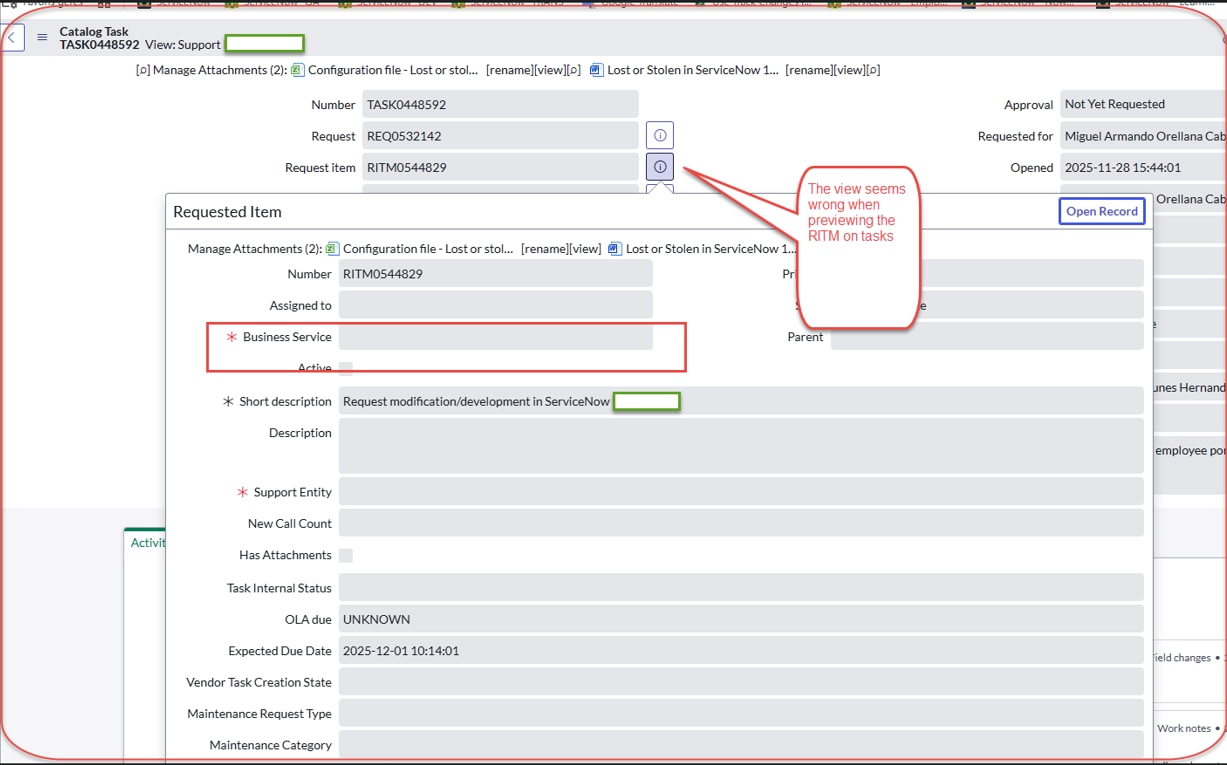
RITM form shows different fields when previewed from Task vs. opening directly

- Mark as New
- Bookmark
- Subscribe
- Mute
- Subscribe to RSS Feed
- Permalink
- Report Inappropriate Content
02-02-2026 09:08 PM
Hi everyone, I’m facing an issue where the Requested Item (RITM) form displays differently depending on how it is opened.
When I open the RITM directly, the form shows the correct fields and values.
But when I preview the RITM from a Catalog Task (using the reference icon or preview), the form shows a different view — missing fields, required fields not populated, and layout inconsistencies.
I’ve already checked the following:
View rules
UI Policies (including “Run on form load” and “Run on mobile”)
Client Scripts
Dictionary overrides
ACLs
Related lists and form layouts
Everything seems normal, but the preview still loads a different layout.
Has anyone seen this behavior before? What else should I check, and how can I ensure the Task preview uses the same view as the full RITM form?
Screenshots attached for reference.
Thanks in advance.
- Labels:
-
Request Management


- Mark as New
- Bookmark
- Subscribe
- Mute
- Subscribe to RSS Feed
- Permalink
- Report Inappropriate Content
02-02-2026 09:16 PM
when you preview it picks default form view of RITM and shows fields in that view
when you are opening normal RITM directly it's some other views
you can add your fields to default form view and they will start showing when you preview RITM
💡 If my response helped, please mark it as correct ✅ and close the thread 🔒— this helps future readers find the solution faster! 🙏
Ankur
✨ Certified Technical Architect || ✨ 10x ServiceNow MVP || ✨ ServiceNow Community Leader
- Mark as New
- Bookmark
- Subscribe
- Mute
- Subscribe to RSS Feed
- Permalink
- Report Inappropriate Content
02-02-2026 09:41 PM
Hi @Anupam1 ,
if the table has Sys_popup view configured it show the popup view when record is previewed


if not it shows the default view


Please mark my answer as helpful/correct if it resolves your query.
Regards,
Chaitanya