Using Procurement Module: How do you source an item based on options selected?

- Mark as New
- Bookmark
- Subscribe
- Mute
- Subscribe to RSS Feed
- Permalink
- Report Inappropriate Content
09-26-2017 02:34 PM
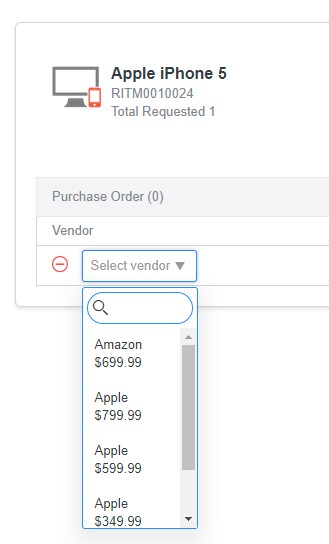
I'm using default OOB procurement right now, I'm trying to order and iPhone 5 using the demo data...which has the following options:
Option 1: gigs (64, 256)
Option 2: color (gold, black, white)
When you go to source the request, how do you source the proper one? There is no indication of what they want, nor which vendor option they should select?

- Mark as New
- Bookmark
- Subscribe
- Mute
- Subscribe to RSS Feed
- Permalink
- Report Inappropriate Content
08-27-2018 03:20 PM
Our client ended up making separate items in the catalog for each configuration...so instead of 1 item with 4 configurations, you had 4 items with 1 configuration. It worked for them as they only had a few items. Otherwise, my suggestion would be to build a new procurement module from the ground up and go away from the gui they have (or build your own ui page if you want).
- Mark as New
- Bookmark
- Subscribe
- Mute
- Subscribe to RSS Feed
- Permalink
- Report Inappropriate Content
08-28-2018 11:39 AM
... as I was brought on to move away from a lot of their customization 🙂 I figured that was going to be your response. Luckily they already have their items split out like that and were hoping to consolidate. I might just keep them separate to use the OOB hoping this is addressed in the future.
Thanks for your response!