Validating Related List Records in ATF

- Mark as New
- Bookmark
- Subscribe
- Mute
- Subscribe to RSS Feed
- Permalink
- Report Inappropriate Content
12-16-2024 02:37 AM
Hello Team,
We have an ATF requirement as follows:
- Create a new record and attach a file to that record.
- Run a scheduled job that imports data into other tables.
- Open the newly created record from step 1 and validate the related list records.
Steps 1 and 2 can be achieved in ATF. However, regarding step 3, if it is possible to do this in ATF, please let me know how it can be done.


- Mark as New
- Bookmark
- Subscribe
- Mute
- Subscribe to RSS Feed
- Permalink
- Report Inappropriate Content
12-16-2024 02:50 AM
you can try to add steps but let us know if stuck somewhere
Ankur
✨ Certified Technical Architect || ✨ 10x ServiceNow MVP || ✨ ServiceNow Community Leader


- Mark as New
- Bookmark
- Subscribe
- Mute
- Subscribe to RSS Feed
- Permalink
- Report Inappropriate Content
12-16-2024 04:25 AM
You can pass the sys_id as below:

Click on highlighted and select the step:

Similarly, if you are using save/submit.. pass that step in 'Open an Existing record'.
To check the visibility of related list, use the below step:

OR, open the related list table and search with the related record sys_id using 'record query' step.
Mark this as Helpful / Accept the Solution if this helps.
- Mark as New
- Bookmark
- Subscribe
- Mute
- Subscribe to RSS Feed
- Permalink
- Report Inappropriate Content
12-16-2024 08:04 AM
@SN_Learn & @Shaqeel & @Ankur Bawiskar
Thanks for your reply.
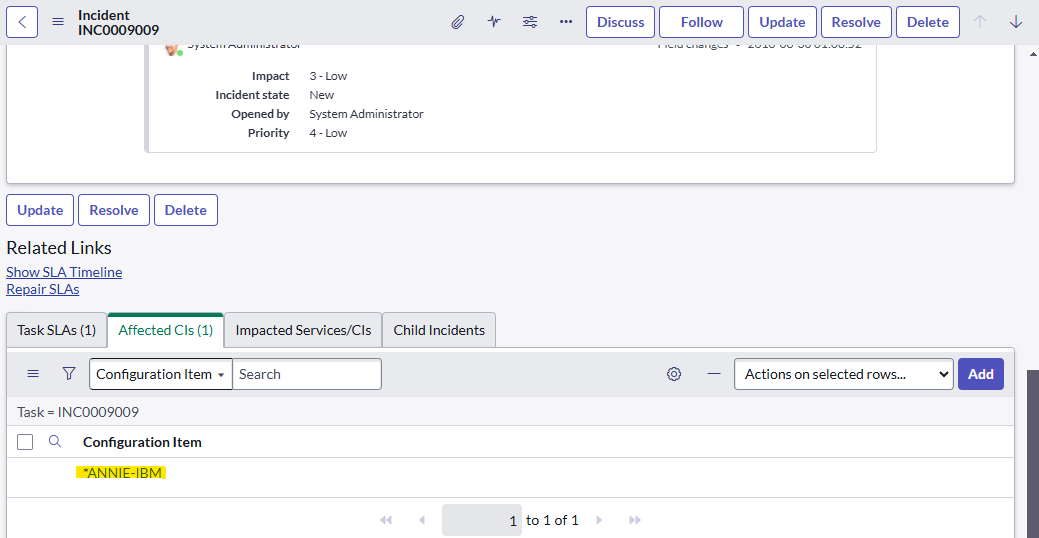
For attachment, like for example I want to validate the related list record '*ANNIE-IBM ' is this possible in ATF?

- Mark as New
- Bookmark
- Subscribe
- Mute
- Subscribe to RSS Feed
- Permalink
- Report Inappropriate Content
12-16-2024 08:27 AM
Yes It is very much possible.
You can validate as well as open this related record using steps under list and related list.
***********************************************************************************************************************
If my response proves useful, please indicate its helpfulness by selecting "Accept as Solution" and " Helpful." This action benefits both the community and me.
***********************************************************************************************************************
Regards
Shaqeel