
- Mark as New
- Bookmark
- Subscribe
- Mute
- Subscribe to RSS Feed
- Permalink
- Report Inappropriate Content
01-27-2022 01:16 AM
Need to create a client script to validate that date I enter there should not be more than 30 days from today, There is another field called Impact. Is user selects any impact than date should not be more than 7 days from today.
Solved! Go to Solution.
- Labels:
-
Service Catalog

- Mark as New
- Bookmark
- Subscribe
- Mute
- Subscribe to RSS Feed
- Permalink
- Report Inappropriate Content
01-27-2022 01:24 AM
Hi Sai,
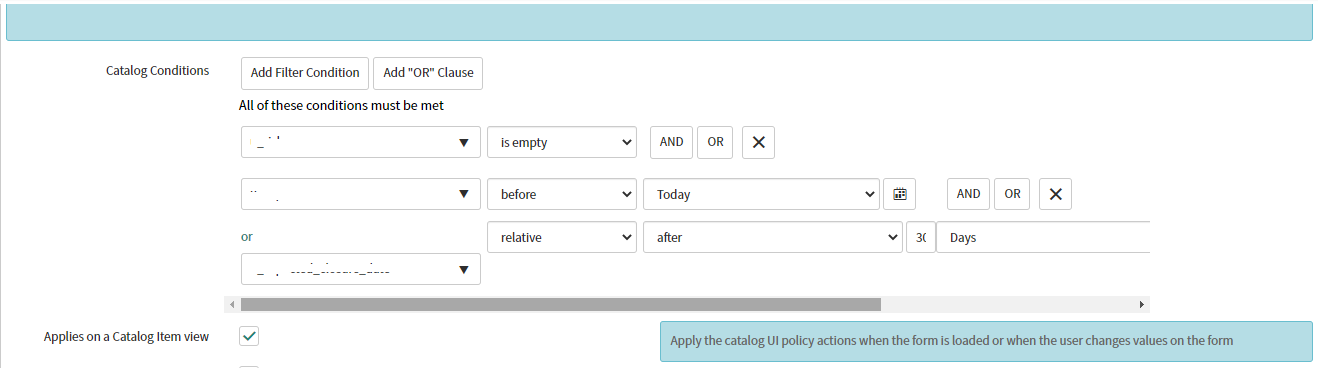
You can do this using 2 UI policies as well. No need of using client script.
UI Policy for Impact is empty
Condition 1: Impact is empty AND //you can remove this condition if not needed.
Condition 2: Date before Today OR // My guess is you dont need dates from the past
Condition 3: Date relative after 30 days from now
UI Policy for Impact is NOT empty
Condition 1: Impact is empty AND //you can remove this condition if not needed.
Condition 2: Date before Today OR
Condition 3: Date relative after 7 days from now
Add below script(In Script section select Run Script is True and add code in Execute if True) in both the policies to clear the date field value and to show error message.(if needed)
function onCondition() {

g_form.clearValue('date_field_name');
g_form.showErrorBox('date_field_name', 'Select a date from today upto the next 30 days', 'error');

return false;
}
Sample snapshot:

Regards,
Shubham


- Mark as New
- Bookmark
- Subscribe
- Mute
- Subscribe to RSS Feed
- Permalink
- Report Inappropriate Content
01-27-2022 01:19 AM
Hi there,
Have you considered using a (Catalog) UI Policy to achieve date validations? There's almost no-code needed to achieve date validations this way. Have a look at an article I wrote on this:
No Code date validations thru (Catalog) UI Policies
If my answer helped you in any way, please then mark it as helpful.
Kind regards,
Mark
2020, 2021 ServiceNow Community MVP
2020, 2021 ServiceNow Developer MVP
---

- Mark as New
- Bookmark
- Subscribe
- Mute
- Subscribe to RSS Feed
- Permalink
- Report Inappropriate Content
01-27-2022 01:21 AM
Ha you beat me to this one. I actually saw this on your blog!!
- Mark as New
- Bookmark
- Subscribe
- Mute
- Subscribe to RSS Feed
- Permalink
- Report Inappropriate Content
01-27-2022 01:21 AM



- Mark as New
- Bookmark
- Subscribe
- Mute
- Subscribe to RSS Feed
- Permalink
- Report Inappropriate Content
01-27-2022 01:24 AM
Hi Sai,
You can do this using 2 UI policies as well. No need of using client script.
UI Policy for Impact is empty
Condition 1: Impact is empty AND //you can remove this condition if not needed.
Condition 2: Date before Today OR // My guess is you dont need dates from the past
Condition 3: Date relative after 30 days from now
UI Policy for Impact is NOT empty
Condition 1: Impact is empty AND //you can remove this condition if not needed.
Condition 2: Date before Today OR
Condition 3: Date relative after 7 days from now
Add below script(In Script section select Run Script is True and add code in Execute if True) in both the policies to clear the date field value and to show error message.(if needed)
function onCondition() {

g_form.clearValue('date_field_name');
g_form.showErrorBox('date_field_name', 'Select a date from today upto the next 30 days', 'error');

return false;
}
Sample snapshot:
Regards,
Shubham
