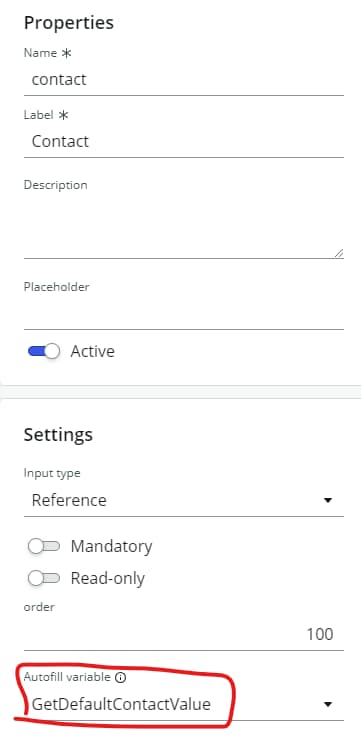
How to Autofill the reference field in Mobile?

- Mark as New
- Bookmark
- Subscribe
- Mute
- Subscribe to RSS Feed
- Permalink
- Report Inappropriate Content
06-09-2024 06:29 PM
Hi
I created a script to autofill the contact field with the user
System Definition > Script Includes
var GetDefaultContactValue = Class.create();
GetDefaultContactValue.prototype = {
    initialize: function() {},

    getDefaultValue: function() {
        var userId = gs.getUserID();
		var userName = gs.getUserDisplayName();
        return {
			"Value" : userId,
			"DisplayValue" : userName
		};
    },

    type: 'GetDefaultContactValue'
};
Executable scripts
new sn_csm_mobile.GetDefaultContactValue().getDefaultValue();
This will not be executed.
Please tell me what is wrong with this script
I referenced these articles
https://support.servicenow.com/kb?id=kb_article_view&sysparm_article=KB1166399

- Mark as New
- Bookmark
- Subscribe
- Mute
- Subscribe to RSS Feed
- Permalink
- Report Inappropriate Content
06-09-2024 09:33 PM
HI @AJ Styles
Can you please keep some logs and check whether script include is returning values are not?
Murthy
- Mark as New
- Bookmark
- Subscribe
- Mute
- Subscribe to RSS Feed
- Permalink
- Report Inappropriate Content
06-19-2024 02:30 PM
I'd like to add on to this to ask why we can't use the "User" variable type to fill in a field that is a reference to the user table? What does the "User" variable return if not a usable link to the logged in user?
- Mark as New
- Bookmark
- Subscribe
- Mute
- Subscribe to RSS Feed
- Permalink
- Report Inappropriate Content
03-18-2025 07:31 AM
Did you find the way autofill a reference input?
- Mark as New
- Bookmark
- Subscribe
- Mute
- Subscribe to RSS Feed
- Permalink
- Report Inappropriate Content
03-21-2025 09:53 PM
hello
What I wrote was the correct answer
Check the body and apply it
This should work fine