Restrict the other group members to assign tickets (both requests and incidents ) to specific group

- Mark as New
- Bookmark
- Subscribe
- Mute
- Subscribe to RSS Feed
- Permalink
- Report Inappropriate Content
10-29-2024 01:05 AM
Hi Team,
I have requirement to restrict the other group members to assign tickets (both sc tasks and incidents ) to specific group called "Capacity Mgmt "only group members of "Capacity Mgmt" will be able to assign tickets to "Capacity Mgmt".
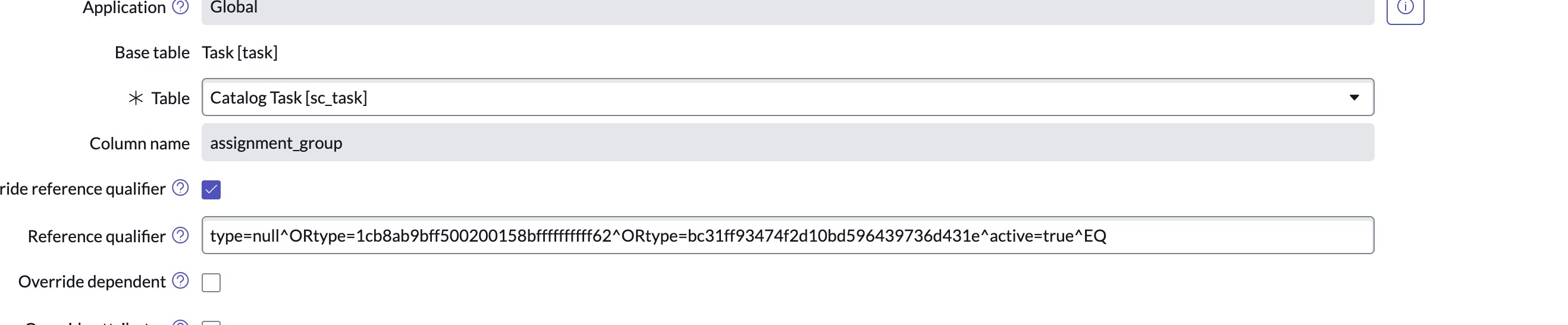
Basically i have tried reference qual on assignment group field of incident table but on assignment group field of sc_task table there is already one reference qualifier set so i am not able to add one more condition . so anyone could suggest some solution or best solution to achieve this requirement .
Thank in advance!!
- Mark as New
- Bookmark
- Subscribe
- Mute
- Subscribe to RSS Feed
- Permalink
- Report Inappropriate Content
12-07-2024 07:50 PM
To restrict members of other groups from assigning tickets (both requests and incidents) to a specific group in ServiceNow, you can use Access Control Rules (ACLs) and Business Rules.
Step 1: Identify the Target Group
- Determine the specific group that you want to restrict assignments to.
- Note its Group Name or Group Sys ID from the sys_user_group table.
Step 2: Create an ACL for the assignment_group Field
You can use an ACL to restrict access to modifying the assignment_group field for requests and incidents.
Navigate to ACLs:
Go to System Security > Access Control (ACL).
Create an ACL for Requests:
Click New to create a new ACL.
Configure the following:
- Type: Record
- Operation: write
- Table: sc_request (for requests)
- Field: assignment_group
- Add a condition in the script to check if the user is allowed to assign to the specific group:
(function executeRule() {
// Replace 'target_group_sys_id' with the actual Sys ID of the group
var restrictedGroup = 'target_group_sys_id';
if (current.assignment_group == restrictedGroup) {
return gs.getUser().isMemberOf(restrictedGroup);
}
return true; // Allow for all other groups
})();
Create an ACL for Incidents:
Repeat the above process, but for the incident table.
Step 3: Add a Business Rule for Additional Enforcement
An ACL restricts field-level access but doesn’t prevent assignments through APIs or scripts. To handle this, use a Business Rule.
- Navigate to Business Rules:
- Go to System Definition > Business Rules.
- Create a Business Rule for Requests:
- Click New to create a new Business Rule.
- Configure the following:
- Name: Restrict Assignment to Specific Group
- Table: sc_request
- When: Before
- Insert/Update: Check both
- Add the following script:
(function executeRule(current, previous /*null when async*/) {
// Replace 'target_group_sys_id' with the Sys ID of the restricted group
var restrictedGroup = 'target_group_sys_id';
if (current.assignment_group == restrictedGroup && !gs.getUser().isMemberOf(restrictedGroup)) {
gs.addErrorMessage('You are not authorized to assign tickets to this group.');
current.setAbortAction(true);
}
})(current, previous);
- Create a Business Rule for Incidents:
- Repeat the above process for the incident table.
Additional Notes
- Ensure that this restriction aligns with your organization's ITSM processes to avoid disruptions.
- You can customize the error message in the Business Rule to provide more clarity.