- Mark as New
- Bookmark
- Subscribe
- Mute
- Subscribe to RSS Feed
- Permalink
- Report Inappropriate Content
03-12-2026 03:30 AM
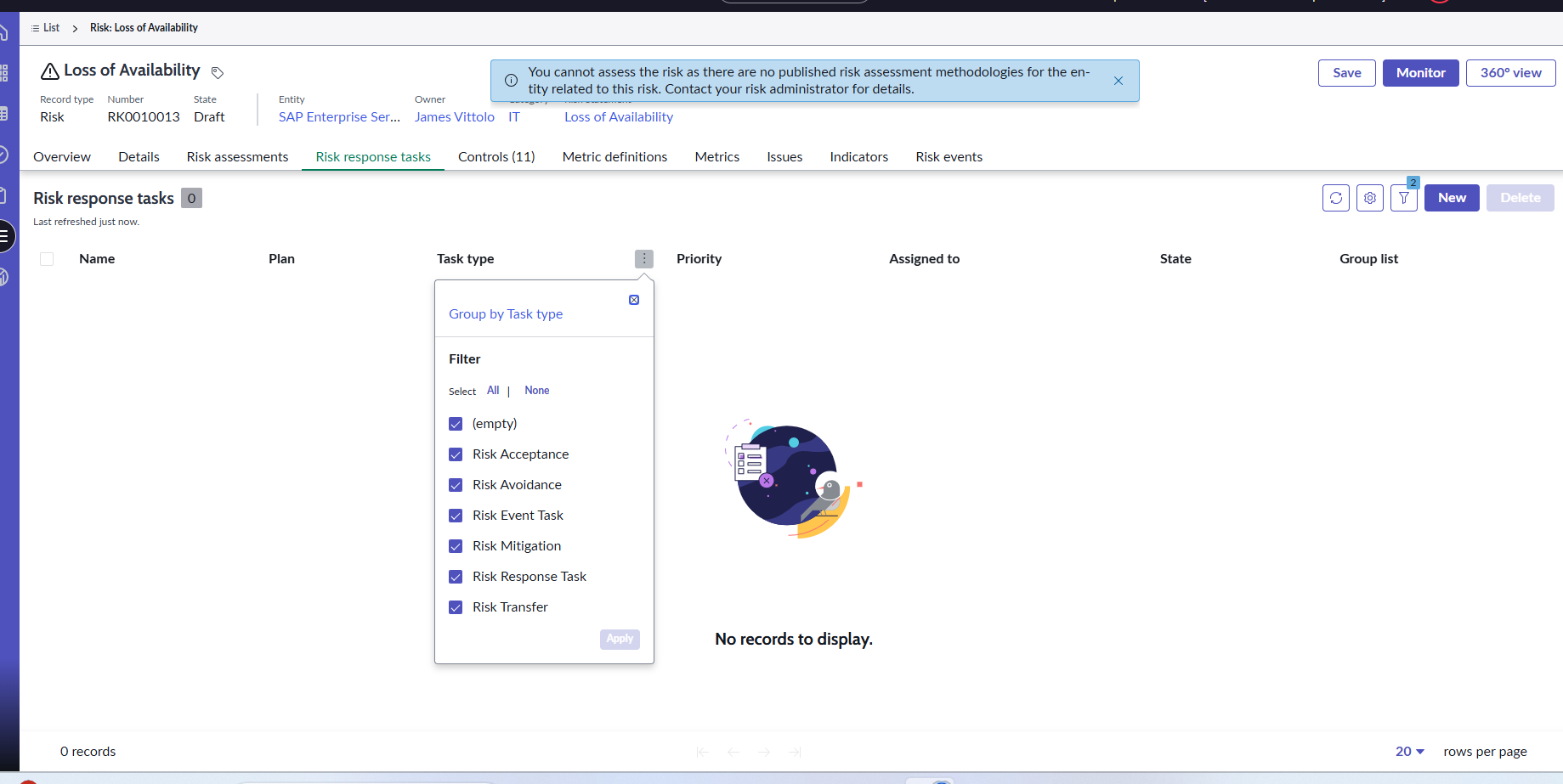
In Risk Workspace → Risk record → Related List → Risk Response Task:
I created a new button to create a Risk Response Task.
But the problem is:
When the task is created, it does not specify which task type to create.
In ServiceNow Integrated Risk Management, there are 4 types of Risk Response Tasks:
Accept
Mitigate
Transfer
Avoid
So I want the user to select the task type when creating the task.
If anyone want to know about this.
Solved! Go to Solution.

- Mark as New
- Bookmark
- Subscribe
- Mute
- Subscribe to RSS Feed
- Permalink
- Report Inappropriate Content
03-12-2026 10:26 PM
Hello @rinathombar ,
I tried your requirnment for that i have created script include(client callable) , ui action with client side code its working.
Workspace client side code :

function onClick(g_form) {

    g_modal.showFields({
        title: "Create Risk Response Task",
        fields: [
            {
                type: 'choice',
                name: 'task_type',
                label: 'Task Type',
                choices: [
                    {displayValue: 'Mitigation', value: 'mitigation'},
                    {displayValue: 'Avoidance', value: 'avoidance'},
                    {displayValue: 'Acceptance', value: 'acceptance'},
                    {displayValue: 'Transfer', value: 'transfer'},
                ],
                mandatory: true
            }
        ]
    }).then(function(fieldValues) {

     var value = fieldValues.updatedFields[0].value;
// g_form.addErrorMessage(value);

        var ga = new GlideAjax('CreateRiskResponseTask');
        ga.addParam('sysparm_name', 'createTask');
        ga.addParam('sysparm_risk', g_form.getUniqueValue());
        ga.addParam('sysparm_type', value);

        ga.getXMLAnswer(function(response) {

            if (response) {
                g_form.addInfoMessage("Risk Response Task Created");
            } else {
                g_form.addErrorMessage("Task creation failed");
            }

        });

    });

}
Script include (client callable):

var CreateRiskResponseTask = Class.create();
CreateRiskResponseTask.prototype = Object.extendsObject(AbstractAjaxProcessor, {
 createTask: function() {

        var riskId = this.getParameter('sysparm_risk');
        var type = this.getParameter('sysparm_type');

        var tableName = '';

        if(type == 'mitigation'){
            tableName = 'sn_risk_mitigation_task';
        }
        else if(type == 'acceptance'){
            tableName = 'sn_risk_acceptance_task';
        }
        else if(type == 'avoidance'){
            tableName = 'sn_risk_avoidance_task';
        }
        else if(type == 'transfer'){
            tableName = 'sn_risk_transfer_task';
        }

        var task = new GlideRecord(tableName);
        task.initialize();

        task.short_description = "Risk Response Task - " + type;
        task.risk = riskId;
        task.assigned_to = gs.getUserID();

        return task.insert();

    },
    type: 'CreateRiskResponseTask'
});


You can also change code as per your requirnment.
If this helps you then mark it as helpful and accept as solution.
Regards,
Aditya,
Technical Consultant
- Mark as New
- Bookmark
- Subscribe
- Mute
- Subscribe to RSS Feed
- Permalink
- Report Inappropriate Content
03-12-2026 10:26 PM
Hello @rinathombar ,
I tried your requirnment for that i have created script include(client callable) , ui action with client side code its working.
Workspace client side code :
function onClick(g_form) {

    g_modal.showFields({
        title: "Create Risk Response Task",
        fields: [
            {
                type: 'choice',
                name: 'task_type',
                label: 'Task Type',
                choices: [
                    {displayValue: 'Mitigation', value: 'mitigation'},
                    {displayValue: 'Avoidance', value: 'avoidance'},
                    {displayValue: 'Acceptance', value: 'acceptance'},
                    {displayValue: 'Transfer', value: 'transfer'},
                ],
                mandatory: true
            }
        ]
    }).then(function(fieldValues) {

     var value = fieldValues.updatedFields[0].value;
// g_form.addErrorMessage(value);

        var ga = new GlideAjax('CreateRiskResponseTask');
        ga.addParam('sysparm_name', 'createTask');
        ga.addParam('sysparm_risk', g_form.getUniqueValue());
        ga.addParam('sysparm_type', value);

        ga.getXMLAnswer(function(response) {

            if (response) {
                g_form.addInfoMessage("Risk Response Task Created");
            } else {
                g_form.addErrorMessage("Task creation failed");
            }

        });

    });

}
Script include (client callable):
var CreateRiskResponseTask = Class.create();
CreateRiskResponseTask.prototype = Object.extendsObject(AbstractAjaxProcessor, {
 createTask: function() {

        var riskId = this.getParameter('sysparm_risk');
        var type = this.getParameter('sysparm_type');

        var tableName = '';

        if(type == 'mitigation'){
            tableName = 'sn_risk_mitigation_task';
        }
        else if(type == 'acceptance'){
            tableName = 'sn_risk_acceptance_task';
        }
        else if(type == 'avoidance'){
            tableName = 'sn_risk_avoidance_task';
        }
        else if(type == 'transfer'){
            tableName = 'sn_risk_transfer_task';
        }

        var task = new GlideRecord(tableName);
        task.initialize();

        task.short_description = "Risk Response Task - " + type;
        task.risk = riskId;
        task.assigned_to = gs.getUserID();

        return task.insert();

    },
    type: 'CreateRiskResponseTask'
});
You can also change code as per your requirnment.
If this helps you then mark it as helpful and accept as solution.
Regards,
Aditya,
Technical Consultant
- Mark as New
- Bookmark
- Subscribe
- Mute
- Subscribe to RSS Feed
- Permalink
- Report Inappropriate Content
03-12-2026 11:31 PM
Hello
thank you aditya but as per user requirement is same when risk assessment after risk response populate create task option so need same in workspace view
if you know tell me where is risk workspace we can get this configuration
Regards
Rina
- Mark as New
- Bookmark
- Subscribe
- Mute
- Subscribe to RSS Feed
- Permalink
- Report Inappropriate Content
03-13-2026 12:07 AM
Hello @rinathombar ,
I thought you want custom ui action for this .
But in servicenow when you select response it automatically create response task , there we dont get any new button. Auto task creation functionality is also works in workspace.


- Mark as New
- Bookmark
- Subscribe
- Mute
- Subscribe to RSS Feed
- Permalink
- Report Inappropriate Content
03-13-2026 12:29 AM
Hello
can you give me number i have configured as per your but when click any one not gerenate task
thank you