- Mark as New
- Bookmark
- Subscribe
- Mute
- Subscribe to RSS Feed
- Permalink
- Report Inappropriate Content
10-18-2023 04:59 AM
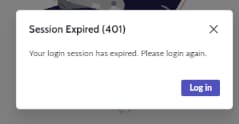
Since we moved to PolarisUI , our user base is getting frustrated by the new security time-out popup [PFA-1]
Is anyone aware of how to prevent this pop-up window from showing? We still need to maintain the same security timeout property we've always had in place , we just want to avoid this pop-up .
Solved! Go to Solution.
- Mark as New
- Bookmark
- Subscribe
- Mute
- Subscribe to RSS Feed
- Permalink
- Report Inappropriate Content
10-23-2023 11:22 AM
This is the fix that resolved this for me:
create a system property "glide.amb.session.timeout.multisso_custom" set to 'false'

- Mark as New
- Bookmark
- Subscribe
- Mute
- Subscribe to RSS Feed
- Permalink
- Report Inappropriate Content
10-18-2023 05:08 AM
Hi @Community Alums
You can increase the session timeout, which is stored in glide.ui.session_timeout system property, alternatively look into SN support article:
https://support.servicenow.com/kb?id=kb_article_view&sysparm_article=KB1117200
Aman Kumar
- Mark as New
- Bookmark
- Subscribe
- Mute
- Subscribe to RSS Feed
- Permalink
- Report Inappropriate Content
10-18-2023 09:56 AM
Hi Aman,
As mentioned in OP, we still need to maintain the same security timeout property.


- Mark as New
- Bookmark
- Subscribe
- Mute
- Subscribe to RSS Feed
- Permalink
- Report Inappropriate Content
10-18-2023 05:49 AM
I don't think this can be changed, but I'm also curious why you'd want to change this behavior. It just makes it more obvious to the user their session is expired so they don't continue filling out a form or making changes to a record only to be redirected to the login screen when they try to save.
- Mark as New
- Bookmark
- Subscribe
- Mute
- Subscribe to RSS Feed
- Permalink
- Report Inappropriate Content
10-18-2023 09:58 AM
I have similar thoughts , and there's a reason why the expression "The End-User is always right" does NOT exist --- they were used to UI16 where this pop-up did not occur, so we're trying to emulate that in PolarisUI. You know how people hate change...