How do I create a report to only show Users with more than one asset assigned to them

- Mark as New
- Bookmark
- Subscribe
- Mute
- Subscribe to RSS Feed
- Permalink
- Report Inappropriate Content
03-01-2018 11:22 AM
How do I create a report to only show Users with more than one asset assigned to them
- Labels:
-
Reporting


- Mark as New
- Bookmark
- Subscribe
- Mute
- Subscribe to RSS Feed
- Permalink
- Report Inappropriate Content
03-01-2018 12:48 PM
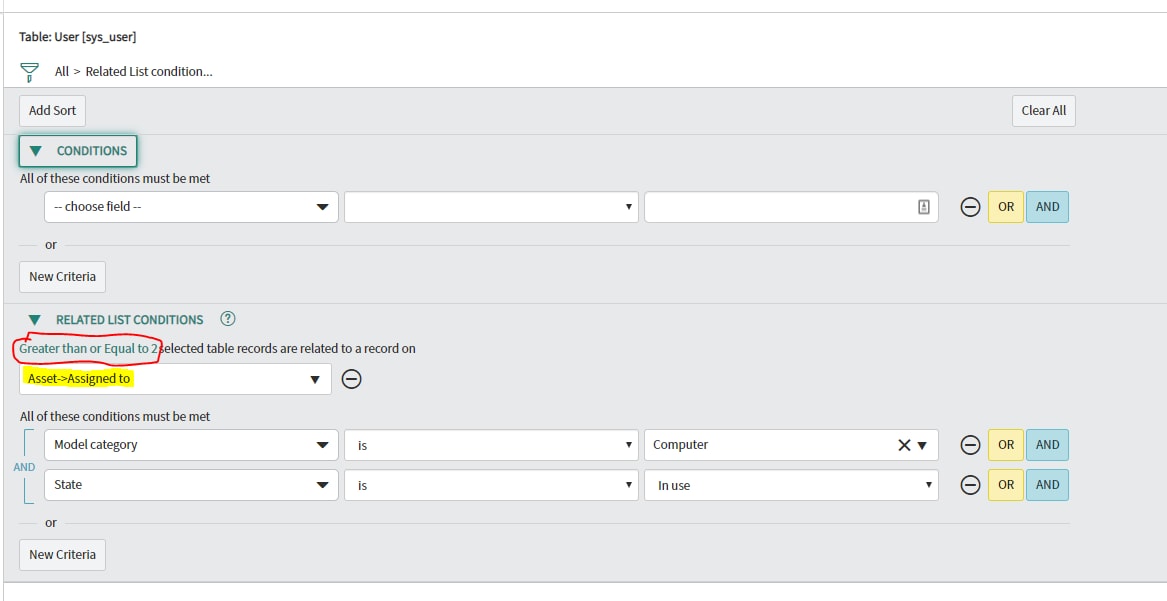
This should be very straightforward using Related List Conditions.
- Mark as New
- Bookmark
- Subscribe
- Mute
- Subscribe to RSS Feed
- Permalink
- Report Inappropriate Content
03-01-2018 01:11 PM


- Mark as New
- Bookmark
- Subscribe
- Mute
- Subscribe to RSS Feed
- Permalink
- Report Inappropriate Content
06-07-2019 01:59 AM
Hi Anthony,
Just found this thread as I was looking for the similar solution whereby I wanted to find users assigned multiple computers and I have managed to get my report working as per Adam's suggestion to use Related lists
To get it to work your source table is actually Users [sys-user] and under related list conditions select Asset -> Assigned to and change the Greater than or Equal to to 2
Hope this helps
Ray


- Mark as New
- Bookmark
- Subscribe
- Mute
- Subscribe to RSS Feed
- Permalink
- Report Inappropriate Content
02-08-2021 06:33 AM
Thanks for your help, nice solution. Instead of writing a script, we can leverage this solution.