- Mark as New
- Bookmark
- Subscribe
- Mute
- Subscribe to RSS Feed
- Permalink
- Report Inappropriate Content
09-26-2018 08:31 AM
I am exploring the advanced conditions for email notifications. The documentation states the following:
The advanced condition script uses the following business rule global variables:
- current: contains the current record from the table to which the notification is linked.
- event: contains the event that triggered the notification
current I understand, I tried to find examples that use the event variable but I was not successful. If someone could provide a few examples, that would help me greatly!
Ric
Solved! Go to Solution.

- Mark as New
- Bookmark
- Subscribe
- Mute
- Subscribe to RSS Feed
- Permalink
- Report Inappropriate Content
09-26-2018 09:30 AM
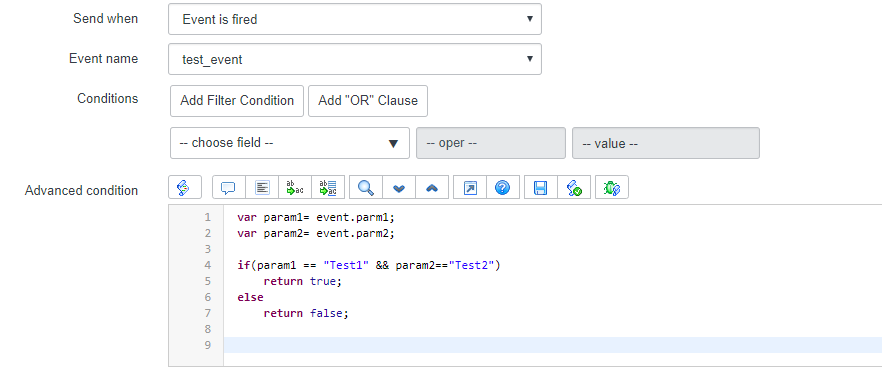
gs.eventQueue('test_event',current,"Test1","Test2"); //eventQueue(name: string, record: GlideRecord, parm1: string, parm2: string, queue: string)Below is an example of how you can use the event global variable in your advanced condition script

Copy/Paste
var param1= event.parm1;
var param2= event.parm2;

if(param1 == "Test1" && param2=="Test2")
	return true;
else
	return false;
- Mark as New
- Bookmark
- Subscribe
- Mute
- Subscribe to RSS Feed
- Permalink
- Report Inappropriate Content
09-26-2018 09:30 AM
gs.eventQueue('test_event',current,"Test1","Test2"); //eventQueue(name: string, record: GlideRecord, parm1: string, parm2: string, queue: string)Below is an example of how you can use the event global variable in your advanced condition script
Copy/Paste
var param1= event.parm1;
var param2= event.parm2;

if(param1 == "Test1" && param2=="Test2")
	return true;
else
	return false;
- Mark as New
- Bookmark
- Subscribe
- Mute
- Subscribe to RSS Feed
- Permalink
- Report Inappropriate Content
09-27-2018 12:50 PM
Thank you Aman! That answers my question perfectly.
Ric
- Mark as New
- Bookmark
- Subscribe
- Mute
- Subscribe to RSS Feed
- Permalink
- Report Inappropriate Content
12-18-2024 07:51 AM
The previous variable is also available in the advanced condition script.