- Mark as New
- Bookmark
- Subscribe
- Mute
- Subscribe to RSS Feed
- Permalink
- Report Inappropriate Content
07-29-2019 05:12 AM
Hi All
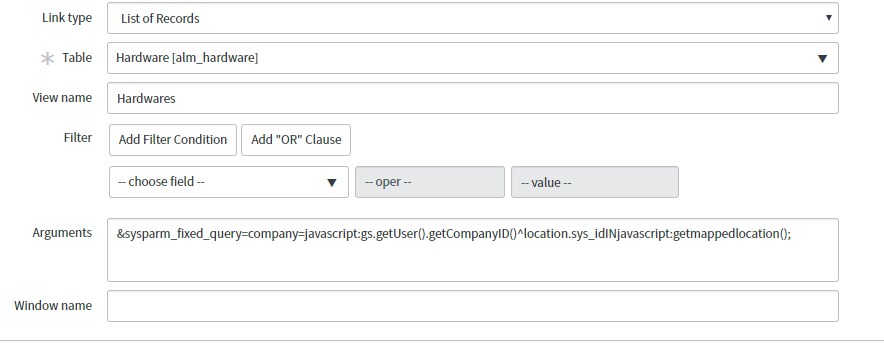
I am trying to call script include from Module arguments but it does not get called.
Is there anyother way to call script include from arguments


Solved! Go to Solution.

- Mark as New
- Bookmark
- Subscribe
- Mute
- Subscribe to RSS Feed
- Permalink
- Report Inappropriate Content
07-29-2019 07:16 AM
just confirming here,
script include has created in scoped application ?
if yes then add scope before the script include
example:
&sysparm_fixed_query=company=javascript:gs.getUser().getCompanyID()^location.sys_idINjavascript:new <scope>.getmappedlocation().getmappedlocation();

- Mark as New
- Bookmark
- Subscribe
- Mute
- Subscribe to RSS Feed
- Permalink
- Report Inappropriate Content
07-29-2019 05:14 AM
You need to add "new" in front of your script include call. So "new getmappedlocation();"
Please mark this as correct/helpful if it resolved your issue!
- Mark as New
- Bookmark
- Subscribe
- Mute
- Subscribe to RSS Feed
- Permalink
- Report Inappropriate Content
07-29-2019 05:17 AM
You mean like below
&sysparm_fixed_query=company=javascript:gs.getUser().getCompanyID()^location.sys_idINjavascript:new getmappedlocation();
I tried with this as well, but it does not get called.
- Mark as New
- Bookmark
- Subscribe
- Mute
- Subscribe to RSS Feed
- Permalink
- Report Inappropriate Content
07-29-2019 05:27 AM
Hello Ronak,
try with this code:
&sysparm_fixed_query=company=javascript:gs.getUser().getCompanyID()^location.sys_idINjavascript:new getmappedlocation().getmappedlocation();
May be you need to change a function name. can you try changing a function name from script include. Sometimes it may cause a issue
Please mark as Correct Answer/Helpful, if applicable.
Thanks!
Abhishek Gardade
Abhishek Gardade
- Mark as New
- Bookmark
- Subscribe
- Mute
- Subscribe to RSS Feed
- Permalink
- Report Inappropriate Content
07-29-2019 06:50 AM
No luck. Even after creating new script include call does not go to script include.