- Post History
- Subscribe to RSS Feed
- Mark as New
- Mark as Read
- Bookmark
- Subscribe
- Printer Friendly Page
- Report Inappropriate Content
01-18-2021 05:20 AM - edited 01-31-2025 09:08 AM
How to add user to group / Add & Remove Users from Groups
| Image | Description |
 |
>> All |

|
|

|
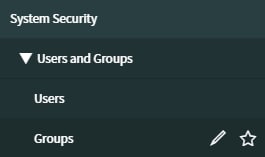
01. Navigate to >> System Security > Users and Groups > Groups |
 |
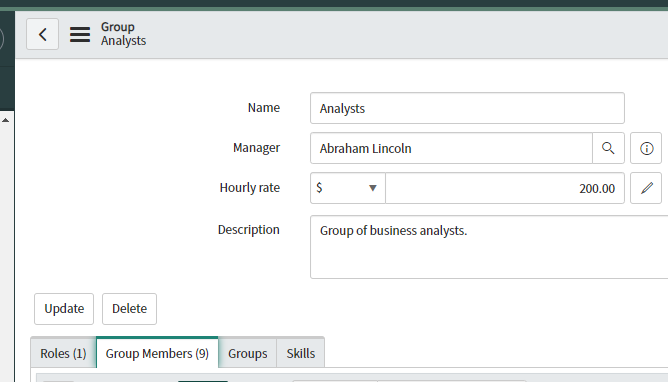
02.Search by and select your group |
 |
03. Select "Group Member" TAB |
 |
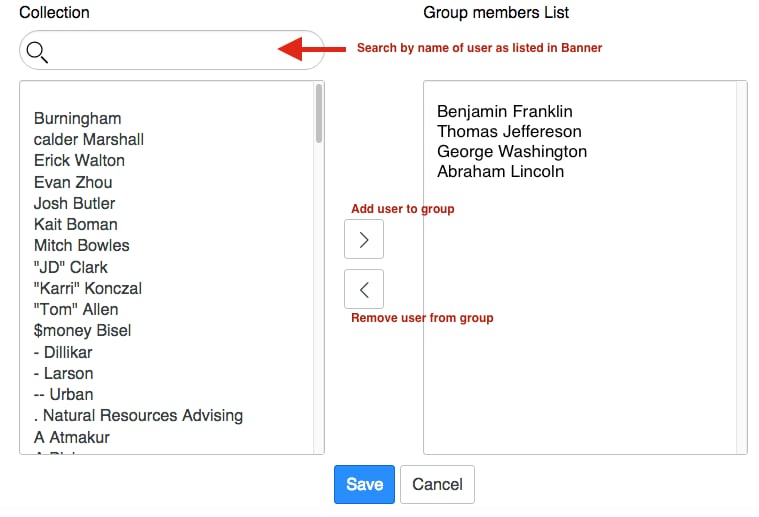
04. Click Edit |
 |
05.
Then either:
Then either:
|
 |
06. Click Save |

-
Roles, not groups: ServiceNow uses roles to define permissions and access levels. Key administrative roles include:
- admin: This role grants the highest level of privilege, essentially full access to the system.
- security_admin: Focuses on security-related configurations and user/group management.
- Other specialized admin roles: There are roles for specific admin functions (e.g., network admin, ITOM admin)
-
Users are assigned roles: Administrators are typically users who have been assigned one or more of these administrative roles.
-
Groups can help, but aren't the core: Groups in ServiceNow are more for organization and assignment of tasks/records. You could create a group called "Administrators" and add users with admin roles to it. However, this group itself doesn't automatically grant admin rights.
- BEST PRACTICE
- Create User
- Create Group
- Placed the user(s) into the group
- Assign roles to the group
- .

- Script summary
- Create a group
- Create a user
- ServiceNow Seven Best Practices for User and Group Management: A Guide for Platform Administrators.

- Mark as Read
- Mark as New
- Bookmark
- Permalink
- Report Inappropriate Content
Where do I find System Security?
- Mark as Read
- Mark as New
- Bookmark
- Permalink
- Report Inappropriate Content
@markdexter
That's a broad question. To best assist you, could you please provide more details about what you're looking for?
I understand. When you say "System Security," are you referring to the security settings that administrators use?