- Post History
- Subscribe to RSS Feed
- Mark as New
- Mark as Read
- Bookmark
- Subscribe
- Printer Friendly Page
- Report Inappropriate Content
on 07-26-2015 12:16 PM
Recently I got a request to configure Approval reminder emails to be sent to the Approvers as they are very busy, and sometimes the process of deciding if they can approve or reject a step takes a while. They wanted to make sure that the approvals didn't get forgotten.we now sending out an individualized notification to any business users who may have approvals that are still pending for Service Requests.
What You Need:
To replicate this process you need to create a workflow on Approval (sysapproval_approver) Table, create an event and a notification which will be triggered by the worflow.
Create Your Event
- Go to System Policy | Events | Registry.
- Click New to create a new Event.

Create Your Workflow:
- Go to Workflow | Workflow Editor
- Click New to create a new Worklow.

Workflow Activities:

a) Use Timer Activity to Enter the number of days the workflow should wait to trigger the event.(Example 2 days)

b) Use the If activity with conditions: "Source Table is sc_req_item" and "State is Requested"

c) Use the Create Event activity with Event name as the one created in the first step and Pass "current.approver.email" in Parm1 and "current.approver.getDisplayValue()" in Parm2.
Note: Connect the Yes of the If activity to the Create Event activity.

d) Connect back the "Create event" to the "Timer" activity.
Publish the Workflow.
Create Your Notification.
Create a event based notification with the event as the one we created in the first step and used the appropriate content.
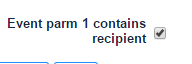
Note: Check the "Event parm 1 contains recipient" to send notification email to the email id of the approver.

- 39,096 Views

- Mark as Read
- Mark as New
- Bookmark
- Permalink
- Report Inappropriate Content
Great Article, I have one issue, I have made one UI action for on demand approval mail reminder and on clicking it triggers an event and event triggers an email notification to all the approvals in requested state. Now, In notification, I want to give the option to approve/reject the approval, but since the Reference message will get changed in reminder mail, it is not updating the record. Any suggestions??
- Mark as Read
- Mark as New
- Bookmark
- Permalink
- Report Inappropriate Content
This works out great! I used the template "request.itil.approve.role" for the notification to provide the approvers with a URL to approve or deny the request.
One isse I ran into was that I use the Activity called "Create Event with GR" and I should have used "Create Event" which was the OOB component.
Thanks for the great example!
- Mark as Read
- Mark as New
- Bookmark
- Permalink
- Report Inappropriate Content
Hi there
I'm having a couple of difficulties executing this which I needs a little bit of help on. It makes sense in the large part but I've two sticky patches:
Firstly, the create event in the workflow. I'm being asked to enter scripts rather than just the strings which are on the screen shots. Is what I've done here right?

Secondly, the event notification. I can't find a way in which to create this as per the instructions. Any help here? When I click on the notifications part of the event, it doesn't give me any way in which to tie it back to the workflow.
I'm running Istanbul.
Thanks
Your friendly Yorkshireman.

- Mark as Read
- Mark as New
- Bookmark
- Permalink
- Report Inappropriate Content
You need to enter it like this:

- Mark as Read
- Mark as New
- Bookmark
- Permalink
- Report Inappropriate Content
Hi All,
Can somebody guide me on creating notification for this purpose?
Regards,
Jitendra Singh
- Mark as Read
- Mark as New
- Bookmark
- Permalink
- Report Inappropriate Content
Do you have a specific question? Please don't forget to mark as helpful or correct answer. 🙂
You need to create a workflow:


- Mark as Read
- Mark as New
- Bookmark
- Permalink
- Report Inappropriate Content
Hi,
I follow all these above steps but reminder notification is not working. Not sure where and what is missing. Can somebody guide me how I can diagnose the issue?


- Mark as Read
- Mark as New
- Bookmark
- Permalink
- Report Inappropriate Content
Can you show the event log for this event and make a screen copy?
- Mark as Read
- Mark as New
- Bookmark
- Permalink
- Report Inappropriate Content
Keep in mind that now email will be created when you send it to yourself.
- Mark as Read
- Mark as New
- Bookmark
- Permalink
- Report Inappropriate Content
Here it is

- Mark as Read
- Mark as New
- Bookmark
- Permalink
- Report Inappropriate Content
Not sending to myself. Creator and Approver is diffenrent.
- Mark as Read
- Mark as New
- Bookmark
- Permalink
- Report Inappropriate Content
Is this the copy from the event log? The parameter 1 and 2 should contain a name or an email address.
My business rule to create the event is:

- Mark as Read
- Mark as New
- Bookmark
- Permalink
- Report Inappropriate Content
Is this a copy of the event log. Parameter 1 and Paramter 2 must contain a name or an email address. Go into the event and enter a valid email address into Parm1 and the user name into Parm2 and reprocess the event. Check what happens. The vaule you have provided will not create an email.
- Mark as Read
- Mark as New
- Bookmark
- Permalink
- Report Inappropriate Content
If you don't mind show me the detail screen of the event.
It should look like this:

- Mark as Read
- Mark as New
- Bookmark
- Permalink
- Report Inappropriate Content
My is like this

- Mark as Read
- Mark as New
- Bookmark
- Permalink
- Report Inappropriate Content
Where I need to apply this business rule?
- Mark as Read
- Mark as New
- Bookmark
- Permalink
- Report Inappropriate Content
You don't need the business rule. my mistake. Actually, lets focus on the event creation and show me a copy of the detail screen of the event log. I do believe it has something to do how you create the event in the workflow.
I believe you put the parameter in single quotes. No "' ' ".
The event creation should look like this

- Mark as Read
- Mark as New
- Bookmark
- Permalink
- Report Inappropriate Content
Here it is

- Mark as Read
- Mark as New
- Bookmark
- Permalink
- Report Inappropriate Content
The " is wrong.
this is how it should look:
return (current.approver.email);
and
return (current.approver.getDisplayValue());
Don't forget to mark this as correct answer
- Mark as Read
- Mark as New
- Bookmark
- Permalink
- Report Inappropriate Content
Is it working?
- Mark as Read
- Mark as New
- Bookmark
- Permalink
- Report Inappropriate Content
Hi Armin,
This is working now. you are great, thank you so much for helping me!
I need one more help. Can you share email script for message body for proper format.
Jitendra Singh
- Mark as Read
- Mark as New
- Bookmark
- Permalink
- Report Inappropriate Content
Jitendra,
Just don't forget to mark the actual answer as correct and helpful.
I use the standard OOB template.

- Mark as Read
- Mark as New
- Bookmark
- Permalink
- Report Inappropriate Content
Jitendra,
Please mark the answer as correct and helpful if I was able to help you.
Armin
- Mark as Read
- Mark as New
- Bookmark
- Permalink
- Report Inappropriate Content
Hi Armin,
I have marked it helpful but not getting option to mark correct. May be because I have used old thread.
- Mark as Read
- Mark as New
- Bookmark
- Permalink
- Report Inappropriate Content
Look for the article
How To Mark Answers Correct From Community Inbox
Armin
- Mark as Read
- Mark as New
- Bookmark
- Permalink
- Report Inappropriate Content
Saved me SO much time.
Thank you!!!!!
- Mark as Read
- Mark as New
- Bookmark
- Permalink
- Report Inappropriate Content
Great article arpitt
I'm struggling with creating the email template, using Helsinki. Perhaps someone can assist arminheinlein
Thanks
Mark
- Mark as Read
- Mark as New
- Bookmark
- Permalink
- Report Inappropriate Content
What is your struggle?
- Mark as Read
- Mark as New
- Bookmark
- Permalink
- Report Inappropriate Content
I don't appear to have the same options. I was wonder if you could walk me through setting up the email template as per the instructions above.
In particular the "When to send" and "Who will receive" menus.
Mark

- Mark as Read
- Mark as New
- Bookmark
- Permalink
- Report Inappropriate Content
Edward,
Sorry for the late reply. You have to switch into advanced mode on the notification.


- Mark as Read
- Mark as New
- Bookmark
- Permalink
- Report Inappropriate Content
I believe with updates to ServiceNow platform and workflow data fabric below would be the approach.
If you want to achieve it using group approval, you can consider leveraging SLAs on sysapproval_group table

If you want to achieve at a single RITM level then you can use a flow that triggers on RITM record.
If you want to apply this email reminder on RITM approvals in general then go with flow with trigger as schedule and table and query sysapproval_approver records then write notification logic accordingly. Only downside of flow + schedule is it wont take holiday calendar into consideration, which is available using SLAs.