- Mark as New
- Bookmark
- Subscribe
- Mute
- Subscribe to RSS Feed
- Permalink
- Report Inappropriate Content
03-25-2020 10:24 AM
I've spent hours and hours looking at post after post and developer site after developer site, and Glidesystem calls galore...
I have a client script in my catalog that will take the due_date value, add x number of days, then return that date/time value in to a variable in my form via an AJAX call to a script include.
Obviously, the due_date is an OOTB field, and displays nicely in my Timezone.
The issue: the server is returning the date/time in GMT.
I've tried all the usual suspects
gs.getSession().getTimeZone()
setTZ()
addDaysLocalTime()
getDisplayValue()
KEEP IN MIND: this is a DATE and TIME field. Not just date, and not just time.
My Script Include (called RemovalDate)
    addDays: function() {

        var eDate = this.getParameter('sysparm_start');
        var addDays = this.getParameter('sysparm_days');
        var gdt = new GlideDateTime(eDate);
        gdt.addDaysLocalTime(addDays);

        return gdt.getDisplayValue();
    },
My Client Script
function onChange(control, oldValue, newValue, isLoading) {

    if (isLoading || newValue == '') {
        return;
    }
    var cdt = g_form.getValue('due_date');
    alert(cdt);
    var ga = new GlideAjax('RemovalDate');
    ga.addParam('sysparm_name', 'addDays');
    ga.addParam('sysparm_start', cdt);
    ga.addParam('sysparm_days', '1');
    ga.getXML(parseResponse);
}

function parseResponse(response) {
    var answer = response.responseXML.documentElement.getAttribute("answer");
    alert(answer);
    g_form.setValue('past_date', answer);
}
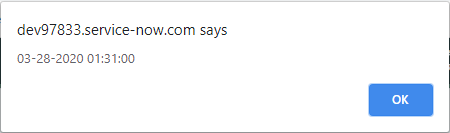
Here is the due date on the record

Here is the value it's returning to validate yes, it's sending that due date to the script

here is what is returning from the server when it adds 1 day

It's populating that exact date/time in the variable

That's true, if i were in GMT. I'm in MST and that's what my profile is set to, as per the due_date
Thoughts?
Solved! Go to Solution.
- Labels:
-
Service Catalog
- Mark as New
- Bookmark
- Subscribe
- Mute
- Subscribe to RSS Feed
- Permalink
- Report Inappropriate Content
03-27-2020 08:37 AM
I Pray to everything holy that anyone having this issue sees this post. After countless hours of work, i finally got it working.
So here is my client script (obviously mine is on change of a variable. Your's can be whatever)
function onChange(control, oldValue, newValue, isLoading) {

    if (isLoading || newValue == '') {
        return;
    }
    var cdt = g_form.getValue('due_date');
	alert(cdt);
    var ga = new GlideAjax('RemovalDate');
    ga.addParam('sysparm_name', 'addDays');
    ga.addParam('sysparm_start', cdt);
    ga.addParam('sysparm_days', '-5'); // I actually want to subtract days from an existing field.
    ga.getXML(parseResponse);
}

function parseResponse(response) {
    var answer = response.responseXML.documentElement.getAttribute("answer");
    alert(answer);
    g_form.setValue('past_date', answer);
}
Here is my Script Include
var RemovalDate = Class.create();
RemovalDate.prototype = Object.extendsObject(AbstractAjaxProcessor, {

    addDays: function() {
        var eDate = this.getParameter('sysparm_start');
        var dta = this.getParameter('sysparm_days');

        // Get Time Offset
        var gdtLocal = new GlideDateTime();
        gdtLocal.getLocalTime(); // get the users local time (per their time zone setting)
        var offset = gdtLocal.getTZOffset(); //this, for example would = 6 for an MST User

        //get Date/Time
        var gdt = new GlideDateTime(eDate);
        gdt.addDays(dta); // add (or subtract if a - number) from eDate
        gdt.add(-+offset);//subtract the offset
        return gdt.getDisplayValue(); //return the date in the user format
    },
    type: 'RemovalDate'
});- Mark as New
- Bookmark
- Subscribe
- Mute
- Subscribe to RSS Feed
- Permalink
- Report Inappropriate Content
10-18-2021 01:20 PM
Thanks to this thread - I was finally able to figure out a very similar issue I had with converting GMT to CST. I had a similar solution with a script includes but I was going a route that involved the TimeZone being a Javascript package that didn't seem to work. This offset did the trick. I also spent an ungodly amount of hours on this before this resolution. 😉