File upload capability in AI Agent Studio during chat interactions

- Mark as New
- Bookmark
- Subscribe
- Mute
- Subscribe to RSS Feed
- Permalink
- Report Inappropriate Content
06-29-2026 04:51 AM
Hello Team,
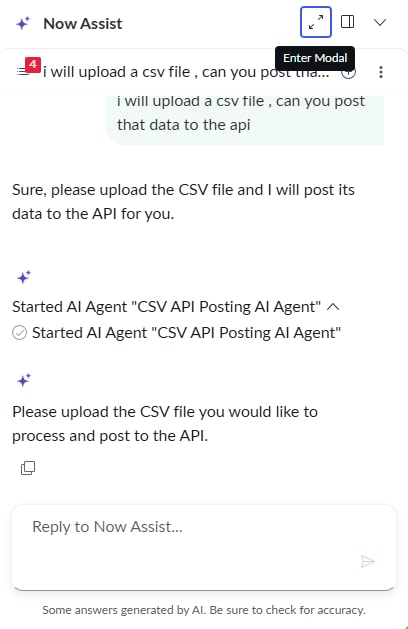
I am currently working on developing a ServiceNow AI Agent and have encountered a limitation related to file uploads.
At the moment, there is no option available for users to attach files directly within the AI Agent chat. My requirement is to allow users to upload documents during the conversation so that the agent can process them later (for example, for data extraction or validation).
This functionality is available in Virtual Agent; however, the attachment option is no longer visible once the AI Agent is triggered.
Could you please confirm whether file uploads are supported in AI Agent during chat interactions? If not, kindly suggest any possible workarounds.
Thank you

- Mark as New
- Bookmark
- Subscribe
- Mute
- Subscribe to RSS Feed
- Permalink
- Report Inappropriate Content
06-29-2026 09:51 PM
Hi @nagapradeep ,
1. Navigate to "Assistant Designer"
2. Click on Edit "Now Assist Panel - Platform (default)"
3. Open settings tab
4. In Additional chat features - > You can see a check box called "Document uploads"
Please refer to below screenshot.

- Mark as New
- Bookmark
- Subscribe
- Mute
- Subscribe to RSS Feed
- Permalink
- Report Inappropriate Content
06-30-2026 12:34 AM


The ‘Allow document upload’ option is already enabled in my settings. However, when I trigger an Agentic workflow through the Now Assist panel, I am unable to upload documents, and the attachment (paperclip) icon is also not visible.
- Mark as New
- Bookmark
- Subscribe
- Mute
- Subscribe to RSS Feed
- Permalink
- Report Inappropriate Content
4 weeks ago
Hi @nagapradeep,
I'm bumping into the same issue and I just found this article: Attachment option disappears after invoking AI Agent in Virtual Agent - Support and Troubleshooting I've created a separate case to make sure that this issue can't be fixed due to creation of a topic and assign it as a tool in the AI Agent. Do you have any update from your side so far?
- Mark as New
- Bookmark
- Subscribe
- Mute
- Subscribe to RSS Feed
- Permalink
- Report Inappropriate Content
3 weeks ago
Hi @nagapradeep ,
I've found a solution and that is to copy the OOB "Add attachment to the ticket" flow and update it specifically for the conversation. You can find this flow in [your_instance].service-now.com/now/conversational-studio/builder > Asset library > topics.
Change the input variable from ticket_number to conversation_id and update the script in the "Get record details" block. My query looks like this:
    var gr = new GlideRecordSecure("sys_cs_conversation");
    gr.addQuery("sys_id", vaInputs.conversation_id);
    gr.query();
Tell the agent to execute this tool, for example: "You MUST ask the user if they want to upload an attachment by executing the (Tool: Add attachment to the conversation) and use the current conversation id retrieved from the (Tool: Get Conversation ID) and use this value as input for conversation_id in (Tool: Add attachment to the conversation) as the final step!"
In my custom e.g. " Create Incident" flow action I've created a step to retrieve the attachment uploaded and attached to the conversation task. Here I copy the exact attachment to the incident that will be created via the AI Agent in Virtual Agent
I hope this will help you out as well!