Hide Create Status Report button in Project Workspace

- Mark as New
- Bookmark
- Subscribe
- Mute
- Subscribe to RSS Feed
- Permalink
- Report Inappropriate Content
12-11-2025 11:04 AM
I want to hide the status report button on project workspace but, i am not able to do that.
Hi All,
Any help will appreciate on this. I want to to hide the "Create Status Report" button in project workspace.
Here are the steps to go there
1. Open Project workspace
2. Open any Project
3. Go to Status Report menu by clicking on left panel
4. Then there is a "Create Status Report: button.
5. I want to hide that.
Please help on this. Thanks in advance !!
- Mark as New
- Bookmark
- Subscribe
- Mute
- Subscribe to RSS Feed
- Permalink
- Report Inappropriate Content
12-12-2025 06:28 AM
Hope that can help:
Navigate to System UI > Related Lists and find the related list for pm_project_status on the pm_project table.
In the Related List record, find the List Control field and remove or modify the "Create Status Report" entry, or set the related list to Read Only by checking the appropriate checkbox.
Alternatively, if it's controlled by List Layout, edit the list layout for pm_project_status and remove the new button action from the list header configuration.

- Mark as New
- Bookmark
- Subscribe
- Mute
- Subscribe to RSS Feed
- Permalink
- Report Inappropriate Content
12-12-2025 07:00 AM
@MaxMixali you wrote:

can you please show me in your PDI how to use or where to find "pm_project_status"? :)))
✂-----Cutting-out-the---✦AI-noise✦---All-replies-written-and-vouched-for-by-GlideFather---

- Mark as New
- Bookmark
- Subscribe
- Mute
- Subscribe to RSS Feed
- Permalink
- Report Inappropriate Content
12-12-2025 08:14 AM
Hi @ashutoshmis ,
I checked a lot for your issue, you can try to hide that central part so the button will remove with that and if no data is there you can add one stylized text that "Data is not available". Click on the "Template Center viewport" and in style set as diplay:none;

See below image

Please mark my answer correct and helpful if this works for you
Thanks and Regards,
Sarthak


- Mark as New
- Bookmark
- Subscribe
- Mute
- Subscribe to RSS Feed
- Permalink
- Report Inappropriate Content
12-15-2025 07:20 PM
could you please share the final outcome if this was able to hide that button?
Ankur
✨ Certified Technical Architect || ✨ 10x ServiceNow MVP || ✨ ServiceNow Community Leader
- Mark as New
- Bookmark
- Subscribe
- Mute
- Subscribe to RSS Feed
- Permalink
- Report Inappropriate Content
12-15-2025 07:12 AM
Hi @sarty, Thanks for your reply.
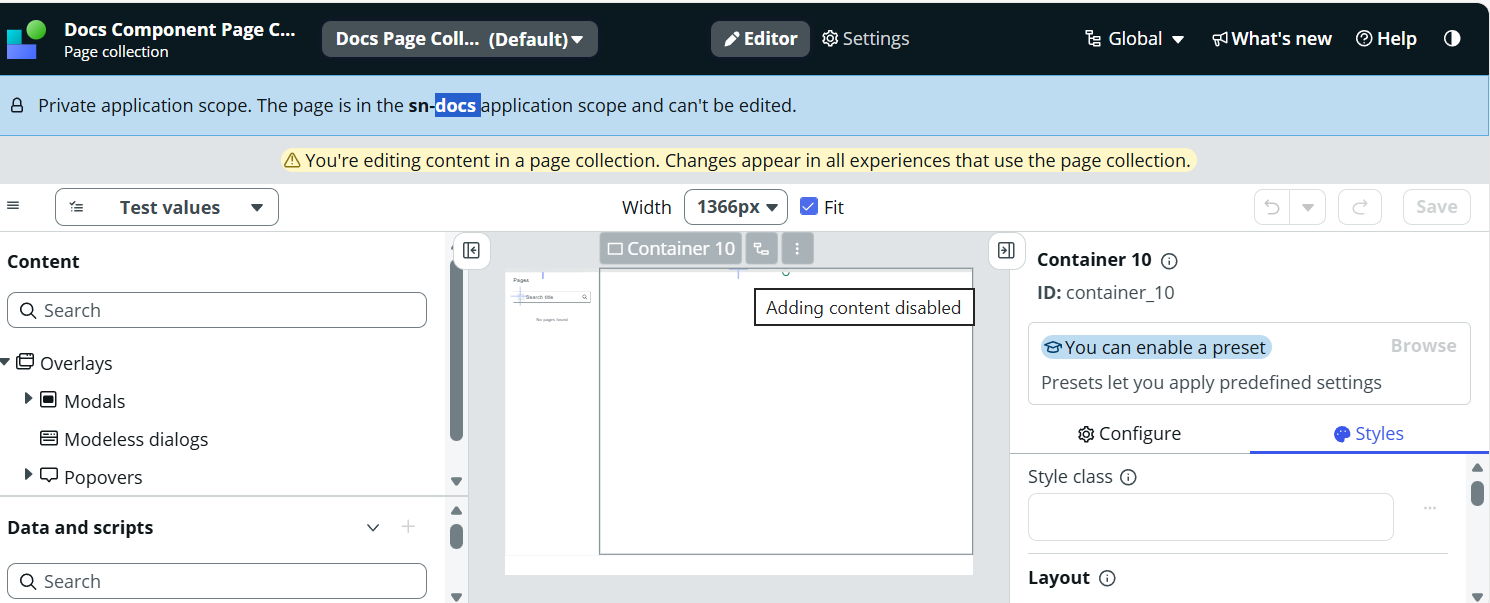
However, I am not able to edit the "Component Page Collection" page as it is inside a restricted scope and if i am trying to change the scope also i am not finding it inside my Instance.
Attaching the screenshot.
Could you please help in this ?