
- Mark as New
- Bookmark
- Subscribe
- Mute
- Subscribe to RSS Feed
- Permalink
- Report Inappropriate Content
05-30-2019 10:35 AM
In Projects, there is a Project Tasks related list. That related list shows Top level tasks associated with that project. Here's an example:

In this example, I created two sub-tasks underneath that parent task. There is no indicator anywhere here that would suggest to the user that this task has child tasks, and this screen doesn't display subs in a collapse/expand list view.
How do I provide a visual indicator to my users that there are sub tasks? Is there a "Number of Children" type of field somewhere? Or a way to have this list view display in a hierarchical collapse/expand list view?
Solved! Go to Solution.
- Labels:
-
Project Portfolio Management

- Mark as New
- Bookmark
- Subscribe
- Mute
- Subscribe to RSS Feed
- Permalink
- Report Inappropriate Content
05-30-2019 10:45 AM
Hi,
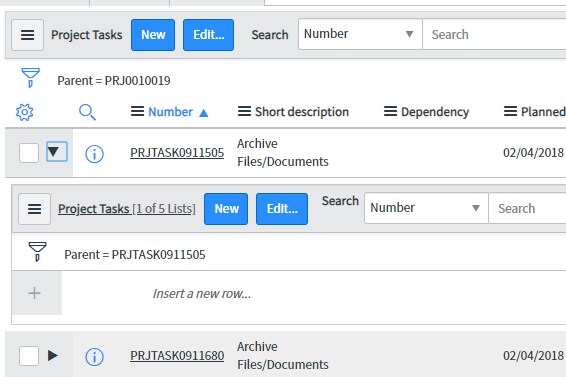
You can show this by enabling the hierarchical lists . Go to list control by right clicking on project task header and enable it.


Once you enable, you could see all sub tasks of project tasks within the Parent project itself.

- Mark as New
- Bookmark
- Subscribe
- Mute
- Subscribe to RSS Feed
- Permalink
- Report Inappropriate Content
05-30-2019 10:45 AM




- Mark as New
- Bookmark
- Subscribe
- Mute
- Subscribe to RSS Feed
- Permalink
- Report Inappropriate Content
05-30-2019 10:46 AM
You can add the Project task as an embedded list from the form layout, which will be easily visible to the users.
Other option is to write a onDisplay business rule to query Child project task and then display using gs.addInfoMessage() to display the number active task on this project
- Mark as New
- Bookmark
- Subscribe
- Mute
- Subscribe to RSS Feed
- Permalink
- Report Inappropriate Content
05-30-2019 10:48 AM
Ignore this response. I didn't read your question properly. Alikutty's answer should help
- Mark as New
- Bookmark
- Subscribe
- Mute
- Subscribe to RSS Feed
- Permalink
- Report Inappropriate Content
05-30-2019 11:14 AM
THanks guys!
