Moving a sub project between master projects

- Mark as New
- Bookmark
- Subscribe
- Mute
- Subscribe to RSS Feed
- Permalink
- Report Inappropriate Content
2 weeks ago
I have a sub project that has been liked to a master project. I would like to move this sub project to a different master project. How can I do this ?
Thanks
John


- Mark as New
- Bookmark
- Subscribe
- Mute
- Subscribe to RSS Feed
- Permalink
- Report Inappropriate Content
2 weeks ago
On the Project record there is a Sub Projects related list. View the current master project, then in the Project Workspace on the Sub Projects list you would check the box next to the record then click the Remove Sub Project button. In the native UI click the Edit... button to remove the sub project. Then when viewing what you want to be the new master project, click the Add Sub Project or Edit... button to select the project that will become the sub project.
- Mark as New
- Bookmark
- Subscribe
- Mute
- Subscribe to RSS Feed
- Permalink
- Report Inappropriate Content
2 weeks ago
Brad,
Thank you for your response.
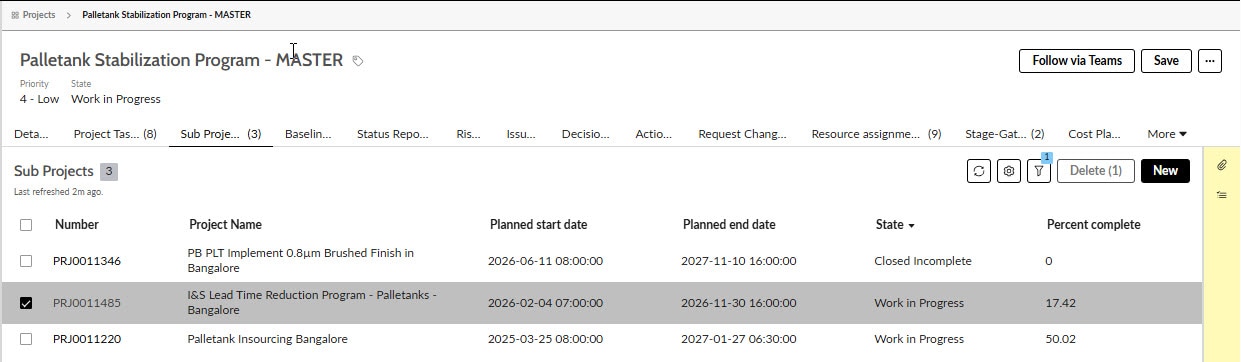
I have navigated to the sub project list and checked the box next to the sub project I want to unlink. I cannot see a "Remove Sub Project" button as you describe. The only button that becomes active when I select the sub project is the "Delete" button as shown in the attached screen shot. Are you able to help me navigate further ?
Thanks,
John
- Mark as New
- Bookmark
- Subscribe
- Mute
- Subscribe to RSS Feed
- Permalink
- Report Inappropriate Content
2 weeks ago
Are you an admin or PPS Admin? This might be a difference between platform releases or Project Workspace or some other plugin version. Try viewing the project in the native UI via the Projects module in the All menu to use the Edit... UI Action instead of this newer declarative action.
- Mark as New
- Bookmark
- Subscribe
- Mute
- Subscribe to RSS Feed
- Permalink
- Report Inappropriate Content
2 weeks ago
Thank you. I have had an admin colleague carry out the actions as I did not have access. Access rights to the action buttons are being reviewed.
