- Mark as New
- Bookmark
- Subscribe
- Mute
- Subscribe to RSS Feed
- Permalink
- Report Inappropriate Content
01-13-2026 08:11 AM
Hi,
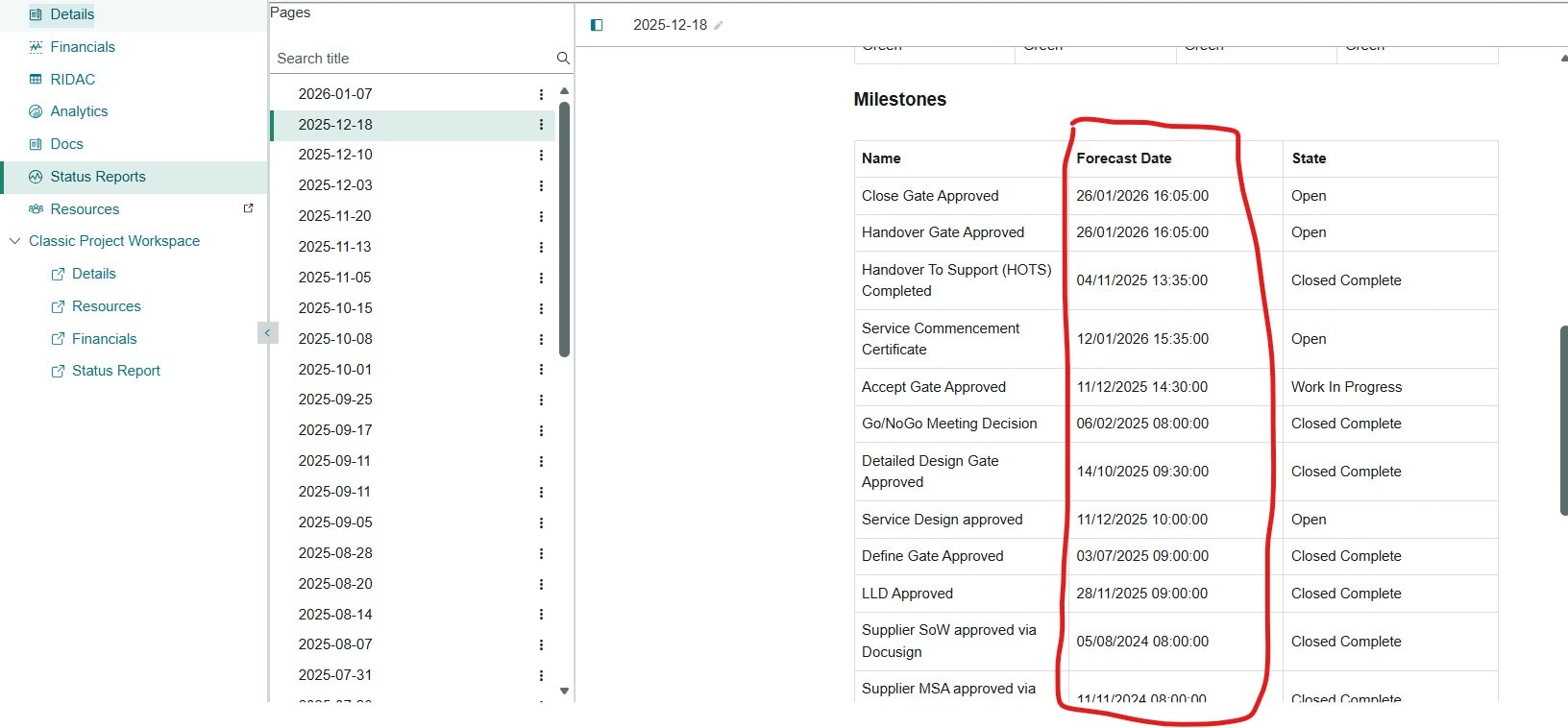
I have created a new status report template using the docs functionality. One thing I have noticed is that the milestones are not sort by date. Is this possible?
Thanks
Steve
Solved! Go to Solution.

- Mark as New
- Bookmark
- Subscribe
- Mute
- Subscribe to RSS Feed
- Permalink
- Report Inappropriate Content
01-13-2026 01:59 PM
Hi Buddy,
As of the latest ServiceNow releases its expected by design. In Docs based Status reports, the Milestones section cannot be sorted by Forecast Date or any other date field. The order is driven by how the data is returned internally usually creation or sequence order and there is no configurration in the template or Docs editor to change that.
For most teams I have seen who need milestones in true chronological order they rely on the OOTB Milestones block alone.
Instead, they usually do like one of the following:
Embed a report in the status report that is explicitly sorted by Forecast date. Reports respect sorting and give you consistent, predictable ordering.
Replace the Milestones block with a custom section that pulls milestone data via a report or list view, so engineers always see the timeline in date order.
Use the Docs status report for high-level narrative and decisions, and direct engineers to Project workspace / milestone lists for accurate, date sorted tracking.
Basically:
This is not a configuration gap; its a current product limitation
For engineering use cases, a report based worlkaround is the most practical and maintainable option
@Woody77 - Please mark Accepted Solution and Thumbs Up if you found Helpful 🙂
- Mark as New
- Bookmark
- Subscribe
- Mute
- Subscribe to RSS Feed
- Permalink
- Report Inappropriate Content
01-13-2026 01:59 PM
Hi Buddy,
As of the latest ServiceNow releases its expected by design. In Docs based Status reports, the Milestones section cannot be sorted by Forecast Date or any other date field. The order is driven by how the data is returned internally usually creation or sequence order and there is no configurration in the template or Docs editor to change that.
For most teams I have seen who need milestones in true chronological order they rely on the OOTB Milestones block alone.
Instead, they usually do like one of the following:
Embed a report in the status report that is explicitly sorted by Forecast date. Reports respect sorting and give you consistent, predictable ordering.
Replace the Milestones block with a custom section that pulls milestone data via a report or list view, so engineers always see the timeline in date order.
Use the Docs status report for high-level narrative and decisions, and direct engineers to Project workspace / milestone lists for accurate, date sorted tracking.
Basically:
This is not a configuration gap; its a current product limitation
For engineering use cases, a report based worlkaround is the most practical and maintainable option
@Woody77 - Please mark Accepted Solution and Thumbs Up if you found Helpful 🙂