- Mark as New
- Bookmark
- Subscribe
- Mute
- Subscribe to RSS Feed
- Permalink
- Report Inappropriate Content
05-28-2026 08:58 AM
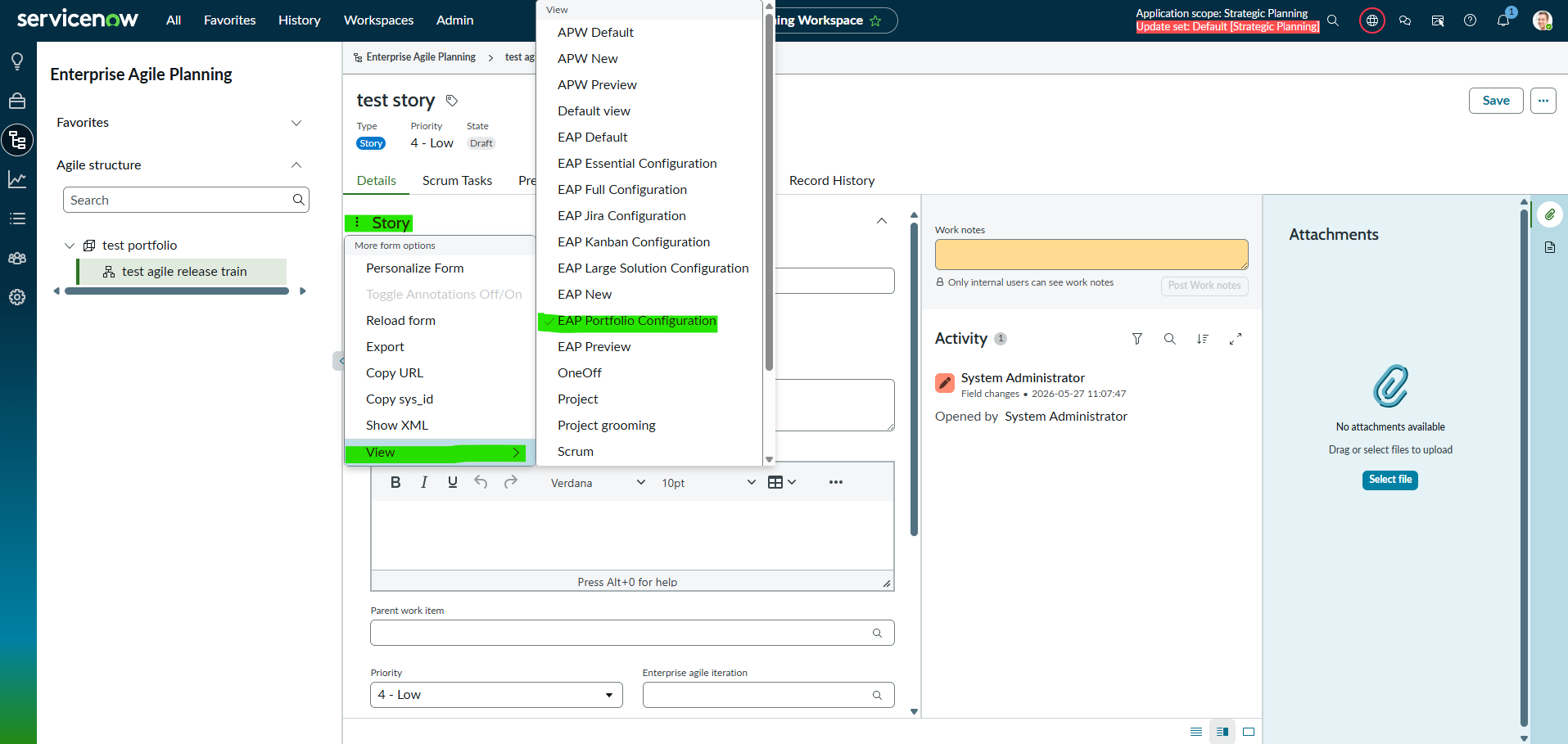
In Strategic Planning Workspace, we are unable to change the view from the Full Details for any record (Epic, Feature, Story). It is stuck on the view for "EAP Portfolio Configuration." We tested this in a PDI and it has the exact same behavior.
The steps to recreate the issue are list below:
1. From Strategic Planning Workspace, select a any record (e.g., Epic, Feature, or Story) and select the option for Full Details in the lower left corner of the pop over panel.
2. Select the menu from the three dots on the left side of the record type.
3. Select View from the menu list.
4. Try to select any of the other views and it will continue to keep the view for "EAP Portfolio Configuration."
Has anyone else run into this issue? And have you found a solution that allows a different view to be selected?
Solved! Go to Solution.
- Mark as New
- Bookmark
- Subscribe
- Mute
- Subscribe to RSS Feed
- Permalink
- Report Inappropriate Content
07-01-2026 11:15 AM
We received instructions from the HI Ticket to force the custom view for the EAP configuration and wanted to share it with the Community:
Ensure this view is selected as the "Work item view" field in the EAP Configuration record.
1. Go to the 'sn_apw_advanced_eap_configuration' table list view.
2. Open your EAP configuration For example : Full Configuration.
3. Add the 'Work item view' (workitem_view) column to the form if it's not present, and update it to the desired view.
I hope this solution is helpful to others.

- Mark as New
- Bookmark
- Subscribe
- Mute
- Subscribe to RSS Feed
- Permalink
- Report Inappropriate Content
05-28-2026 09:16 AM
Hi @juliebailey
Refer this article and validate: KB1276673 How to resolve Workspace form view rule not applying
Also check this post , if helps: How to configure Lists in strategic planner workspace (fka Alignment planner workspace)?
Regards
Tanushree Maiti
ServiceNow Technical Architect
LinkedIn: https://www.linkedin.com/in/tanushreemaiti
- Mark as New
- Bookmark
- Subscribe
- Mute
- Subscribe to RSS Feed
- Permalink
- Report Inappropriate Content
05-28-2026 09:23 AM
Same experience in the new Demand menu and it's records, cannot change the view manually
- Mark as New
- Bookmark
- Subscribe
- Mute
- Subscribe to RSS Feed
- Permalink
- Report Inappropriate Content
06-18-2026 10:59 AM
I received a response from the HI Ticket that we created for this issue and it sounds like the option to change the view from the menu described in my original post has been removed as of the Australia release. We are looking into an option that will force a custom view for all forms (e.g., Epic, Feature, and Story) in Strategic Planning Workspace. Does anyone have experience with setting a custom view in Strategic Planning Workspace.
- Mark as New
- Bookmark
- Subscribe
- Mute
- Subscribe to RSS Feed
- Permalink
- Report Inappropriate Content
07-01-2026 11:15 AM
We received instructions from the HI Ticket to force the custom view for the EAP configuration and wanted to share it with the Community:
Ensure this view is selected as the "Work item view" field in the EAP Configuration record.
1. Go to the 'sn_apw_advanced_eap_configuration' table list view.
2. Open your EAP configuration For example : Full Configuration.
3. Add the 'Work item view' (workitem_view) column to the form if it's not present, and update it to the desired view.
I hope this solution is helpful to others.