Understanding Demand Management in ServiceNow SPM: End-to-End Process and Field Guide

- Mark as New
- Bookmark
- Subscribe
- Mute
- Subscribe to RSS Feed
- Permalink
- Report Inappropriate Content
05-18-2026 06:36 AM
Understanding Demand Management in ServiceNow SPM: End-to-End Process and Field Guide
Demand Management in ServiceNow Strategic Portfolio Management (SPM) helps organizations capture, evaluate, prioritize, and approve business requests before converting them into executable work items such as Projects, Epics, Changes, or Defects.
This article provides a beginner-friendly overview of:
the Demand lifecycle,
demand creation methods,
important fields and sections,
financial concepts,
and how a Demand fits into the overall planning process.
Demand Process Flow
The Demand lifecycle typically progresses through the following states:
State Description
| Draft | Demand is created and initial details are filled by the Demand Submitter (it_demand_user) and Collaborators. |
| Submitted | Demand Manager submits the demand for evaluation. |
| Screening | Assessments are triggered and sent to stakeholders for scoring and evaluation. |
| Qualified | Demand has been evaluated and is ready for prioritization in the Demand Workbench. |
| Approved | Leadership approves the demand and a work item (Project/Epic/etc.) can be created from it. |
| Deferred | Demand is temporarily put on hold or postponed. |
| Completed | Demand lifecycle is finished and formally closed. |
Ways to Create a Demand
Demands can be created through multiple entry points:
Left Navigation / Application Navigator
Demand Workbench
CONNECT IT Portal
Idea Module (Idea → Demand conversion flow)
Before Creating a Demand
Before submitting a demand, review the following key considerations.
1. Decide the Demand Category
Choose whether the demand is:
Strategic
Operational
Strategic Demands
Used for:
planned initiatives,
transformation efforts,
long-term improvements.
Additional financial planning fields become available for Strategic demands, especially when Type is:
Project
Epic
Examples:
ROI%
Financial Benefits
Benefit Plans
Operational Demands
Used for:
day-to-day support,
operational work,
maintenance activities.
Operational demands typically do not include advanced strategic financial planning fields.
2. Define the Purpose Clearly
Prepare:
a meaningful title,
a detailed description,
and the business justification.
Clearly explain:
what needs to be done,
why it is required,
and expected business value.
3. Estimate Timeline
If possible, identify:
expected start date,
target completion date.
4. Gather Supporting Information
Include:
business impact,
risks,
assumptions,
dependencies,
expected benefits.
This helps approvers and stakeholders evaluate the demand effectively.
How a Demand Fits into the Overall Process
A Demand acts as the intake and governance layer before execution begins.
Depending on the selected type, a Demand can later convert into:
Project
Epic
Change
Defect
Other work items
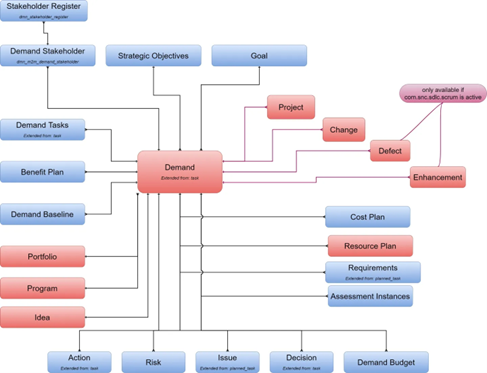
Demands also integrate with:
portfolios,
programs,
financial planning,
resource planning,
strategic objectives.
Demand Submission (Draft Stage)
The Draft state is the initial phase of the Demand lifecycle.
In this phase:
the demand is created,
information is refined,
collaborators contribute details before formal submission.
Who Can Create a Demand?
Demand Users
Demand Managers
Collaborators
Collaborators can:
edit the demand,
contribute information,
add work notes.
Demands created by you or where you are added as Collaborator are accessible from:
All > Demands > My Demands
Demand Fields Overview
Number
Auto-generated unique identifier for the demand.
Name
Title of the demand.
Description
Detailed explanation of the demand.
Category
Determines whether the demand is:
Strategic
Operational
Strategic
Used for:
long-term initiatives,
transformation,
improvements.
Operational
Used for:
support work,
maintenance,
day-to-day operational activities.
Type
Available values depend on selected Category.
Strategic Types
Enhancement
Project
Epic
Story
No Conversion
Operational Types
Change
Defect
No Conversion
No Conversion
Use this option when:
the demand is intended for governance/funding purposes,
but should not directly convert into a single execution work item.
Example:
funding a large initiative containing multiple projects or programs.
Date Fields
Start Date
Estimated planned start date of the demand.
Can be updated during planning.
Editable until approval.
Due Date
Estimated target completion date.
Used for:
planning,
stakeholder communication,
timeline estimation.
Approved Start Date
Formally approved execution start date.
Set after stakeholder approval.
Represents committed timeline.
Highlighted in red if different from Start Date.
Copied to Project Approved Start Date during conversion.
Approved End Date
Formally approved completion date.
Defines approved execution window.
Highlighted in red if different from Due Date.
Copied to Project Approved End Date during conversion.
Details Section
Portfolio
A Portfolio is a collection of:
demands,
projects,
programs
grouped together to align with strategic business objectives.
When a Portfolio is selected:
associated stakeholders are automatically included.
Program
A Program is a subset of a Portfolio that groups related initiatives aimed at delivering a common business outcome.
Investment Fields
Investment Class
Defines investment purpose.
Run
Investment used to sustain existing business operations.
Change
Investment used to introduce business changes or improvements.
Investment Type
Defines the nature or purpose of the investment.
Collaborators
Users who can:
edit,
contribute,
update the demand.
Any user can be added as collaborator.
Demand Manager
Responsible for:
managing the demand lifecycle,
coordinating evaluations,
driving approvals.
Expense Type
Capex (Capital Expenditure)
Long-term investments such as:
projects,
infrastructure,
strategic initiatives.
Opex (Operational Expenditure)
Ongoing operational/running costs.
Project Manager
If:
Category = Strategic
Type = Project
then a Project Manager can be assigned directly on the demand.
Business Alignment Fields
Business Unit
Business unit owning the demand.
Also influences:
available Strategies in Business Case section.
Impacted Business Units
Business units affected by the demand.
Business Capabilities
Capabilities associated with organizational value delivery and strategic alignment.
Business Applications / Impacted Business Applications
Applications affected, enhanced, added, or modified by the demand.
Business Case Section
Strategy
Strategic objectives fulfilled by the demand.
If a Business Unit is selected:
related business strategies,
plus enterprise strategies,
become available.
Goals
Goals help align the demand with:
business priorities,
portfolio objectives,
organizational strategy.
Goal Filtering Logic
Goals filtered based on selected Portfolio.
If Strategy selected:
only related goals appear.
Without Strategy:
all portfolio goals appear.
Additional Business Case Fields
These fields capture justification and planning context:
Business Case
Risk of Performing
Risk of Not Performing
Enablers
Barriers
In Scope
Out of Scope
Assumptions
Financials Section
Capital Expense
Estimated capital expenditure (Capex).
Operational Expense
Estimated operational expenditure (Opex).
Total Planned Costs
Automatically calculated using:
Capital Expense
Operational Expense
Financial Benefit
Estimated business or revenue benefit.
Financial Return
Calculated using:
Total Costs
Financial Benefit
ROI %
Calculated using:
Total Costs
Financial Return
Updated automatically when:
cost plans,
benefit plans,
resource assignments
are created or updated.
Capital Budget
Total capital budget across fiscal years.
Operational Budget
Total operational budget across fiscal years.
Discount Rate %
Interest rate used to calculate present value of future cash flows.
Net Present Value (NPV)
Measures future financial value compared against current investment.
Calculated using:
yearly costs,
yearly benefits,
discount rate.
Internal Rate of Return (IRR)
Annual interest rate required to achieve:
NPV = 0
Used to compare investment profitability.
Important Note
ServiceNow requires:
at least one year with costs,
and one year with benefits
to calculate IRR correctly.
If all values occur within the same year:
IRR may remain blank.
Rate Model
Determines hourly resource rates used for:
resource assignments,
time cards,
cost calculations.
Demand Actual Cost
Actual cost incurred while working on:
demand,
demand tasks.
Calculated after:
time cards are submitted and approved.
Demand Actual Effort
Actual effort spent by resources based on approved time cards.
- 4,864 Views