Knowledge Center not displaying new templates properly

- Mark as New
- Bookmark
- Subscribe
- Mute
- Subscribe to RSS Feed
- Permalink
- Report Inappropriate Content
08-04-2026 01:55 PM
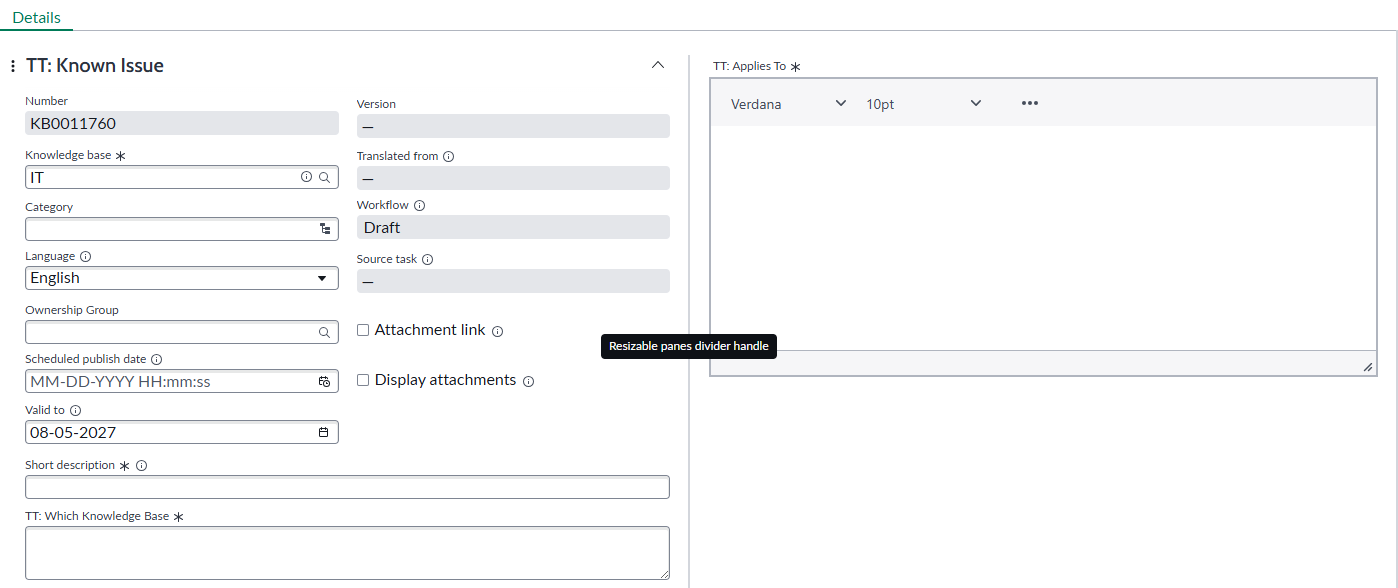
From our Knowledge Admin: We have created a new KA template and added the new fields we need, following the documentation, but when we go to actually add a new article in the Knowledge Center, it looks nothing like the OOTB templates. there are no fields down the left side and I can't update the form like the documentation says I should be able to do. What are we missing?

- Mark as New
- Bookmark
- Subscribe
- Mute
- Subscribe to RSS Feed
- Permalink
- Report Inappropriate Content
08-04-2026 08:26 PM
Hi @smacleod
Refer KB: KB0826659 Unable to see fields from custom knowledge template when creating a knowledge article.
Regards
Tanushree Maiti
ServiceNow Technical Architect
LinkedIn: https://www.linkedin.com/in/tanushreemaiti
- Mark as New
- Bookmark
- Subscribe
- Mute
- Subscribe to RSS Feed
- Permalink
- Report Inappropriate Content
08-05-2026 07:22 AM
How do we add the fields we added to the template to the center column in the knowlege center?


- Mark as New
- Bookmark
- Subscribe
- Mute
- Subscribe to RSS Feed
- Permalink
- Report Inappropriate Content
08-05-2026 08:10 AM
any screenshot?
Regards
Dr Atul G. - Learn N Grow Together ServiceNow Techno - Functional Trainer
LinkedIn: https://www.linkedin.com/in/dratulgrover
YouTube: https://www.youtube.com/@LearnNGrowTogetherwithAtulG
******************************************************************************************
- Mark as New
- Bookmark
- Subscribe
- Mute
- Subscribe to RSS Feed
- Permalink
- Report Inappropriate Content
08-05-2026 09:47 AM