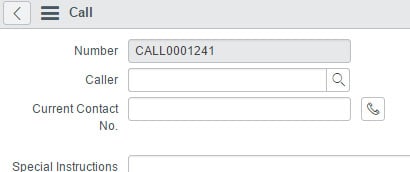
Call me strange but when it comes to UI design I think buttons related to fields should be next to the field. In ServiceNow I've been told numerous times that I can either have a Form Button in the banner or a Form link at the bottom - why? Why not next to the field?
Well I set out to find a solution and quite quickly found one using UI Macros - but I am on Fuji with it's new UI and nice monochrome button icons - how can I get that look and feel on my own UI macro?
To create a UI macro with new style icons try the following (if anyone has any reason to believe that there may be unintended consequences then please comment - and - use at your own risk):
My use case here was to add a button next to the Current Contact field to get the contact number of the Caller captured in the Caller field (we don't want to pre-populate it as we want to encourage asking for the current number if possible - people tend to move around a lot):

To build this:
- Add a system UI macro (enter 'ui macros' in the navigation) - give it a useful name e.g. getCallContact
- Create your script - in this case I used the following:
<?xml version="1.0" encoding="utf-8" ?>
<j:jelly trim="false" xmlns:j="jelly:core" xmlns:g="glide" xmlns:j2="null" xmlns:g2="null">
<j:set var="jvar_n" value="getCallContact_${ref}"/>
<a id="${jvar_n}" onclick="getCallContact('${ref}')" title="Get Caller's Contact No." class="icon ref-button icon-phone btn btn-default btn-ref"></a>
<script>
function getCallContact(reference) {
//Get the related reference field ready for populating
var s = reference.split('.');
var referenceField = s[1];
//Get office phone for affected user or mobile if no office phone
//Cycle options if there are any on future clicks
userObject = g_form.getReference('caller'); //Change this if caller is in another field.
var officePhone = userObject.phone;
if (officePhone.length==0 || g_form.getValue(referenceField)==officePhone) {
var mobilePhone = userObject.mobile_phone;
g_form.setValue(referenceField, mobilePhone);
}
else
{
g_form.setValue(referenceField, officePhone);
}
}
</script>
</j:jelly>
- This is the clever bit - you will notice in the code above that I have created the button as an <a> tag - in here I specify the title (for a hover hint) and a class - in the middle of the class there is a reference to the button icon 'icon-phone' - this can be changed to any icon in the ServiceNow css (see my other article)
- Now configure the dictionary of the field you want to apply the button to and add a reference to your script in the attributes field:
ref_contributions=getCallContact
And that's it! Save and reload your form and there you are - beautiful Fuji-style buttons next to your fields - easy to understand and more productive!
Thanks to whoever I got the css trick from (I found something on Google and can't recall it)